

Building a video-driven Android app in 2026 is high-stakes. Users expect TikTok-level features like AR masks, background removal, and instant exports without their phones overheating.
For developers, this usually leads to a "build vs. buy" headache. Building a robust video editor on Android from scratch means months of debugging hardware fragmentation. But buying has its own traps: bloated libraries, cryptic docs, and pricing that doesn't scale.
If you’ve scouted for a video editor SDKs Android GitHub repo lately, you’ve likely found only half-baked wrappers. For production, the shortlist usually narrows to three: Banuba, Meishe, and IMG.LY. We’re cutting through the marketing fluff to compare their rendering engines, AI features, and integration hurdles. Whether you’re building a social platform or a pro editing suite, here is how they actually stack up.
[navigation]
TL;DR
- This article is for Android development teams and product owners evaluating a video editor SDK for production-grade apps.
- We compare three industry leaders: Banuba Video Editor SDK, IMG.LY Video Editor SDK, and Meishe SDK across performance, feature depth, integration complexity, and long-term scalability.
- The most critical differences appear in export speed, AI-driven automation, the presence (or absence) of Face AR, and the total engineering hours required to maintain the integration.
- Banuba is the best fit for apps that prioritize user engagement through fast exports, high-fidelity AR effects, and AI-driven editing, offering the quickest time-to-market for modern Android applications.
- IMG.LY and Meishe remain viable alternatives for niche requirements such as design-heavy marketing tools or professional, manual-only editing workflows, but they come with significant trade-offs in performance and integration effort.
Comparison Criteria
To keep this comparison objective, we’re looking at these SDKs through the lens of a developer who needs to ship yesterday but can’t afford to compromise on quality. It’s easy to get distracted by a "feature-war" list, so we’ve narrowed it down to the six metrics that actually impact your bottom line and your team’s sanity.
Here is how we’re measuring these tools:
- Performance & Latency: Users have zero patience for lag. We looked at real-time preview smoothness and export speeds, specifically how long it takes to process high-res video without making the phone run hot.
- Feature Set (AI/AR): Beyond basic trimming, we checked for the "must-haves" of 2026: background removal, 3D masks, and auto-captions.
- Integration Complexity: Every day spent wrestling with a library is a day you aren't launching. We prioritized SDKs that offer a "mobile-first" approach and support popular frameworks like Flutter and React Native.
- Customization Potential (UI): Your app shouldn’t look like a generic widget. We evaluated whether these SDKs allow customization and white-labeling.
- Documentation & Support: Great tech is useless if the docs are cryptic or outdated. We looked for clear API references and a support team that actually answers technical questions.
- Pricing & Licensing Model: We focused on transparency. Whether it's based on Monthly Active Users (MAU) or flat fees, you need to know exactly how the cost scales once you hit the top of the App Store.
3 Best Android Video Editor SDKs Compared
To save you the trial-and-error, we’ve pitted the three major contenders, Banuba, Meishe, and IMG.LY, against each other. Dive in to see which one has the performance and features to actually back up your vision.
Banuba Video Editor SDK
Banuba Video Editor SDK for Android is often the first name that comes up when a project requires high-end AR and lightning-fast processing without a bloated integration cycle. It’s built with a "mobile-first" philosophy, meaning it doesn't just port desktop features to Android; it optimizes them for the specific constraints of mobile hardware. Besides, the SDK is also available for Flutter and React Native, making it platform-compatible.
Banuba is a heavyweight in the AI and AR space, providing an SDK that combines professional-grade video editing with a massive library of Face AR effects. It’s designed for apps that live and die by user engagement: think social platforms, dating apps, and creative tools where "lag" is a dealbreaker.
Key Strengths
- Best-in-Class Export Speed: In head-to-head tests, Banuba exports an 8-second 4K video in approximately 3 seconds, significantly outperforming competitors like Meishe (~5 seconds) and IMG.LY (~17 seconds).
- Classic video editing with next-gen features: Banuba offers a library with over 1k AR filters and overlays to boost users' engagement. Like it did for Hive.
- Immediate AR Previews: Unlike Meishe, where users often have to wait for mask previews to load, Banuba’s assets are ready the moment the camera opens.
- AI-Powered "Autocut": AI clipping automatically edits selected clips, applying transitions, effects, and music based on the video's style, perfect for lowering the barrier to entry for casual creators.
- Rapid Integration: Banuba claims an integration time of under 8 minutes thanks to its Maven package manager for Android, making it one of the most developer-friendly options on the market.
- AI Captions: Multilingual AI subtitles support with editing and customization options.
On the technical side, the rendering engine is built for high-fidelity AR without the typical battery drain. Combined with Maven package support, this allows for a sophisticated setup that remains lightweight and easy to maintain.
The UI is fully customizable and allows editing the user flow and the interface to tailor everything to your brand book.
Ideal Use Cases
This isn't just for social networks. The SDK is versatile enough for a wide range of verticals:
- Photo/Video Apps: Obviously, for core editing and effects.
- eCommerce: Allow customers record product reviews and edit them within your app.
- Marketing: Branded mini-games and interactive video campaigns.
- Social Media: Creating sticky, viral content.
- Lifestyle & Education: Engaging tutorials or interactive learning experiences where video quality matters.
Banuba operates on a commercial model based on Monthly Active Users (MAU). This is great for scalability. You aren't hit with a massive enterprise upfront fee when you're just starting out. They also offer a 14-day free trial, so you can validate the tech with your own hands before committing a cent.
Banuba is a perfect fit for commercial projects where user retention depends on smooth performance and "wow-factor" AR features. If you need a solution that scales with your user base, helps cut the dev time in half, and offers a professional 14-day trial to validate the tech, this is the industry standard.
While it is the leader for creator-driven apps, teams looking for a completely free, open-source hobbyist tool or those requiring niche, desktop-style multi-track cinema editing might find better alignment with other solutions.
Meishe (Meicam)
Meishe (or Meicam) is essentially the "pro-grade" veteran of the group. Coming from a broadcast background, it’s built for depth and manual control rather than a quick "plug-and-play" setup. If your app needs to look and feel like a professional desktop editor shrunk down for a phone, this is usually the direction people look in.
Key Strengths
- Granular Text & Time Tools: Meishe excels at the technical side of typography, offering deep settings for shadows, outlines, and professional time-manipulation effects.
- Timeline Precision: It allows for highly detailed editing flows, giving users more control over layers and sequences than your average social media editor.
Limitations
- High Complexity: The "pro" features come with a cost. The integration is notoriously difficult, with a steep learning curve that can slow down your time-to-market.
- Asset Latency: Unlike Banuba’s instant-load masks, Meishe often struggles with preview delays, which can frustrate users looking for a snappy experience.
- Regional Focus: A lot of their advanced AI features, like subtitle recognition, are primarily optimized for the Chinese market, which can be a hurdle for global apps.
Ideal Use Cases
- Professional Editing Suites: Apps designed for "heavy" creators who spend hours fine-tuning a single video.
- Marketing Tools: Where precise control over branding, text positioning, and complex transitions is more important than face filters.
Meishe uses a license-based model where trials can run without authorization, but exports are watermarked until you obtain the required license files for commercial use.
Meishe isn't the right fit for teams on a tight deadline or startups looking for a "TikTok-in-a-box" solution. If you need your Android video editor SDK to be integrated in days rather than months, the complexity here will likely be a bottleneck. It’s also a poor choice if your primary hook is AR/face effects, as it lacks the speed and smoothness found in modern competitors.
IMG.LY Video Editor SDK
IMG.LY takes a completely different path from its competitors. It isn't trying to be an AR expert; it’s a design tool at its core. It trades viral face filters and 3D masks for world-class typography and a sleek, developer-friendly cross-platform engine.
Key Strengths
- Typography Masterclass: This is where IMG.LY wins. It offers 34 pre-installed fonts. If your users need pixel-perfect text overlays, this is the gold standard.
- AI features + captions support: Markets built-in AI capabilities and caption workflows (including formats like SRT/VTT, depending on setup).
- Template + automation readiness: Supports template-driven creation and “headless”/export-style automation for previews and media pipelines.
Limitations
- Zero AR or Beautification: This is the dealbreaker for many. IMG.LY has no AR masks and no real-time retouching in the camera. You get a clean feed, but you won't get the "beauty mode" users expect in 2026.
- Performance Bottlenecks: It is the slowest of the bunch when it comes to the finish line. In export tests, a file that Banuba handles in 3 seconds takes IMG.LY roughly 17 seconds.
Ideal Use Cases
- Corporate & Marketing Tools: Apps where branding and clean, professional design are more important than viral filters.
- E-commerce: Creating high-quality product videos where clear text and a professional "clean" look are the priority.
Pricing is quote-based/enterprise, with costs tailored to your setup (platforms, scale, and required features), so you typically need to contact sales.
IMG.LY isn't the right choice for anyone building a TikTok or Reels competitor. Without AR masks, skin smoothing, or real-time beautification, you’ll struggle to meet modern user expectations for social engagement. It’s a design-first tool, perfect for business and marketing apps, but a tough sell for the creator economy where "engagement" is the only metric that matters.
Android Video Editor SDKs: Comparison Table
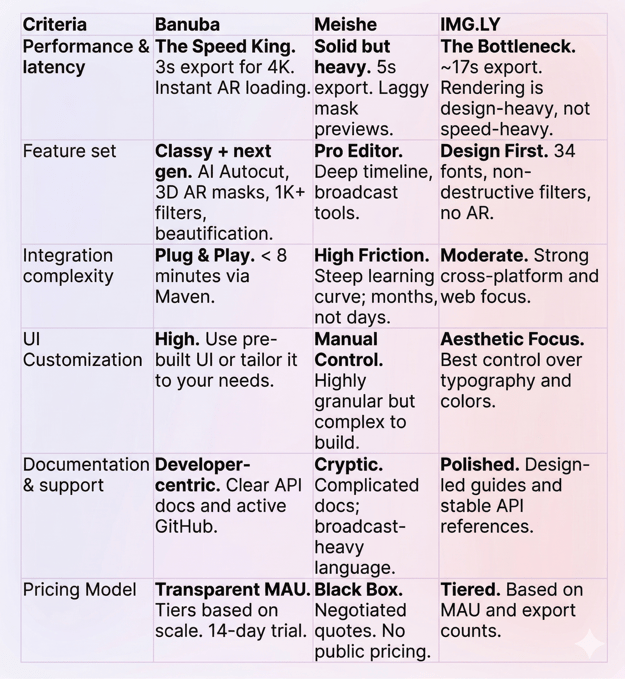
Summary
If you're looking at this from a purely technical standpoint, Banuba is clearly optimized for the modern "scrolling" era where every millisecond of export time counts. The fact that it’s the only one of the three offering a 14-day trial without a "Request a Quote" wall says a lot about its confidence in the tech.
Meishe is a powerhouse, but only if you have a team specifically dedicated to wrestling with its documentation. It’s an enterprise-level beast that isn't built for a quick launch.
IMG.LY is essentially a designer’s dream. If your app is meant for corporate presentations or aesthetic marketing videos, the 34 fonts are a huge win. But if your users want to look better on camera (beautification) or use fun filters, they’ll find it empty.

-
Focus on "feature fit" first. Don’t pay for bloat you won’t use. Beyond the features, the dealbreakers are usually performance (specifically, preview smoothness and export speed), ease of integration, and whether the documentation is clear enough to save your team weeks of trial and error.
-
Most professional SDKs move away from one-time fees in favor of commercial licenses. Pricing is typically a tiered model based on Monthly Active Users (MAU), the specific features you enable, and the number of platforms you support. Banuba offers a 14-day trial period to validate its solution in your application.
-
The best choice for scaling is an SDK that offers modular features and a flexible licensing model that grows with your user base. Solutions like Banuba are frequently preferred for high-growth apps because their performance remains stable under heavy use and their MAU-based pricing provides a clear, predictable scaling path.