

[navigation]
TL;DR:
- We compared Banuba Face AR SDK and Faceunity across platform coverage, language and SDK surface, license model, deployment, pricing, and category-specific face tracking features, using each vendor's published specification data.
- Banuba publishes browser support (HTML5 and WebGL 2.0+, Chrome, Firefox, Safari on mobile and desktop). Faceunity's published platform list covers iOS, Android, Windows, Mac, Unity, Flutter, and Electron, and does not name a browser target.
- Banuba publishes hard tracking numbers: 68 facial anchor points, a 3D mesh of up to 3,308 vertices, stability under up to 70% facial occlusion, and tracking at distances up to 3.7 meters.
- Faceunity publishes breadth numbers instead: at least 75 filter varieties, 56 foundational expressions for avatar driving, and adjustments across 25 human body points with seven beauty dimensions.
- Faceunity is the better pick for teams building desktop streaming tools who need Electron packaging and full-body reshaping in the same SDK. Banuba does not document a body-shaping equivalent.
- Neither vendor publishes a rate card. Banuba prices on platforms, monthly active users, and feature set, with a 14-day free trial. Faceunity has no public price list and routes to a trial application and sales contact.
- Banuba's narrow, defensible win is cross-platform live streaming and social apps that need real face AR in the browser alongside native iOS and Android from one license. That is the shape b.stage used to reach 1 million monthly active users.
- Both engines process frames on-device, so neither sends user video to a server. If on-device processing is a compliance requirement rather than a preference, get it in writing from whichever vendor you pick.
How we evaluated both SDKs
The five dimensions below decide whether an integration ships in a sprint or stalls in procurement. We applied the same criteria and the same depth to both vendors, and we flag every gap rather than filling it.
- Platform. Which operating systems, engines, and runtimes the vendor officially supports, based on the published feature list. Community forks do not count.
- Language and SDK surface. The native API language, the shape of the integration samples, and whether official per-platform demo repositories exist.
- Licence. How commercial use is granted, what the trial path looks like, and what the contract binds to.
- Deployment. On-device versus cloud, and what integration assistance the vendor documents.
- Pricing. Whether a rate card is public, and what the cost scales with.
On top of those five, we compared the category-specific capabilities that matter for face AR: tracking precision under stress, beautification depth, makeup, avatars, backgrounds, and gesture handling.
Banuba's Face AR SDK is the reference implementation for the Banuba column throughout. Faceunity values come from its published effects specification and its official integration demo repositories.

Banuba Face AR SDK
Banuba's engine is built for teams shipping one AR feature set to mobile, desktop, and the browser at the same time.
Platform and language
Banuba Face AR SDK supports HTML5, iOS, Android, Windows, macOS, Unity, Flutter, and React Native. It runs on devices from iOS 13+ and Android 8.0+ with a 1280x720 camera recommended, at a minimum of 30 FPS. Mobile requires OpenGL ES 3.0+, desktop requires OpenGL 4.3+ (4.1+ on macOS, Windows 8.1+, macOS 10.13+), and the web target requires WebGL 2.0+ with Chrome, Firefox, or Safari on both mobile and desktop. Official integration samples exist per platform on GitHub, and Banuba maintains first-party Flutter and React Native plugins on pub.dev and npm rather than leaving hybrid teams to community wrappers.
Tracking depth
Banuba's face tracking detects 68 facial anchor points and builds a 3D mesh of up to 3,308 vertices, enabling real-time structural changes to the nose, eyes, lips, and chin rather than a flat overlay. The tracker holds steady under up to 70% facial occlusion, across the full -80° to +80° angle range, and at distances up to 3.7 meters. Those three numbers are the ones worth stress-testing during a trial, because they describe the conditions where a filter visibly detaches from a face: a hand across the mouth, a head turned toward a second screen, or a subject standing back from a kiosk camera.
Feature set
The SDK covers makeup, hair color with single-strand detection, beautification (skin smoothing, blemish removal, teeth whitening, eye circle and wrinkle removal), face morphing, background subtraction, 3D avatars driven by eyebrow, jaw, nose, and mouth movement, LUT color grading, and expression triggers including mouth open, smile, eyebrows, and eye open or close. Triggers can also fire from hand gestures. Banuba ships over 1,000 licensable ready-made filters and a Studio tool for building custom ones.
Banuba's face-tracking in action
Deployment and pricing
Processing runs fully on-device and works offline, so user video never leaves the phone. Banuba's Face AR SDK licensing comes in two shapes. A flat annual license fee provides unlimited usage and a predictable line item that doesn't move if the app scales to a very large user base. An Active User Based license tracks the number of active users over time, which means significantly lower spend at the start but a cost that grows with the user base and can exceed the flat fee if the app takes off. Which one is cheaper depends entirely on your growth curve, so model both. Pricing is quoted against supported platforms, monthly active users, and the specific feature set, and there is a 14-day free trial before purchase.
Proof in production
b.stage, the fandom SaaS platform from Korean company bemyfriends, uses Banuba face filters, beauty effects, and 3D masks in its live streaming and video chat. In two years, it passed 1 million monthly active users across 224 countries. Its team cited natural-looking touch-up that does not blur skin texture, the breadth of the mask catalog, and support responsiveness as the reasons for choosing Banuba. The same pattern shows up across creator-focused apps more broadly; see how creator apps drive engagement with Face AR SDK.

Faceunity
Faceunity, from Hangzhou Xiangxin Technology Co., Ltd., sells the Nama SDK as an AR video effects and beautification engine aimed at live streaming, short video, photography, online education, online meetings, and medical beauty.
Platform and language
Faceunity's published platform list covers iOS, Android, PC (Windows), Mac, Unity, Flutter, and Electron. The iOS API is Objective-C, and the iOS demo is Objective-C plus C. Faceunity maintains official per-platform integration example repositories for iOS, Android, Windows, and Unity on GitHub. The vendor describes its rendering engine as lightweight, with compact packages and low power consumption.
A browser or HTML5 target does not appear on Faceunity's published platform list.
Tracking depth
Faceunity does not publish a landmark count, a mesh vertex count, an occlusion tolerance figure, a head-angle range, or a detection distance. What it does publish is capability breadth: face landmark and expression tracking, Animoji, AR masks, face transfer, face warping, musical filters, live photo, and high-precision gesture and expression recognition.
Feature set
Faceunity documents 2D, 3D, and ARMesh sticker tools, at least 75 fundamental filter varieties, avatar driving from 56 foundational expressions across face, tongue, and eyes, real-time subject and background separation without a green screen, AI-driven skin refinement and blemish removal, full-face makeup styles with hairstyle and color adjustment, and body shaping across 25 human body points with seven beauty dimensions.
 Faceunity AR example Source
That last item is the clearest thing Faceunity has that Banuba does not. Banuba publishes no equivalent full-body reshaping specification, and a team whose product is built around body beautification should treat that as decisive rather than as a tiebreaker.
Deployment and pricing
Faceunity runs real-time beautification, reshaping, and makeup on-device. It provides demo integration samples plus on-site integration assistance. There is no public price list. Access starts with a trial application, and commercial use goes through sales. We are not going to estimate what a Faceunity contract costs, because the vendor does not publish one.
Side-by-side comparison
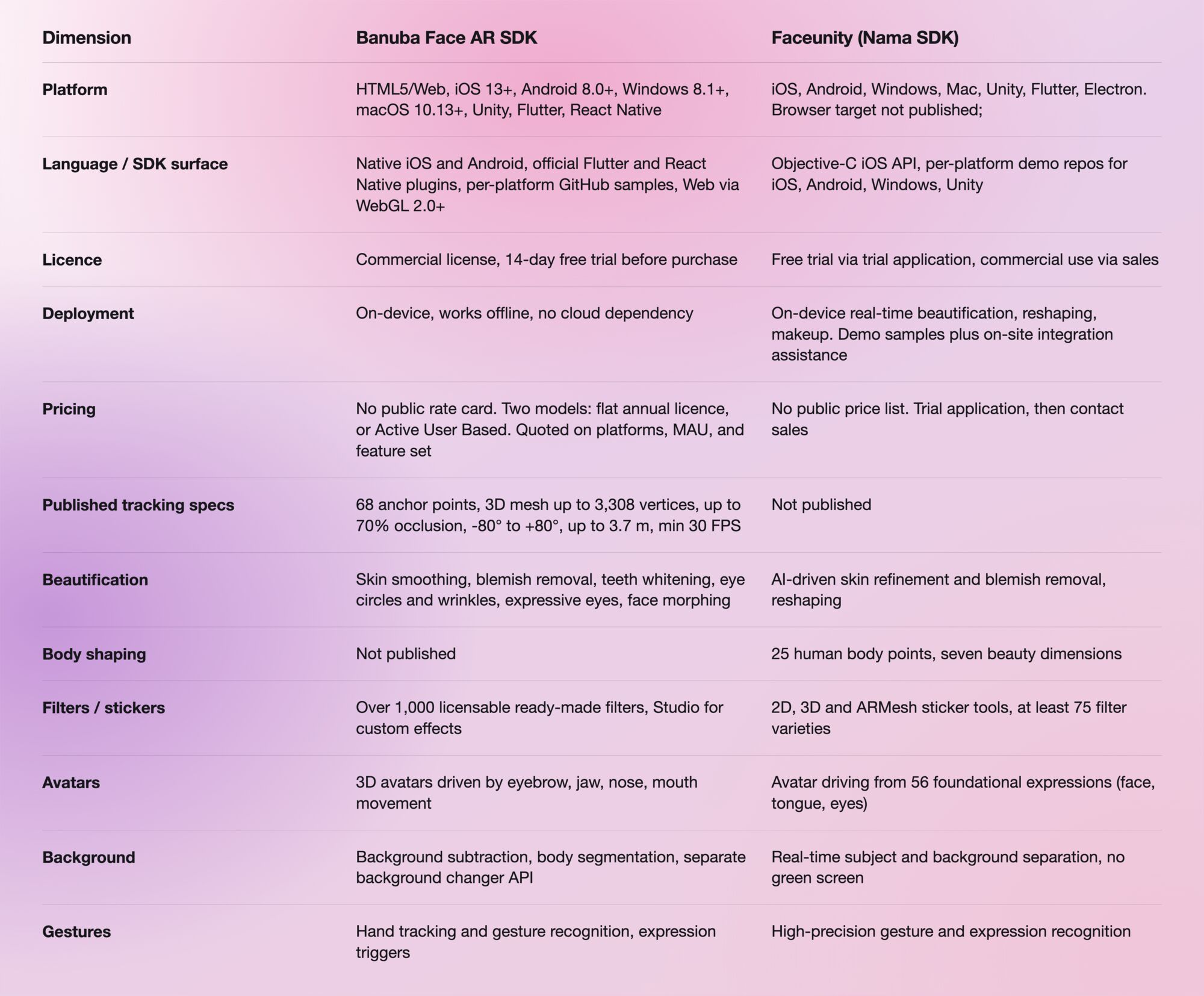

Which one to pick
Overall, for the cross-platform case: Banuba, and specifically for live streaming and social apps that need real face AR in the browser alongside native iOS and Android under one license. That is a narrow claim, and it is the only overall win we are claiming here. It rests on two published facts: Banuba lists HTML5 and WebGL 2.0+ as supported targets with named browsers, and Faceunity's published platform list does not name a browser target. If your product never touches a browser, this advantage is worth nothing to you.
Pick Faceunity if you are building a desktop streaming or beauty tool. Electron is on its published platform list and is not on Banuba's, so a team packaging an Electron app gets a supported path from Faceunity and would need a different approach with Banuba. Faceunity is also the stronger choice if full-body reshaping is core to the product, because 25 body points and seven beauty dimensions are documented capabilities, and Banuba publishes no counterpart.
Pick Banuba if tracking has to survive real conditions. Occlusion, extreme head angles, and camera distance are where face AR breaks in the field, and Banuba is the only one of the two publishing numbers you can hold it to. If a vendor will not put a figure on occlusion tolerance, you cannot compare it; you can only test it.
Pick either if on-device processing is the requirement. Both run locally. That is a genuine tie, and any article telling you otherwise is selling something.
If procurement predictability is the constraint, note that neither vendor publishes a rate card, so budget for a sales cycle in both cases. Banuba at least publishes what the price is calculated from, which makes the first conversation shorter.
For a wider read on how vendor face AR SDKs behave once they hit production traffic, this production-readiness comparison of two face AR SDKs covers the same evaluation pattern against a different competitor.
References and further reading
- Banuba Face AR SDK product page: https://www.banuba.com/facear-sdk/face-filters
- Banuba Face AR SDK documentation: https://docs.banuba.com/far-sdk
- Banuba Face AR SDK pricing guide: https://www.banuba.com/blog/banuba-face-ar-sdk-pricing-guide
- b.stage case study: https://www.banuba.com/blog/1-million-maus-in-2-years-for-a-saas-fandom-platform
- Faceunity effects specification: https://www.faceunity.com/en/effects.html
- Faceunity official integration demos: https://github.com/Faceunity
-
Banuba does not publish a rate card. The license comes in two shapes: a flat annual fee with unlimited usage and a fixed cost regardless of scale, or an Active User Based fee that starts lower and grows with your user base. The quote depends on how many platforms you need, your monthly active users, and the feature set. The Banuba Face AR SDK pricing guide breaks down how each factor moves the number.
-
HTML5, iOS 13+, Android 8.0+, Windows, macOS, Unity, Flutter, and React Native, holding a minimum of 30 FPS on mid-range hardware. Requirements per platform, including the OpenGL and WebGL versions, are in the Banuba Face AR SDK documentation.
-
Yes. Banuba's web target runs on WebGL 2.0+ in Chrome, Firefox, and Safari on both mobile and desktop, which is what makes app-less campaigns and in-store kiosks possible. Banuba's Web AR SDK page has a live browser demo you can run before writing any code.
-
Banuba offers a 14-day free trial before purchase, which is long enough to run the occlusion and head-angle tests that decide whether the tracking holds for your use case. You can request it from the Banuba Face AR SDK page.
-
Not in the material we reviewed. Faceunity publishes capability breadth (filter counts, expression counts, body points) rather than tracking precision figures such as landmark count, occlusion tolerance, or head-angle range. Banuba publishes those figures on its face tracking software page, which is the practical difference when you are trying to compare two engines on paper rather than in a bake-off.
