

The hard part of an AR mirror is never the screen or the camera. It is the computer vision underneath: detecting the face, holding the track through extreme angles and partial occlusion, segmenting facial regions for makeup, and rendering products that respond to skin tone in real time. Coding that pipeline in-house is a six to twelve-month research project before a single product renders correctly. Banuba ships those layers as a ready package, so a retail or engineering team can stand up a working mirror in weeks and spend their time on the in-store experience instead of on tracking math.
[navigation]
TL;DR
- An AR mirror combines four layers: face tracking, hand tracking for touchless control, a try-on rendering engine, and a product catalog. Banuba's SDK provides all four from a single integration.
- Banuba Face AR SDK runs on-device at 30 FPS with a -80° to +80° head-angle range, which is the tracking quality a mirror needs for shoppers moving freely at a kiosk.
- Touchless gesture control comes from Banuba's hand tracking, so shoppers swap products with simple gestures and never touch a shared screen.
- Banuba TINT digitizes a new product collection in under 48 hours, so a store can load its real catalog rather than generic demo items.
- A Banuba TINT virtual try-on deployment typically launches in under 2 weeks, far faster than an in-house build.
- All processing runs on-device, so no shopper face data leaves the mirror, which removes a recurring privacy blocker for retail legal teams.
- Banuba TINT virtual try-on has driven up to 1000% higher add-to-cart rates, up to 300% higher sales, and up to 60% lower return rates in production retail deployments.
- Banuba's mirror supports USB and external webcams, which matters for kiosk hardware that does not use a phone camera.
What is an AR mirror, and where does it fit in retail?
An AR mirror is an in-store smart display that overlays virtual makeup, eyewear, jewelry, and accessories onto a shopper's live reflection. It bridges the physical store and the digital try-on experience: a customer walks up, tries multiple products and combinations without physically applying anything, and leaves knowing what they want. Banuba's AR mirror software powers exactly this setup for brands including Gucci, Samsung, and Océane, turning a regular store fixture into a self-service try-on station.
For the buyer, the value is concrete. Shoppers test more products with no staff help and no consumable testers to replace, prepared customers free up staff to give others better attention, and health-conscious shoppers can try eye makeup or headwear even while wearing a mask. The mirror is reusable indefinitely, which removes the cost of physical testers entirely.
What does an AR mirror need under the hood?
A production AR mirror is four systems working together.
- Face tracking is the foundation: it locates and follows the face so makeup and accessories stay anchored.
- Hand tracking adds touchless control, letting shoppers change products with gestures instead of touching a shared screen, which is both more hygienic and more enjoyable in a store.
- A rendering engine draws products that look real under live lighting and adapt to different skin tones and facial features.
- Finally, a product catalog holds the digitized versions of the items a store actually sells.
Banuba's stack covers all four. The face tracking layer comes from the Face AR SDK, the touchless layer from Banuba's hand tracking, and the try-on rendering and catalog from Banuba TINT. Because they share one engine, you integrate once rather than stitching together separate vendors for tracking, gestures, and try-on.
Banuba's Face AR SDK virtual makeup example
Should you build an AR mirror from scratch or with an SDK?
Building from scratch means hiring computer vision engineers to train and tune face detection, head-pose estimation, facial segmentation, and a real-time renderer, then maintaining that pipeline across hardware and OS updates. Even a strong team needs the better part of a year to reach production quality, and the work never really ends because tracking accuracy has to be defended against every new device and lighting condition. For most retailers and brands, that is not a viable investment.
Licensing an SDK collapses that timeline. The tracking, segmentation, rendering, and gesture layers arrive pre-built and benchmarked, so the team's job becomes configuration and in-store design rather than research. The honest tradeoff is customization depth: an SDK gives you defined extension points rather than total control of the internals. For an AR mirror, where the differentiator is the catalog and the store experience rather than the tracking algorithm, that tradeoff almost always favors the SDK.

How do you build an AR mirror with Banuba's SDK?
Start with face tracking as the base layer. Banuba Face AR SDK handles the detection and pose tracking that keep products aligned, and it runs fully on-device, so the mirror works without a cloud connection and no shopper image ever leaves the hardware. Reference integrations live in the Banuba iOS samples and Android samples repositories, with full setup guides in the Banuba documentation.
Next, load the catalog. Banuba TINT digitizes a new collection in under 48 hours: for makeup, you fill in product parameters and Banuba's AI generates the virtual version, and for eyewear, you upload three frame photos (front, left, right). This is what lets a store show its real inventory instead of demo products, and it is why a typical TINT deployment goes live in under 2 weeks.
Then add the touchless interface. Banuba's hand tracking lets shoppers control the mirror with simple gestures, so they can switch products, build a full look, or compare options without touching the screen. For kiosk hardware that does not use a phone camera, Banuba supports USB and external webcams, which is a common requirement for fixed in-store installations. White labeling lets the whole interface match the brand's look, so the mirror feels native to the store.

What results can an AR mirror deliver?
The business case rests on conversion and returns. Across production retail deployments, Banuba TINT virtual try-on has produced up to 1000% higher add-to-cart rates, up to 300% higher sales, and up to 60% lower product return rates. The return reduction matters as much as the sales lift, because letting a shopper preview a true-to-life result before buying cuts the mismatched purchases that drive returns.
A concrete example: Océane, a Brazilian beauty brand, ran Banuba TINT on its store and saw its add-to-cart rate climb from the 3% industry average to 32%, and during the pilot, it sold out a month of stock within a week. The same try-on engine that produced those numbers online is what powers the in-store mirror, so the conversion mechanics carry over to the physical floor.
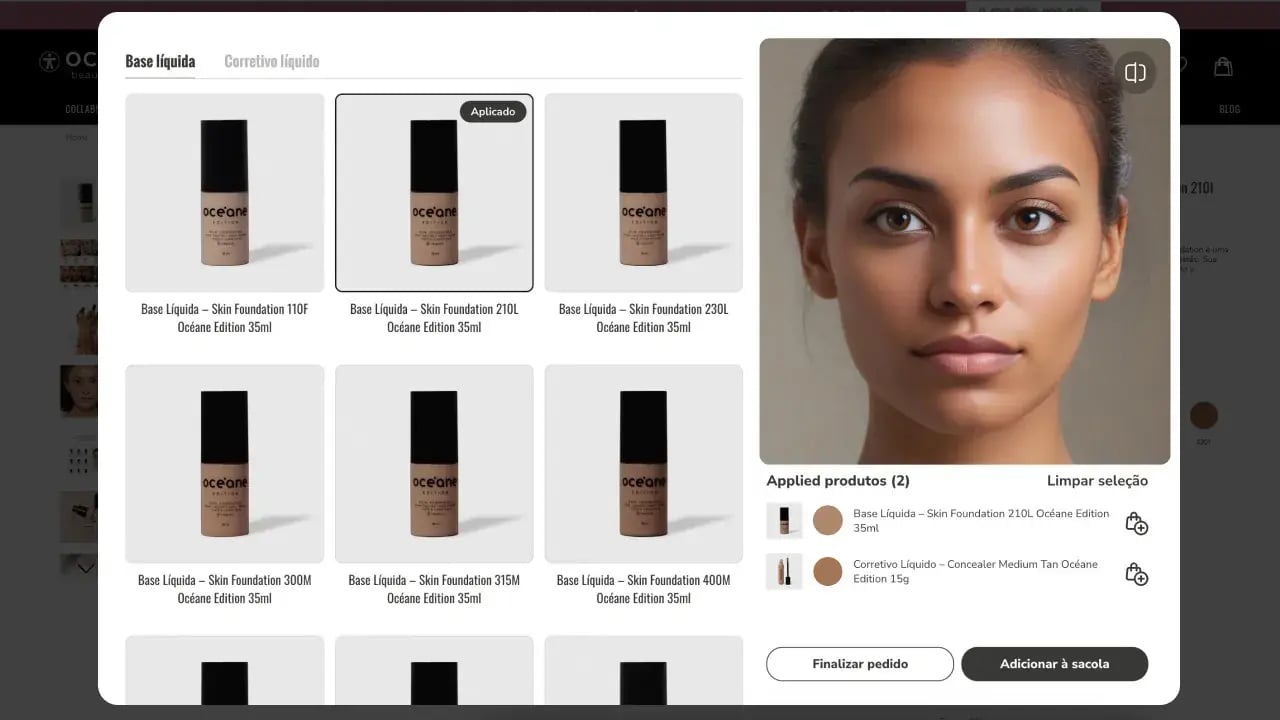 Oceane's virtual try-on interface example
Conclusion
An AR mirror is a high-impact retail upgrade, but its value lives in the catalog and the store experience, not in reinventing face tracking. Building the computer vision yourself costs the better part of a year before the first product renders; licensing Banuba's AR mirror software gives you on-device tracking, touchless gestures, fast catalog digitization, and a launch measured in weeks. For a team that wants a working, brand-matched mirror on the floor this quarter, the SDK route is the pragmatic one.
-
No. Banuba Face AR SDK runs fully on-device, so face tracking and try-on happen locally and no shopper image is sent to or stored on a server. This is a standard requirement for retail privacy reviews, and you can confirm the on-device architecture in the Banuba Face AR SDK documentation.
-
A Banuba TINT virtual try-on deployment typically goes live in under 2 weeks, with a new product collection digitized in under 48 hours. Building the equivalent tracking and rendering pipeline in-house usually takes six to twelve months. See Banuba's virtual try-on plugin page for integration details.
-
Banuba's mirror supports makeup, eyewear and sunglasses, jewelry, headwear, watches, and more, tried separately or as a complete look. The makeup try-on adapts to different skin tones for a true-to-life result, as described on Banuba's Beauty AR page.
-
Yes. Banuba's hand tracking provides touchless gesture control, so shoppers swap products and build looks with gestures rather than tapping a shared screen, which is more hygienic for a public kiosk. This no-touch interaction is powered by Banuba's Face AR SDK.
-
Yes. Banuba supports USB and external webcams in addition to built-in cameras, which is important for fixed kiosk hardware. Reference setups are in the Banuba SDK samples on GitHub.
-
Banuba TINT virtual try-on has driven up to 1000% higher add-to-cart rates and up to 60% lower returns in production. Océane, for example, lifted its add-to-cart rate from 3% to 32%, detailed in Banuba's Océane case study.
