
Banuba shipped updates across all three products in 2025. The largest set landed in Banuba Face AR SDK. Banuba Face AR SDK is a real-time, on-device face tracking and AR effects SDK that runs at 30 FPS on mid-range mobile hardware with a -80° to +80° head-angle tracking range. It gained face shape detection, a retrained gender recognition model, three rounds of background segmentation work, and an eyewear trio of glasses detection, lens segmentation and frame colour detection. Banuba Video Editor SDK added video templates, finger drawing, Weatherman mode, and a redesigned editor screen. Banuba TINT launched on the Shopify App Store and added automatic makeup digitization, merchant analytics and new try-on categories.
The year was shaped less by single headline features than by depth: existing neural networks were retrained, integrations were widened, and the try-on catalogue grew into product types the platform could not handle before.
[navigation]
TL;DR
- Banuba Face AR SDK added face shape detection in September 2025 (version 1.17.6), with five documented shape categories feeding personalized recommendations.
- Banuba Face AR SDK improved background segmentation three times in 2025, including a Guided Filter edge pass in May and hands-and-body segmentation in August.
- Banuba Face AR SDK shipped an eyewear trio in December 2025: glasses detection, glasses lens segmentation and glasses frame colour detection.
- Banuba Face AR SDK's gender recognition model was retrained in July 2025; the feature itself has been in the SDK since 2024.
- Banuba Face AR SDK added light source detection and correction in March 2025, so effects react to the lighting the user is actually sitting in.
- Banuba Video Editor SDK added video templates, predefined sets of effects, transitions and music that a user completes by replacing placeholders.
- Banuba Video Editor SDK's finger drawing tool shipped with five line variants, and Weatherman mode moved from experimental to a supported mode.
- Banuba Video Editor SDK's AI Clipping reached iOS in February 2025, combining three or more videos and matching the cut to the beat.
- Banuba TINT launched on the Shopify App Store on 3 April 2025, with merchant analytics following in August.
- Banuba TINT's automatic makeup digitization reads a merchant's catalogue and maps each shade to a standardised colour, with 90% or more of eligible SKUs resolved without manual work.
Face AR SDK
The most notable additions and improvements to Banuba Face AR SDK were these.
Better background segmentation
Banuba's background subtraction technology was improved three separate times in 2025. Version 1.17.2 in May brought a Guided Filter pass that cleans up the edge between the person and the backdrop; version 1.17.5 in August added hands and body segmentation; and version 1.17.7 in December delivered a further round of virtual background improvements.

Retrained gender recognition
Gender detection has been part of Banuba Face AR SDK since version 1.14.0 in 2024. What changed in 2025 was the model behind it: version 1.17.4, released in July, shipped a retrained gender recognition model with better accuracy.
Improved hair and teeth processing
Hair segmentation in Banuba Face AR SDK improved twice. Version 1.16.4 in January stabilised the hair mask across frames, and version 1.17.2 in May improved segmentation quality outright.
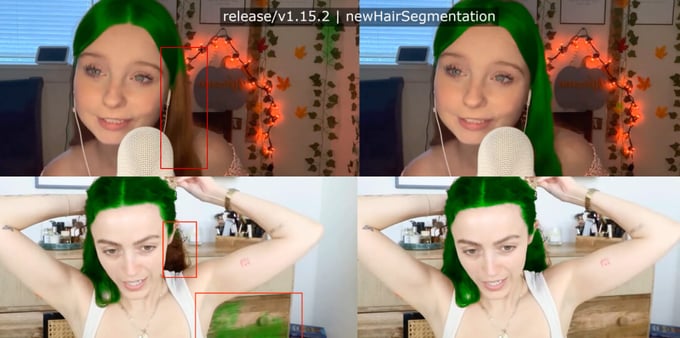
On the teeth side, version 1.17.0 in March optimized the performance of the teeth whitening algorithm, so the bleaching simulation runs faster on the same hardware.
Face shape detection
Version 1.17.6, released in September 2025, added face shape detection, and version 1.17.7 improved the algorithm in December. It classifies a face as square, oval, oblong, round, or heart, which is what lets a recommendation system narrow a catalogue to the frames or styles that actually suit the person in front of the camera.
The eyewear trio
The single biggest release of the year for eyewear arrived in version 1.17.7 on 19 December 2025, which added three related algorithms at once: glasses detection, glasses lens segmentation, and glasses frame colour detection. Together, they are what makes it possible to recognise the glasses a person is already wearing, isolate the lenses from the frame, and read the frame's colour, which is the groundwork for eyewear virtual try-on that reacts to what the camera sees rather than to a fixed 3D model.
Light source detection and performance
Version 1.17.0 in March 2025 added light source detection and correction, so effects can respond to the lighting conditions the user is in, alongside a major performance optimization, updated face tracking and better stability in the face description model. Later releases added support for video textures in effects (1.17.2, May) and a glitter effect for makeup (1.17.7, December).
GreenBee success story
GreenBee is a Japanese company that creates software for consumer electronics, and its client list includes multiple Fortune 500 companies. One of its products is a video conferencing tool preinstalled on laptops, and the company wanted to adapt it to Neural Processing Units. Banuba was a good fit thanks to a long partnership and deep neural network experience. As a result, the software became much more energy-efficient, which matters for a tool that mostly runs on battery.
Video Editor SDK/API
Banuba Video Editor SDK picked up several features that landed well with our clients' users.
Video templates
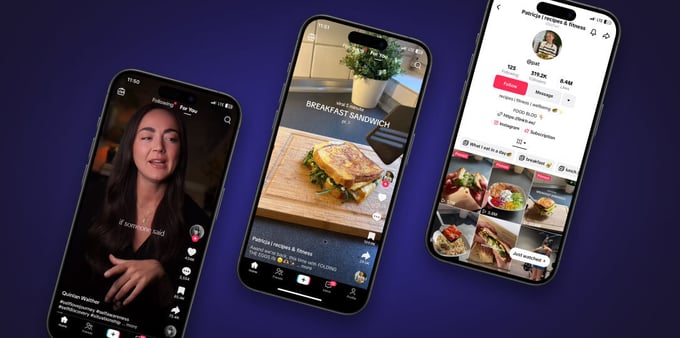
Templates are predefined sets of effects, transitions, and music. All it takes to make something shareable is replacing the placeholders with your own clips. Together with AI clipping, this makes Banuba Video Editor SDK a genuinely low-effort path to a finished video.
Finger drawing
This tool lets users draw freely on top of a video, with five line variants to choose from. It works for highlighting an object in an explainer, or for doodles, and it was one of the most requested additions from our customers. It ships disabled by default, so you switch it on for the audience it fits.
Weatherman mode
Weatherman mode builds on Banuba's background replacement. It lets users drag and drop themselves anywhere on the screen, the way a TV presenter stands beside the map. It is useful for explainers, microlearning content, and reactions, and it works in both Banuba Face AR SDK, for example, during video calls, and Banuba Video Editor SDK. It arrived as an experimental feature in April 2025 and became a supported mode in May.
A redesigned editor
A completely rebuilt editor screen landed in February 2025 with new controls and a set of quality-of-life improvements. It is not flashy work, but it is the screen users spend all their time in, so it changes the feel of the whole product.
AI clipping on iOS
AI clipping uses artificial intelligence to choose the most important elements out of three or more videos, connect them, place transitions, and match the result to the beat of the music. It reached iOS in February 2025, so the feature now runs on both mobile platforms.
New success stories
Elixir is a video shopping app for the Middle East. To give its users everything they needed to make short videos, the team integrated Banuba Camera SDK and Banuba Video Editor SDK. It worked: in 4 weeks, 569 stores have begun to sell through this platform, and 4800 users signed up.
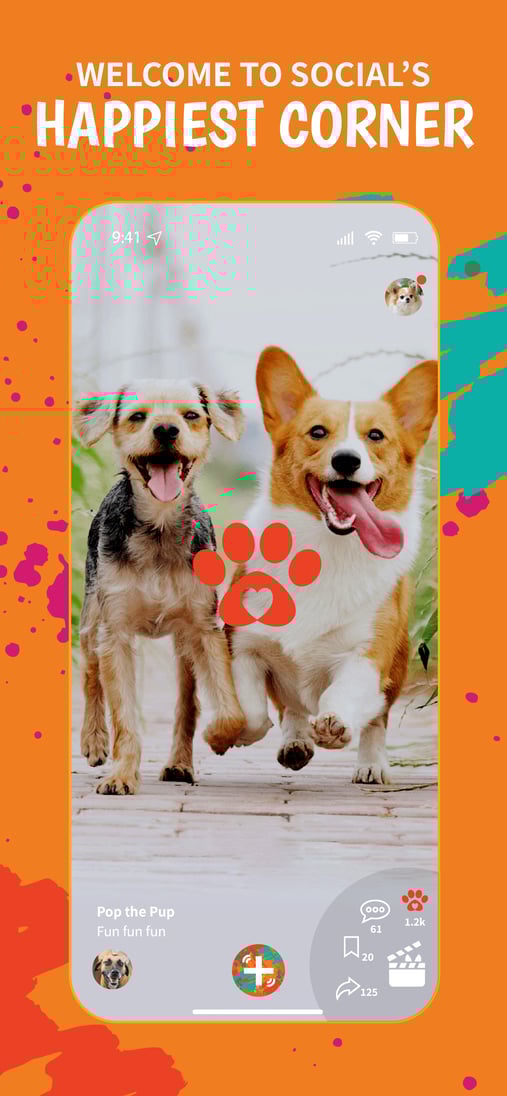
Fureelz is a short video social platform focused on animal lovers. Thanks to a quick integration of Banuba Video Editor SDK, the team reached market faster than expected, adding only about 25 MB to the app's download size and running well on over 90% of smartphones.
TINT virtual try-on platform
Banuba TINT is Banuba's virtual try-on platform. It covers makeup (lipstick, lip gloss, blush, eyeliner, eyeshadow, mascara, eyebrows, foundation, concealer, contour, highlighter and powder), skincare, accessories (headwear, glasses, scarves, contact lenses and jewellery), hair colour and style, nail polish, and eyelashes. 2025 was a busy year for it.
Shopify App Store launch
Banuba TINT launched on the Shopify App Store on 3 April 2025, after the widget-side Shopify integration shipped in February. Setup runs in four steps: duplicate the theme, paste the widget snippet into theme.liquid, add the try-on button block to the product template, and test. Shopify is the largest ecommerce platform, so a first-party listing widened the pool of stores that can add virtual try-on considerably. A free plan for development stores followed in June.
Automatic makeup digitization
Digitizing a cosmetics catalogue by hand is what stops most merchants before they start, so Banuba TINT automated it. The system reads your product titles and variants and maps each shade to a standardised colour value. 90% or more of eligible SKUs get a confident colour automatically, and the rest are flagged for review rather than silently guessed. It was demoed in October 2025.
Glasses digitization
Eyewear frames became straightforward to prepare too. Three photos are enough, left, body and right, and Banuba TINT builds the digital model from them. Self-service digitization arrived in the admin panel in early 2025.
New virtual try-on product types
Banuba widened what it can put on a face during 2025:
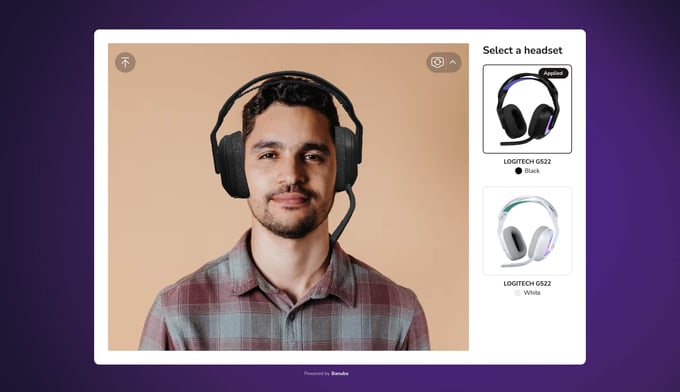
- Headphones. Demoed with Logitech in June 2025, with models that sit correctly on the user's head.
- Wigs. Women's wigs, men's wigs, and hair extensions, demoed in October 2025 on the back of Banuba's hair segmentation.
- Goggles and swimming masks. Product types that do not fit the standard eyewear shape, handled alongside kits and isolated-SKU mode in July 2025.
Lens colour on real glasses
Beyond swapping frames, Banuba can now change the colour of the lenses on the glasses a person is already wearing. The glasses lens segmentation algorithm that makes this possible shipped in Banuba Face AR SDK 1.17.7 on 19 December 2025.
Gloss and chameleon effects
Try-on gained gloss and chameleon colour effects for lips and for eyelids, which is what makes a lipstick read as a gloss rather than a matte and gives an eyeshadow its shift in colour with the angle of the light. The lips version landed first, the eyelids version followed later in 2025.
Kits and multi-variant carts
Kits, demoed in July 2025 alongside isolated-SKU mode, group several products so a shopper can try a look rather than one item at a time. Separately, version 1.4.3 added the ability to add multiple variants of the same product to the cart, plus product sorting.
Merchant analytics
Merchant analytics for the Shopify plugin arrived in August 2025. The admin panel reports sessions, try-ons, and SKU and look performance, so a store owner can see which products people are actually trying on rather than guessing from sales alone.
Bulk upload and platform work
Bulk product upload was demoed in March 2025, which is the difference between onboarding a ten-product brand and a thousand-product one. Version 1.1.0 in June brought a redesigned interface, faster mobile loading and a book-a-demo entry point, and the December releases improved loading speed, face-analysis startup and eye-distance calibration.
Case study: Contem1g
Contem1g is a Brazilian cosmetics company. One of its biggest challenges in online sales was helping customers pick the right foundation and concealer shades, which is exactly the problem virtual try-on exists to solve. The timing coincided with a new product line called Glow Filter. With Banuba TINT, the Glow Filter line became the most tried-on product and the top revenue generator for the brand on the platform.
Case study: Loncolor
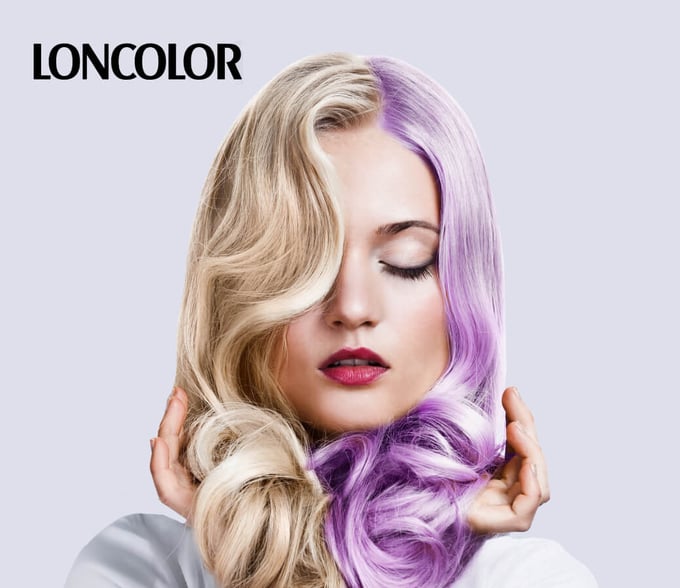
Loncolor is a Romanian hair dye and hair care producer. It wanted to give customers a way to see a colour before buying, so it worked with Scorpion Technology, a Bucharest-based technology company with over ten years in the market. The result is not an app: a shopper scans a QR code on the dye package, a web page opens in their browser, and the colour appears on their face. The hair colour component is built on Banuba Face AR SDK, and the project rolled out during 2025.
Banuba Studio
Banuba Studio, the browser-based tool for creating custom Face AR effects, reached version 1.1.0 in July 2025. It is where effects are built and adapted for use with Banuba Face AR SDK, and it is the alternative to commissioning every mask and filter externally.
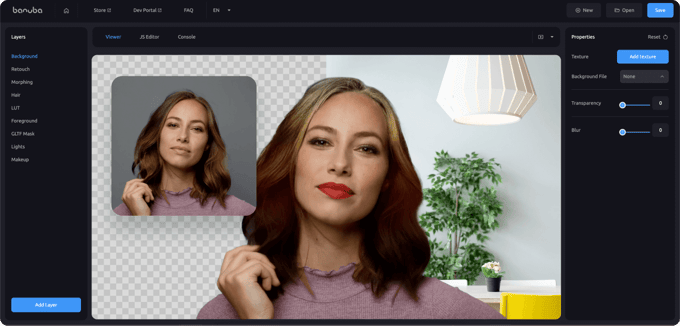
If you would rather not build anything yourself, the Banuba Asset Store carries ready-made effects.
See it for yourself
Feel free to try our demo apps and check what Banuba products can do.
Banuba Face AR SDK:
Banuba Video Editor SDK:
Banuba TINT
Thank you for your trust
All of the improvements we made, we made for you, our clients and partners. Nothing gives us more joy than seeing you succeed.
We would like to thank you for your trust, feedback, and patience. May the new year bring you new opportunities, favourable market conditions, and great customers.
-
Banuba released updates to all three products in 2025. Banuba Face AR SDK added face shape detection, a retrained gender recognition model, light source detection, three rounds of background segmentation improvements, and glasses detection, lens segmentation and frame colour detection in December. Banuba Video Editor SDK added video templates, finger drawing, Weatherman mode, a redesigned editor screen and AI clipping on iOS. Banuba TINT launched on the Shopify App Store, automated makeup digitization, and added merchant analytics.
-
Banuba prices each product separately, and each has its own pricing guide: the Banuba Face AR SDK pricing guide, the Banuba Video Editor SDK pricing guide, and the Banuba TINT virtual try-on pricing guide. Face AR SDK is offered on two models, a flat annual licence fee with unlimited usage, or active-user-based pricing that starts lower and grows with the user base.
-
Largely, yes. Banuba publishes agent skills on GitHub that give a coding assistant the context it needs to wire up Banuba Face AR SDK or Banuba Video Editor SDK, which is why integration times are quoted in minutes rather than sprints.
-
There are three different answers depending on what you are integrating. Banuba Video Editor SDK takes as little as 8 minutes. The Banuba Video Editing API takes a few hours. A complete content creation suite takes 1 to 2 days.
-
Banuba maintains separate documentation per product: Banuba Face AR SDK documentation, Banuba Video Editor SDK documentation, and Banuba TINT documentation. Each covers requirements, setup, and configuration for the platforms that the product supports.