

[navigation]
TL;DR
- There are two practical ways to build makeup software with Banuba: the ready-made Banuba TINT web widget for e-commerce, or Banuba's Face AR SDK for a fully custom app.
- Banuba TINT launches in under 2 weeks, runs in the browser with no app install, and is added with a single CDN script tag plus a merchant ID.
- Banuba's makeup rendering supports 16 makeup product types with skin-tone-aware application, directly addressing the most common buyer complaint: "product color is not displayed correctly."
- Banuba TINT covers 16+ product categories (makeup, eyewear, hair color, contacts, jewelry, accessories), so a single integration serves more than one department.
- For custom apps, Banuba's Face AR SDK ships open starter repos for Android, iOS, and web, and applies makeup through Prefabs rather than the older, deprecated Makeup API.
- Color accuracy is a rendering and lighting problem, not a catalog problem: a skin-tone-aware application is what makes a foundation shade look right across different users.
- Océane, a Brazilian cosmetics brand, used Banuba TINT to lift its add-to-cart rate from a 3% industry average to a record 32%, over 1000% of the industry norm.
- Pick Banuba TINT if you sell online and want speed, and pick Banuba's Face AR SDK if makeup is the core of your own app and you need full control over the camera and UI.
What "makeup software" actually means for your team
"Makeup software" usually describes one of two products. The first is a virtual try-on experience bolted onto an e-commerce store, where a shopper opens their camera, sees lipstick or foundation rendered on their face in real time, and adds the matching product to the cart. The second is a standalone application, such as a selfie editor, a beauty camera, or an in-store smart mirror, where applying and adjusting makeup is the main thing the user does.
Both rest on the same hard parts: detecting the face, tracking it as the user moves, and rendering makeup that follows the lips, eyes, and cheeks convincingly under changing light. Building that pipeline in-house means hiring computer vision specialists and spending months on model training before you render a single lipstick. An SDK gives you that pipeline as a library, so your team works at the level of "apply this shade" instead of "detect these facial landmarks."
Route 1: build makeup software with Banuba TINT
If you run a beauty or optical store and want a try-on live quickly, the fastest path to makeup software is the Banuba TINT widget. It is web-based, so it works on almost any connected device without a native app, and it can be launched in under 2 weeks. Banuba TINT supports 16+ product categories, including makeup, eyewear, hair color, contacts, jewelry, and accessories, and renders 16 makeup product types with skin-tone-aware application.
The integration is deliberately light for front-end teams:
- Add the widget script. Banuba TINT ships over a CDN and is added to a page with a single module script tag. There is no native build step and no app store submission.
- Get a merchant ID and client token. These two credentials activate the widget and control which features and categories are enabled for your account, so you can scope the experience to your catalog.
- Map your catalog. Each product (a lipstick shade, a frame, a hair color) is linked to a try-on asset. For categories like glasses, Banuba provides a digitization path so 3D models match your real SKUs.
- Customize and white-label. The widget UI can be themed to match your brand, and a white-label option removes Banuba branding so the experience reads as native to your store.
- Connect to your store platform. Teams commonly wire TINT into Shopify, Tiendanube, and other e-commerce platforms so "try on" sits next to "add to cart."
Because the widget is hosted and maintained as a service, your team does not own the rendering engine, model updates, or device-compatibility testing. That is the trade you make for speed.

Route 2: build custom makeup software with Banuba's Face AR SDK
When makeup is the core of your own product, rather than a feature on a store page, Banuba's Face AR SDK gives you the underlying engine to build on. It runs on-device, tracks the face in real time, and exposes makeup rendering through native libraries for Android, iOS, and web. Banuba publishes starter projects you can clone and run:
- Android (Kotlin): beauty-android-kotlin
- iOS: beauty-ios
- Web: beauty-web
A typical build with the SDK looks like this:
- Add the SDK and a client token. Pull the platform library into your app and initialize it with your Banuba token.
- Open the camera and start the player. The SDK handles the camera feed and runs face tracking on-device, so frames never need to leave the phone.
- Apply makeup through Prefabs. Banuba's current recommended approach applies makeup with Prefabs. (The older standalone Makeup API is deprecated, so build new projects on Prefabs.) You set lip, eye, brow, and complexion effects and adjust their intensity in code.
- Combine makeup with the Face Beauty module. Alongside makeup, the SDK's Beauty module offers touch-ups such as teeth whitening and subtle face morphing, which selfie editors and beauty cameras typically ship together with try-on.
- Build your own UI. Because you own the app, the shade picker, look presets, and capture flow are entirely yours, which is the main reason to choose this route over the widget.
You can read the full reference in the Banuba Face AR SDK documentation. This route costs more engineering time than the widget, but it is the right call when the camera experience is your product.
Banuba's makeup software in action
Getting color accuracy right
The single most common complaint about existing try-on tools is that the product color is not displayed correctly. A foundation that looks right on one shopper looks chalky or orange on another, and that mismatch destroys trust at exactly the moment a shopper is deciding to buy. This is why Banuba's 16 makeup product types use skin-tone-aware application: the rendering adapts the shade to the user's actual complexion and lighting rather than pasting a flat color over the lips or cheeks. When you evaluate any makeup SDK, test it across a deliberately diverse set of faces and lighting conditions before you trust the demo reel, because color accuracy is where most engines quietly fail.

What integration actually takes
A few practical numbers shape the build decision. The Banuba TINT widget targets a launch in under 2 weeks, runs in current versions of Safari, Chrome, Edge, Opera, and Samsung Internet, and needs an HTTPS connection for camera access. The Face AR SDK route runs on iOS, Android, and web, but the timeline depends entirely on how much custom UI and how many platforms you build for.
A recurring buyer question is whether Banuba offers 3D/AR try-on or AI photo-based try-on. Banuba TINT is a real-time AR engine: the shopper sees makeup on a live camera feed, not a static processed photo. On pricing, Banuba quotes per deployment rather than publishing a fixed list price, so the cost reflects your categories, platforms, and volume. Ask for a quote scoped to your actual catalog rather than estimating from a public number.
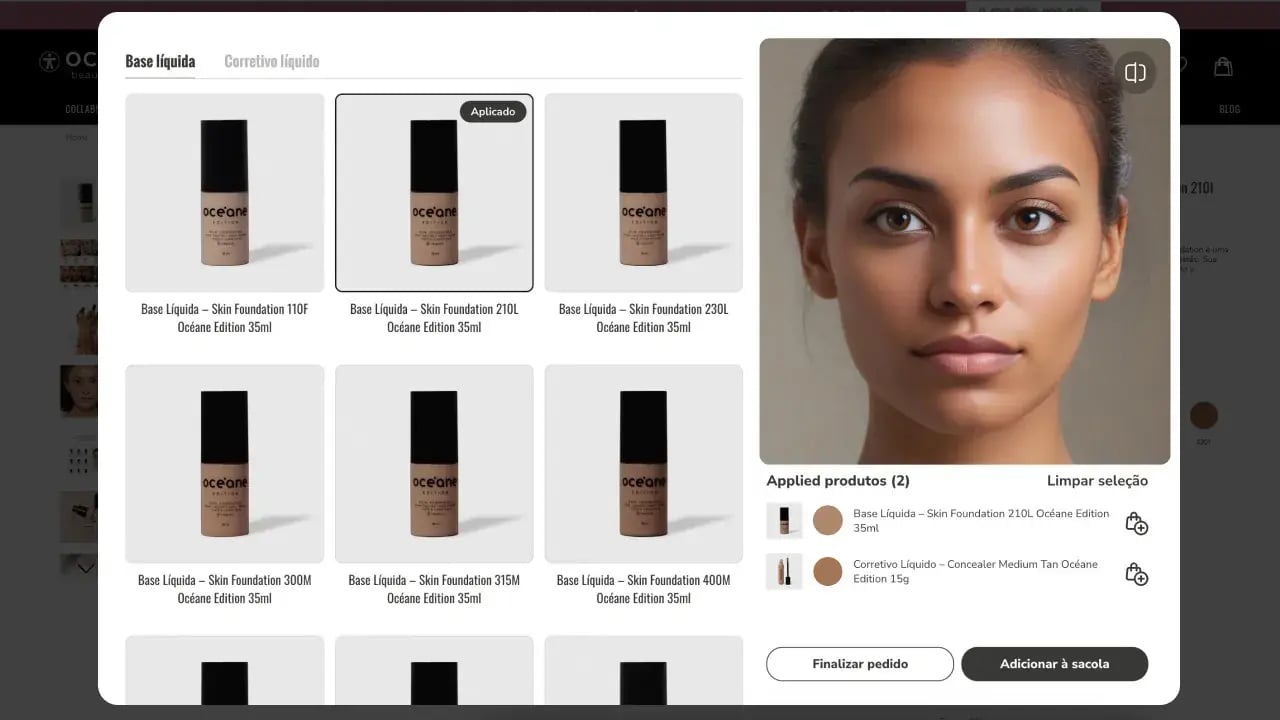 How Banuba's makeup software interface looks: Oceane's case study example
Proof it works: Océane
Océane, a Brazilian cosmetics manufacturer and retailer, was one of the first companies in its market to adopt Banuba TINT. Its pilot covered only concealer and foundation, and within the first month, the add-to-cart rate for those items rose from a 3% industry average to 20.15%, an increase of more than 600%. Demand outran supply, and the products sold out. By July, the add-to-cart rate peaked at 32%, meaning roughly a third of shoppers who tried a product online added it to their cart. You can read the full Océane virtual try-on case study for the rollout details.
References / further reading
-
No. The point of using an SDK is that face detection, tracking, and rendering are already built. With the Banuba TINT widget you need only front-end skills; with the Face AR SDK you need standard mobile or web development, not machine learning research.
-
It is real-time AR. Shoppers see makeup rendered live on their camera feed, which is what makes the try-on feel responsive and trustworthy.
-
Banuba TINT supports 16+ categories, including makeup, eyewear, hair color, contacts, jewelry, and accessories, plus 16 makeup product types. One integration can therefore serve makeup, optical, and accessory lines together.
-
Yes. The widget UI can be styled to your brand, and a white-label option removes Banuba branding so the experience reads as your own.
-
Choose Banuba TINT if you sell online and want a fast, hosted try-on. Choose the Face AR SDK if makeup is the core of your own app and you need full control over the camera, UI, and on-device behavior.
