

[navigation]
TL;DR:
- Landmark accuracy is decided by the tracking architecture, not the point count. Banuba Face AR SDK reconstructs a 3D head model directly from the camera feed via its patented Face Kernel technology, skipping the conventional 2D-landmark-then-3D-estimation step that introduces drift under fast movement.
- Banuba Face AR SDK maintains sub-pixel accuracy across 68 facial anchor points and can reconstruct a face mesh with up to 3,308 vertices.
- Tracking with Banuba Face AR SDK stays locked from -90° to +90° head angle, in low light, and with up to 70% of the face covered by a hand, mask, or microphone.
- Banuba's engine tracks 37 facial morphs rather than hundreds of static points, which lowers CPU load and leaves headroom for the effects layered on top.
- Building landmark detection in-house means owning dataset collection, model training, per-device optimization, and a permanent maintenance loop against new hardware and OS releases.
- Banuba Face AR SDK ships to HTML5, iOS, Android, Windows, macOS, Unity, Flutter, and React Native from one integration, with a floor of iOS 13+ and Android 8.0+.
- Processing runs entirely on the device with Banuba Face AR SDK, so no facial data leaves the handset and GDPR compliance is structural rather than contractual.
- b.stage, a SaaS fandom platform, passed 1 million monthly active users across 224 countries two years after launch using Banuba face filters, beauty touch-up, and 3D masks.
What does face landmarks detection actually have to do?
A landmark detector has one job: return a stable set of coordinates describing facial geometry, frame after frame, fast enough that whatever consumes those coordinates looks attached to the face rather than floating near it.
That framing sets the bar higher than "detect a face". Detection answers whether a face is present. Landmarks answer where every part of it is, at what depth, and at what angle, and they have to answer it again 30 or more times per second without the answer jittering between frames. Banuba's face landmarks SDK tracks up to 87 points, some of which are conventional landmarks such as eyes and nose, and others of which describe facial expression and spatial position.
The consuming feature determines how much error you can absorb. Analytics tolerates a few pixels of noise. Makeup try-on does not: lipstick that slides off the lip line by two pixels reads as broken. Facial measurement, such as pupillary distance, needs a metric scale on top of pixel accuracy. Decide which of these you are building before you evaluate anything, because it sets the accuracy threshold every later decision is measured against.
What do you have to build if you do it from scratch?
The in-house path is well documented and consistently underestimated. Four workstreams have to be staffed, not one.
Data. A landmark model needs annotated faces across skin tones, ages, lighting conditions, head angles, and occlusion states. Public datasets thin out quickly at the edges of that distribution, which is exactly where production failures occur.
Model training and evaluation. Landmark regression is straightforward to get working at 70% quality and difficult to push past 95%. You need a held-out benchmark that reflects your users' real conditions, or you will optimize for the demo.
Per-device optimization. A model that runs at an acceptable frame rate on a current flagship may not on a three-year-old mid-range Android. Compressing networks and shifting work between CPU and GPU per device tier is its own specialism. Banuba does this in the SDK: on a 2019 mid-range Android phone, expect 35 to 40 FPS for makeup filters and 30 or more FPS for complex 3D masks.
Temporal stability. Independent per-frame inference produces jitter. Smoothing it without introducing lag is the part teams discover late. Banuba's anti-jitter system is patented and runs noise-detection algorithms several times within a single frame, which is affordable precisely because the engine processes 37 morph parameters rather than hundreds of static points.
None of this is unachievable. It is a multi-quarter research commitment with a maintenance tail that never ends, which is a different proposition from a feature sprint.

Why does the tracking architecture matter more than the point count?
Most AR SDKs detect 2D facial landmarks first, then apply equations to estimate a 3D head position from them. The 2D-to-3D conversion is where error accumulates, and it accumulates worst under exactly the conditions your users create: fast head movement, partial occlusion, older hardware.
Banuba's Face Kernel technology constructs the 3D head model directly from the camera feed and skips the 2D step. The practical consequences are measurable rather than rhetorical:
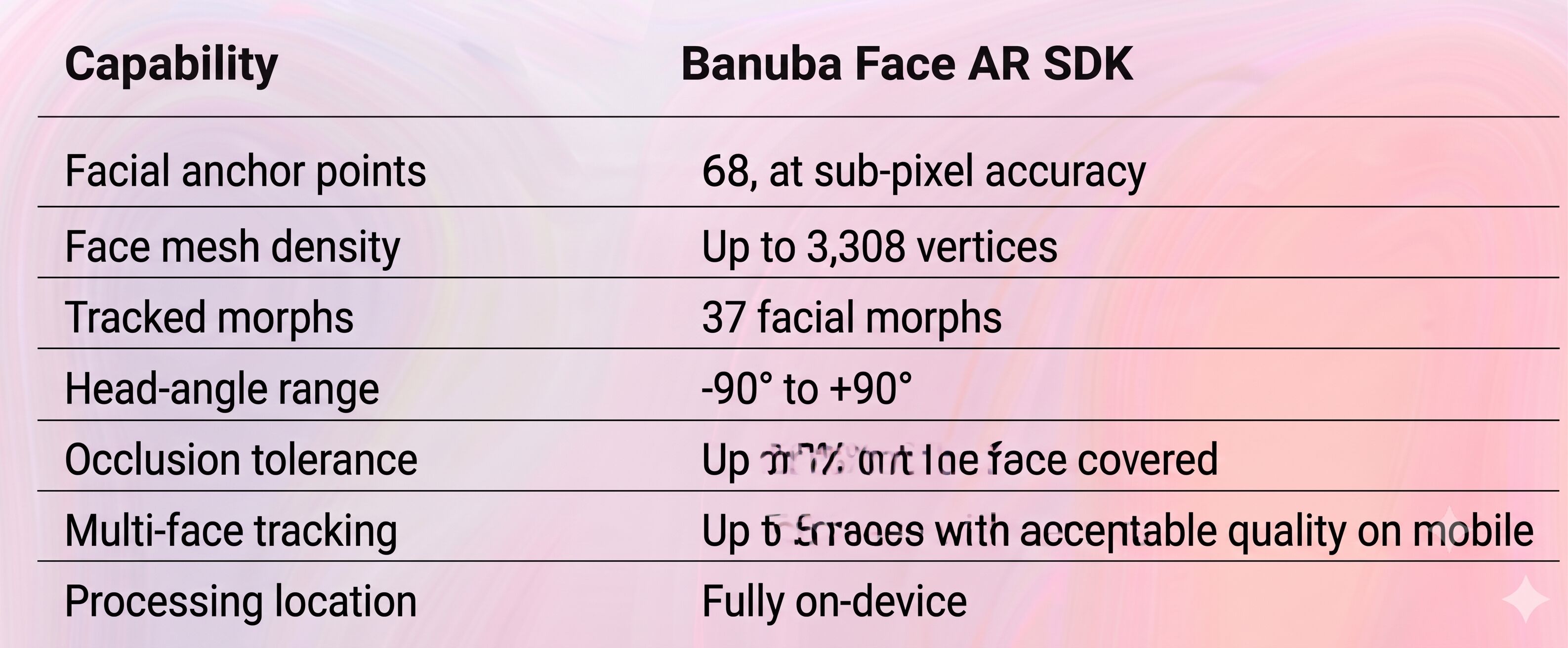
Point count on its own is a weak signal. Two SDKs can both advertise 68 anchor points and behave completely differently once a hand crosses the frame. Ask instead how the 3D pose is derived, what happens at 80° of yaw, and what the frame rate is on the oldest device you intend to support. For a broader field view, our comparison of face landmarks SDKs covers how the main options differ on those axes, and this side-by-side of face landmarks SDKs tested in 2026 walks through the same evaluation applied to a wider set of vendors.
How do you implement face landmarks detection with an SDK?
The integration path is short enough to describe in five decisions.
1. Fix the target platforms first. Banuba Face AR SDK covers HTML5, iOS, Android, Windows, macOS, Unity, Flutter, and React Native from a single SDK, so cross-platform scope is a configuration question rather than a second project. The device floor is iOS 13+ or Android 8.0+ with a 1280x720 camera at a minimum of 30 FPS.
2. Wire up the camera and render loop. The SDK takes camera frames and returns tracking data plus a rendered output surface. The Face AR SDK documentation covers platform-specific setup, and the iOS integration samples and Android integration samples are working projects rather than snippets, which is usually the fastest way to confirm the architecture fits before committing to it.
3. Decide what consumes the landmark data. If you need raw coordinates for your own logic, read the landmarks array directly. If you need visual output, use the effects layer so tracking and rendering stay in sync rather than drifting apart in your own pipeline.
4. Test under stress, not in the office. Build your QA set from the failure modes: extreme yaw, hand-over-face, backlit windows, one meter versus two meters from the lens, two people in frame. This is where architectural differences between SDKs become visible, and where an in-house model usually reveals its dataset gaps.
5. Confirm the privacy position in writing. Banuba Face AR SDK processes on-device, stores no user data, and is built for GDPR compliance. If you are shipping to regulated markets, that is a structural property of the integration rather than a policy you have to negotiate.
Banuba's face tracking in action
What does this look like in production?
b.stage, the SaaS fandom platform built by Korean company bemyfriends, uses Banuba beauty effects, face filters, and 3D masks in its live streaming and video chat. Two years after launch it passed 1 million monthly active users from 224 countries, serving artists and eSports teams including T1, Sentinels, Hwasa, and Chungha.
The engineering detail worth extracting is why the team selected the SDK: natural-looking touch-up that does not blur skin texture, a library of around 1,000 ready-made masks and filters with custom options, and support responsive enough to keep AR features working smoothly through launch. Those are integration and maintenance concerns, not feature-list concerns, and they are what separates a landmark detector that ships from one that stalls in QA.

When should you still build in-house?
Three cases justify it. You need a facial geometry representation no commercial SDK exposes. Landmark detection is itself the product you sell, not a feature inside a product. Or you have a standing computer vision team with the mandate and the benchmark data to beat a specialist vendor on your specific distribution.
Outside those cases, the trade is straightforward: an SDK costs you some control over the model internals and buys you a working detector across eight platforms, tuned per device tier, with the stress-condition behavior already solved. For most teams, the constraint is engineering time, not license cost.
Conclusion
Face landmark detection is deceptively easy to prototype and genuinely hard to ship. The gap between the two is dataset coverage, per-device optimization, and temporal stability, and it is measured in engineering quarters rather than sprints. An SDK closes that gap by handing you a detector that has already been tuned against extreme angles, occlusion, low light, and older hardware, across every platform you are likely to target.
If landmark quality under stress is the requirement, start with the Banuba Face AR SDK documentation and the integration samples, and run your own stress set against them before you commit either way.
-
Face detection locates a face in a frame; landmarks detection locates the individual features within it and tracks them over time. Banuba's face detection SDK handles the first, and the Face AR SDK's landmark tracking handles the second, with the same engine driving both.
-
Banuba Face AR SDK maintains sub-pixel accuracy across 68 facial anchor points and tracks up to 87 points in total, some of which describe facial expression and spatial position rather than fixed anatomical landmarks. It also reconstructs a face mesh of up to 3,308 vertices, which is what lets effects sit on the face rather than near it. The Banuba technology overview describes the underlying tracking approach.
-
Yes. Banuba Face AR SDK tolerates up to 70% of the face being covered by a hand, mask, or microphone, and holds tracking in low light. This is the single most common production failure mode for landmark detectors, so it is worth testing explicitly against whichever SDK you evaluate. Our explainer on how real-time face detection works covers the mechanics.
-
Yes. Banuba Face API exposes face detection, tracking, and segmentation as a module of the Face AR SDK, so you can take the detection and tracking pieces and drive your own rendering or analytics on top.
-
No. Banuba Face AR SDK processes everything on-device, stores no user data, and is built for GDPR compliance. Full specifications are on the face landmarks SDK product page.
-
Banuba Face AR SDK supports HTML5, iOS, Android, Windows, macOS, Unity, Flutter, and React Native, running on iOS 13+ and Android 8.0+ with a 1280x720 camera at a minimum of 30 FPS. The full list is in Banuba's system requirements documentation.
