

The video conferencing market is expected to reach roughly $12 billion in 2026, growing at about 12% year over year. Virtual backgrounds are a big part of why. What started as a novelty on Zoom in 2020 has become something users actively look for, and get frustrated without.
It goes beyond video calls. Live streaming apps use background replacement to let creators broadcast from anywhere. E-commerce platforms use it for product photography. Telehealth apps use it to protect patient privacy. Gaming apps use it to composite players into virtual environments. The use case list keeps growing.
For product teams, this creates a clear problem. Users expect background removal to work perfectly, in real time, on mid-range phones, with no visible artifacts around hair or shoulders. Meeting that expectation is hard. Building it from scratch means hiring ML engineers, training segmentation models, writing platform-specific rendering code, and testing across hundreds of devices. That is why most teams reach for an API or SDK instead.
This article walks through what it actually takes to add background removal to an app. We will cover the core technical requirements, weigh the build-from-scratch path against using a remove-background API, and examine how Banuba’s Background Removal API fits into the picture.
[navigation]
Adding background removal to a mobile or web app means building real-time segmentation that separates a person from their surroundings on every frame of video. That involves training or sourcing ML models, writing GPU-accelerated rendering pipelines, and optimizing performance across dozens of device types. A remove background API handles all of this out of the box, giving developers production-grade background subtraction, replacement, and blur through a straightforward integration, typically in days rather than months.
TL;DR
- Background removal is now table stakes. Users expect it in every video call, live stream, and camera-based app. Platforms like Zoom, Google Meet, and TikTok have trained users to treat virtual backgrounds as a default, not a bonus.
- Building it from scratch is a serious undertaking. Real-time segmentation requires deep learning models, GPU optimization, per-device tuning, and constant maintenance as new phones and OS versions ship.
- A remove background API cuts months off the timeline. Pre-trained models, cross-platform SDKs, and tested rendering pipelines let your team skip the hardest parts and ship faster.
- On-device processing matters more than you think. Cloud-based APIs add latency that kills real-time video. On-device Background Removal SDKs like Banuba’s process locally, which means zero round-trip delay and built-in privacy compliance.
- The SDK or/and API path makes sense when speed and reliability outweigh full control. If your core product is not computer vision, spending 6–12 months building segmentation from zero is hard to justify.
Why Background Removal Works So Well in Apps
The popularity of background removal taps into specific user behavior patterns and UX expectations that make apps stickier and more shareable. The data backs this up.
UX Patterns That Drive Adoption
Real-time preview. Users see the effect before they commit. There is no upload-wait-download cycle. The background changes live, and users can swap between options instantly. This creates a sense of control that keeps people engaged. It is the same instant feedback loop that made Snapchat filters and TikTok effects so addictive.
Privacy without effort. Not everyone wants coworkers to see their living space. 70% of users use virtual backgrounds during video calls to maintain privacy and professionalism. Background blur and replacement solve this without asking users to physically rearrange anything.
Camera confidence drives engagement. This is where it gets interesting. 72% of managers feel their direct reports are more engaged when their videos are turned on Zoom, and 69% feel their direct reports are more productive with video on Zoom. A Korn Ferry survey found that 75% of professionals say more can be accomplished during meetings when cameras are on. But people will not turn the camera on if they feel self-conscious about their surroundings. Background removal lowers that barrier. It is not just a cosmetic feature; it directly affects whether users engage with the camera at all, which drives every engagement metric downstream.
This is exactly what Banuba's SDK demonstrated in practice. When video conferencing app VROOM integrated Banuba's Face AR SDK to boost camera enablement through virtual backgrounds, face filters, and beautification, the app saw 30% more MAUs and 54% more sign-ups. That is a direct line from privacy features to user growth.
Performance That Users Take for Granted
Low latency. Any visible delay between moving and the background updating breaks the illusion. Users expect sub-frame response, which means processing must occur in under 33 milliseconds on a 30 fps feed. Cloud-based APIs are great until you try to use them for live video. A 2-second round-trip delay is a lifetime in a video call. This is why on-device processing matters so much for real-time use cases.
Clean edges. Hair, glasses, and moving hands are the hardest parts. If the segmentation mask flickers or leaves a halo around the person, users notice immediately. Most APIs handle a solid-colored mug just fine. Throw in curly hair, transparent glasses, or a Labrador, and the mask usually falls apart.
Cross-device consistency. A feature that works on a flagship phone but stutters on a two-year-old mid-range device is, for most users, not a feature that works. Background removal needs to perform well across a wide range of hardware.
User Behavior Drivers
People share video content more when they feel confident in how it looks. Background removal lowers the bar for creating shareable content, whether that is a polished video call recording, a livestream, or a short-form video clip.
The market numbers tell the story of how central video has become. The global video conferencing market generated about $10 billion in revenue in 2025 and is projected to reach $12 billion in 2026.
And the use cases extend well beyond meetings. Video conferencing usage in healthcare grew by 47% between 2023 and 2025. E-learning, live streaming, telehealth, social media, and content creation: every one of these categories benefits from letting users control what appears behind them.
Core Features Required to Build Background Removal
If you are building a competitive background-removal feature, here is what needs to be in place under the hood. We can group these into five capability areas.
Segmentation Engine
This is the core. A deep learning model processes each video frame and classifies every pixel as either foreground (the person) or background (everything else). The model needs to handle edge cases: hair strands, semi-transparent objects like glasses, fast hand movements, and varying lighting conditions. Most production systems use lightweight neural networks optimized for mobile inference, such as MobileNet-based architectures or custom encoder-decoder designs.
Rendering Pipeline
Once you have a segmentation mask, you need to actually do something with it. The rendering pipeline composites the foreground onto a new background, whether that is a static image, a video, a blur effect, or full transparency. This pipeline has to run on the GPU to keep latency low. It also needs to handle mask smoothing, edge feathering, and temporal consistency to prevent flicker between frames.
Background Options
Users expect more than just a static image replacement. A complete implementation supports background blur (bokeh) with adjustable intensity, static image backgrounds with proper scaling and aspect ratio handling, video backgrounds (looping clips), solid-color backgrounds or full transparency for green-screen-style compositing, and dynamic content modes (fit, fill, scale-to-fill).
Platform-Specific Optimization
Real-time video processing on mobile devices means working within tight power and thermal budgets. You need GPU-accelerated inference on both iOS (Metal/Core ML) and Android (OpenGL ES, Vulkan, or NNAPI). Web support adds another layer: WebGL 2.0 and increasingly WebGPU, plus browser-specific quirks. Desktop platforms (Windows, macOS) have more headroom, but still require optimized pipelines to avoid eating CPU and draining laptop batteries.
Integration and Export Layer
Background removal rarely lives in isolation. It needs to integrate with camera capture pipelines, work alongside other effects (face filters, beautification, AR overlays), and feed into video encoding and export systems. The integration layer handles camera orientation, resolution negotiation, and frame format conversion between the segmentation engine and the rest of the app.
Build Paths: From Scratch vs. Using a Remove Background API
Path A: Building from Scratch
Building your own background removal system means assembling and maintaining every layer of the stack yourself. Here is what that typically involves.
ML model development. You will need a segmentation model trained on large, diverse datasets of people in different environments. Off-the-shelf open-source models like MODNet or Mediapipe exist, but production-quality results usually require fine-tuning or training a custom model. That means sourcing training data, managing annotation pipelines, and iterating on model architecture.
GPU rendering. Writing shader code for mask application, edge smoothing, and background compositing across Metal, OpenGL ES, Vulkan, and WebGL. Each platform has different capabilities and quirks. Supporting all of them is a significant engineering effort.
Per-device optimization. A model that runs at 30 fps on a Pixel 8 might drop to 15 fps on a Samsung A14. You will spend considerable time profiling, quantizing models, and tuning inference settings for different chipsets and GPU families.
Ongoing maintenance. New phone models, new OS versions, new GPU drivers. Each release cycle can break things or create performance regressions. The model itself also needs periodic retraining as you encounter new edge cases in production.
Pros of building from scratch:
- Full control over model architecture, training data, and output quality.
- No licensing costs or third-party dependencies.
- Can be tightly tailored to your specific use case.
Cons:
- 6 to 12 months of development time, minimum, for a production-grade implementation.
- Requires specialized ML and GPU engineering talent that is expensive and hard to hire.
- Ongoing maintenance burden that does not shrink over time.
- High risk of shipping with visible quality issues (flickering, halos, poor edge handling).
Path B: Using a Remove Background API (Recommended)
A remove-background API like Banuba provides a prebuilt segmentation engine, rendering pipeline, and cross-platform integration layer. Instead of building each component, you integrate the SDK into your app and configure it through a documented API.
Think of it this way: you are outsourcing the computer vision infrastructure to a team that does nothing but optimize it. Your engineering team focuses on your product, not on retraining ML models or debugging shader code on obscure Android devices.
Pros:
- Ship in days or weeks instead of months.
- Production-quality segmentation from the start, with no ramp-up period.
- Cross-platform support (iOS, Android, Web, desktop) in a single integration.
- The SDK provider handles model updates, device optimization, and bug fixes.
- Predictable costs that scale with your licensing agreement, not with engineering hours.
Cons:
- Less control over the segmentation model itself. You work within the API’s capabilities.
- Dependency on a third-party provider for updates and support.
- Licensing costs, though typically far lower than building in-house.
When the API path makes the most sense: when background removal is a feature in your app, not the product itself. If your core business is video conferencing, live streaming, content creation, e-learning, or telehealth, your engineering time is better spent on what makes your product unique, not on solving a computer vision problem that someone else has already solved well.
Build vs. SDK: Side-by-Side Comparison
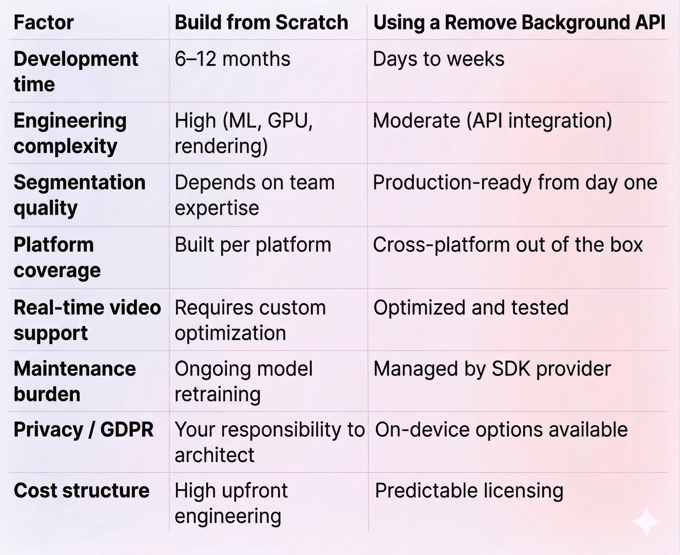
Adding Background Removal with Banuba’s SDK
What the Banuba Background Remover API Does
Banuba’s Background Remover API is an on-device SDK that performs real-time background separation using proprietary neural networks. It classifies each pixel in a video frame as foreground or background, then applies whatever effect you choose: replacement with an image, video, or animated GIF; background blur; or full transparency.
The keyword there is on-device. Unlike cloud-based background removal services that send frames to a remote server and wait for a response, Banuba processes everything locally on the user’s phone, tablet, or computer. No video data leaves the device. That architecture eliminates round-trip latency entirely, which is critical for real-time video, and it simplifies GDPR and privacy compliance because there is no video data transmission to worry about.
Integrating Banuba’s remove background API means you do not need to build or maintain:
- A custom ML segmentation model (Banuba ships its own proprietary neural networks).
- GPU rendering pipelines for mask application and compositing.
- Per-device performance optimization across chipsets and GPU families.
- Temporal smoothing and edge-feathering algorithms.
- Ongoing model retraining and dataset management.
Platform Support
The Banuba Background Removal API supports iOS (13+), Android (8.0+, API 26+), Web (WebGL 2.0, Chrome/Firefox/Safari), Windows (8.1+), and macOS (10.13+). Cross-platform frameworks are covered too: Flutter and React Native bindings are available, along with Unity support for game and immersive experience developers.
That breadth matters. It is one of the few commercially available remove-background API solutions that work natively in web browsers without requiring a plugin or download, and it also offers full native mobile and desktop support.
In October 2025, Banuba released a significant upgrade to its background separation technology. The updated AI model focuses on smoothing borders between the user and the virtual background, specifically targeting the jagged edges and pixelation artifacts that have plagued video background effects for years. The company calls this eliminating the “ladder effect.”
The update also introduced creative features like support for animated GIFs and dynamic videos as backgrounds, plus a unique "Weatherman Mode" that lets users drag and reposition themselves anywhere on the screen. That last one is particularly useful for presentations and educational content.
Integration Overview
Banuba distributes its SDK through standard package managers: CocoaPods for iOS, Maven for Android, and npm for Web. Flutter and React Native wrappers are also available. The integration flow is straightforward:
- Request a free token,
- Add the dependency,
- Initialize the SDK with a license key,
- Use the Virtual Background API to set background textures, blur, or transparency.
For those who prefer vibe coding, there are also LLM-optimized documents that an AI can easily digest and use as a foundation for its work.
The SDK is designed to combine with other Banuba modules. You can layer background removal with face filters, beauty effects, and AR overlays within the same rendering pipeline. This is useful for apps that want to offer a full set of camera effects, not just background replacement.
Full integration guides, API references, and ready-to-build sample projects for every supported platform are available in the Banuba documentation and on Banuba’s GitHub. The documentation includes quickstart samples that, according to Banuba’s internal benchmarks, enable developers to get a basic background-removal implementation running in about 8 minutes.
Decision Framework: When to Build vs. When to Use an API
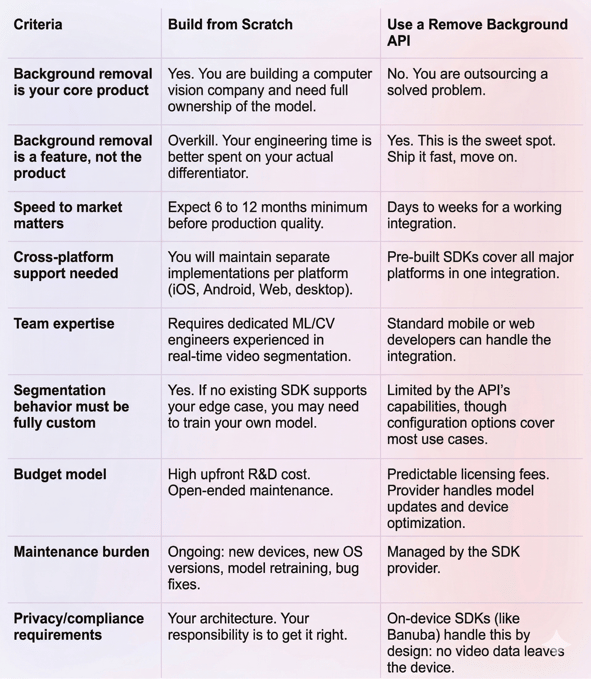
If your app is a video conferencing tool, a live streaming platform, an e-learning product, or a social app, background removal is expected, but it is not your differentiator. Your differentiator is the product you are wrapping around it. Use an API.
Conclusion
Background removal has gone from novelty to necessity. Users expect it, platforms have normalized it, and apps that lack it feel incomplete. But the engineering effort behind real-time, production-quality segmentation is substantial. Training ML models, building GPU rendering pipelines, optimizing for dozens of device types, and maintaining the whole stack through OS and hardware updates is a full-time job for a specialized team.
For most product teams, a remove background API is the faster, safer, and more cost-effective path. It lets you deliver the feature users expect without diverting engineering resources from what actually makes your product different.
Banuba’s Background Remover API is built for this exact scenario. On-device processing, cross-platform support, production-quality segmentation, and a clean integration path that gets you from zero to working feature in days. If you are evaluating options, the free trial is the quickest way to test it against your own use case.
-
Not if you are using an SDK. Banuba’s remove background API is designed for standard mobile and web developers. You do not need ML or computer vision expertise. The integration uses familiar tools (CocoaPods, Maven, npm) and comes with sample projects you can build and run immediately. If you are building from scratch, you will need deep experience in ML model training, GPU programming, and real-time video processing.
-
Banuba’s SDK supports iOS (13+), Android (8.0+), Web (WebGL 2.0), Windows, macOS, and Ubuntu. Cross-platform frameworks include Flutter and React Native, with Unity support for game developers. Full platform requirements are documented at docs.banuba.com.
-
A basic integration typically takes a few days. Banuba’s documentation includes quickstart guides and sample apps for every supported platform, and the company reports that developers can get a working prototype running in as little as 8 minutes. Full production integration, including custom background options, UI work, and testing across target devices, usually takes one to three weeks, depending on your app’s complexity.
