

The video conferencing market hit roughly $10 billion in 2025 and is growing at a double-digit rate toward $31 billion by the mid-2030s. Features like real-time transcription, noise suppression, and virtual backgrounds now rank among the top reasons users pick one platform over another.
For developers building video-centric apps, the question is not whether to add background removal. It's how. And the answer splits into two very different paths: grab an open-source library like OpenCV and build your own pipeline, or plug in a commercial remove background API that handles the hard parts out of the box.
This article compares those two paths head-to-head. We look at Banuba's Background Removal API and OpenCV's background subtraction toolkit across the criteria that matter once your app goes live: segmentation quality, real-time performance on actual devices, platform reach, developer effort, and cost at scale.
[navigation]
A remove background API allows developers to separate people from their surroundings in real-time video without building computer vision models from scratch. OpenCV offers free, open-source tools for this task, but requires significant engineering work to reach production quality. Banuba provides a ready-made, commercially supported API built on patented neural networks, optimized for mobile, web, and desktop. For teams shipping user-facing products that need reliable background removal across devices and lighting conditions, Banuba is the stronger choice.
TL;DR
- This comparison is for engineering leads, product managers, and CTOs deciding between a commercial remove background API and an open-source approach for video apps.
- We evaluated Banuba and OpenCV on segmentation accuracy, real-device frame rates, platform coverage, integration effort, and total cost of ownership.
- Banuba delivers production-ready person segmentation with clean edges, dynamic background types (video, GIF, 360°), and flat-fee licensing that does not penalize growth.
- OpenCV gives you raw building blocks for background subtraction but requires months of custom development, model training, and per-device optimization to match commercial output.
- If your priority is shipping fast and scaling predictably, Banuba wins. If you need full algorithmic control and have a dedicated CV team, OpenCV gives you that flexibility.
Why Choosing a Remove Background API Gets Tricky
Removing a background in a recorded, well-lit video is solved. Doing it reliably on a three-year-old Android phone, in a dimly lit room, with the user waving their hands and wearing a hoodie that blends into the couch behind them, is a different problem entirely.
Two tools can both claim "background subtraction" while producing wildly different results in practice. One might clip fingers every time the user gestures. Another might leave patches of wall visible around the shoulders. Edge quality around hair is particularly revealing: cheap segmentation creates a harsh, flickering outline that users notice immediately.
Beyond raw accuracy, there is the build-versus-buy decision. OpenCV gives you algorithms. Banuba gives you a finished product. That distinction touches everything from time-to-market to long-term maintenance costs.
We scored both options against five areas that separate prototypes from production.
How We Scored Each Option
Segmentation Quality. How cleanly does the tool separate a person from the background? What happens with long hair, moving hands, mixed skin-and-clothing tones, low light, and cluttered backgrounds?
Real-Device Performance. What frame rates can you expect on mid-range mobile hardware? Does performance hold up during a 10-minute video call without causing overheating or battery drain?
Platform Reach and Integration Effort. Which operating systems and frameworks are supported? How long does it take to go from zero to a working demo? Is the tool maintained by the vendor or by community contributors?
Background Flexibility. Can you only blur or replace with a static image? Or does the tool support video, GIF, and 3D environment backgrounds?
Total Cost of Ownership. License fees are only one part. Engineering time for custom model training, optimization, and maintenance counts too.
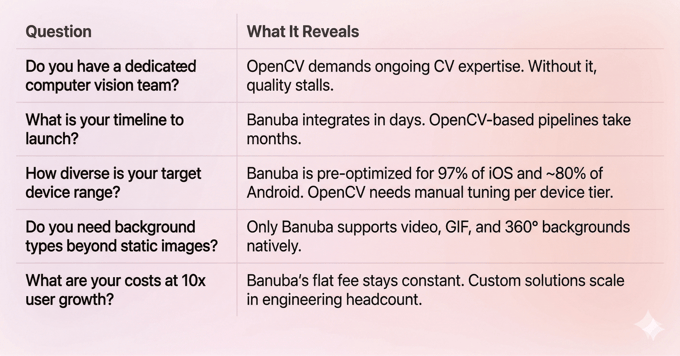
A Decision Framework: Build or Buy?
Before diving into the specifics, use this quick checklist to clarify which approach fits your team.
Banuba Background Removal API
What It Is
Banuba's remove background API is a commercially licensed SDK built on proprietary neural networks that separate people from their surroundings in real time. The company has been in the AR and computer vision space since 2016, holds 30+ patents, and remains fully independent. Its client list includes Samsung, Gucci, RingCentral, Schwarzkopf, and 120+ other companies across video conferencing, streaming, dating, beauty, and fintech.
How It Handles Segmentation
Banuba uses deep convolutional neural networks trained on a dataset of over 200,000 images covering diverse skin tones, hairstyles, and lighting conditions. The network classifies every pixel in the frame as either "person" or "background," producing a probability mask that updates in real time.
In October 2025, Banuba announced a significant upgrade to this pipeline. The new AI model smooths the borders between the user and their digital background, removing the "ladder effect" (jagged edges and pixelation) that has long plagued virtual backgrounds. As Banuba CPO Anton Liskevich put it, the model "intelligently blends" users into their chosen environment rather than simply cutting them out.
A follow-up update in December 2025 further improved separation accuracy in complex cases, such as when background objects share the same color as the person's clothing.
Key Strengths
- Edge quality around hair and hands. The segmentation model handles long hair without edge flickering and keeps fingers intact during gestures. This has historically been one of the hardest problems in real-time person segmentation.
- Dynamic background types. Beyond static images and blurs, Banuba supports video backgrounds, animated GIFs, 360-degree environments, and a unique "Weatherman Mode" that lets users reposition themselves on-screen.
- On-device processing. No frames leave the user's phone. All computation runs locally, which means zero cloud latency and strong privacy compliance (GDPR-ready).
- Performance on constrained hardware. The SDK maintains 30+ FPS even on devices as old as iPhone 7. On newer hardware, frame rates can reach 300 FPS at under 10% hardware load. It supports iOS 13.0+, Android 8.0+, and covers ~97% of iOS and ~80% of Android devices.
- Cross-platform coverage. iOS, Android, Web (all major browsers), Windows, macOS, Unity, plus vendor-maintained Flutter and React Native wrappers. Web support is a genuine differentiator: Banuba is one of the very few commercial background removal SDKs that work directly in browsers without any downloads.
- Compatibility with face AR. The background removal API works alongside Banuba's, beauty filters, AR masks, and virtual try-on features. You can layer effects: a user might have a virtual background, skin smoothing, and an AR mask active simultaneously.
Pricing
Flat subscription per platform. The license fee depends on selected features and payment schedule (yearly, half-yearly, or quarterly). The crucial detail: cost does not scale with your user count. Growing from 10,000 to 10 million MAUs changes nothing on your invoice.
A 14-day free trial is available. Integration docs include LLM-ready content for vibe coding.
Limitations
Custom AR effect creation in Banuba Studio has a learning curve, though basic background removal integration is fast (teams report under 8 minutes to a working demo).
Best For
- Video conferencing and telehealth apps needing professional virtual backgrounds
- Live streaming platforms targeting global audiences on mixed-quality hardware
- Social, dating, and creator apps where background replacement is a core experience
- E-commerce and beauty apps combining background removal with face AR or virtual try-on
- Any product where shipping speed and cross-platform consistency outweigh the desire for low-level control

OpenCV Background Subtraction
What It Is
OpenCV (Open Source Computer Vision Library) is a free, open-source library with over 2,500 algorithms for image processing, object detection, and machine learning.
How It Handles Background Subtraction
OpenCV ships with classical background subtraction algorithms: MOG2 (Mixture of Gaussians, the default), KNN (K-Nearest Neighbors), and CNT (a lighter, faster option). All three were built for a specific scenario: a static camera watching a scene where moving objects enter the frame. The background model learns over time, and anything that deviates from it is flagged as foreground.
Here is the catch. For person-specific segmentation, the kind needed for virtual backgrounds, OpenCV offers no ready-made solution. Its DNN module lets you load pre-trained networks like ResNet or DeepLab, but choosing, optimizing, and deploying the right model for mobile devices is entirely up to you.
Key Strengths
- Zero license cost. Apache 2 license, no fees, no MAU caps, no vendor lock-in.
- Full algorithmic control. Pick any segmentation model, train on your own data, tune every parameter.
- Massive ecosystem. Bindings for C++, Python, Java, JavaScript across all major platforms. Huge community and thousands of tutorials.
Limitations
- No production-ready person segmentation. The built-in algorithms (MOG2, KNN) detect motion, not people. A person sitting still gradually blends into the background model. For virtual backgrounds, you must build a separate deep learning pipeline.
- Heavy engineering lift. Reaching production quality means sourcing a segmentation model, converting it for mobile inference (TFLite, ONNX, CoreML), optimizing per device tier, handling edge cases (hair, hands, low light), and building the rendering pipeline. Plan for months of work from a dedicated CV team.
- Coarse edges without post-processing. Raw masks at mobile-friendly resolutions (128x128 or 256x256) produce stair-stepped edges that need alpha matting and anti-aliasing passes.
- Static backgrounds only. Video, GIF, and 360° replacements require custom rendering code.
- No device optimization or support guarantees. CPU/GPU balancing, battery management, and thermal throttling are all your problems. No SLA, no vendor support.
Best For
- CV teams that need full control over the segmentation pipeline
- Projects where background subtraction is part of a larger custom system (surveillance, industrial inspection, robotics)
- Budget-constrained MVPs that accept lower initial quality in exchange for zero licensing fees
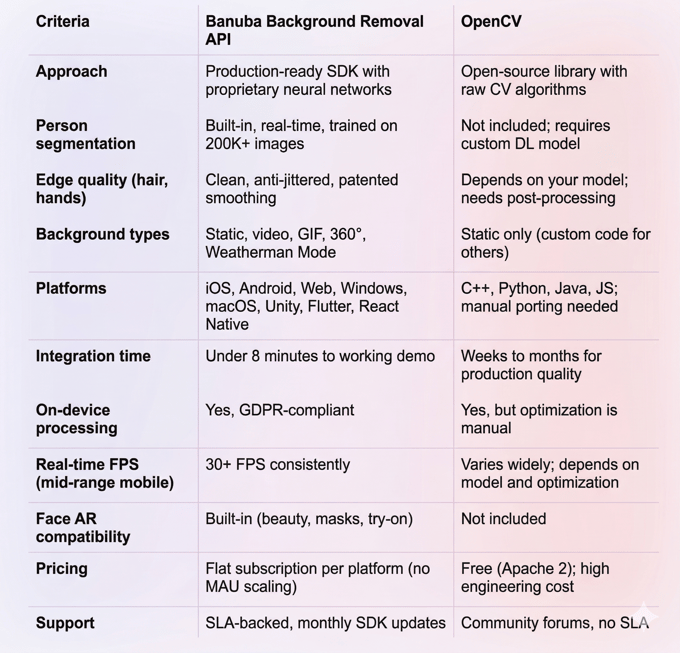
Banuba Background Removal API vs OpenCV: Comparison Table
Which Path Should You Take?
Choose Banuba if your product needs background removal that works reliably across devices, and you want to ship soon. The combination of clean segmentation, dynamic background types, cross-platform support (including web browsers), and flat pricing makes it the practical choice for video conferencing, streaming, social, and e-commerce apps. You are buying finished technology and ongoing support rather than raw components.
The flat licensing model is especially worth noting for growth-stage products. Your costs stay fixed whether you serve 5,000 or 5 million users. That predictability matters during fundraising conversations and financial planning.
Choose OpenCV if you have a strong computer vision team and need algorithmic control that no commercial SDK can offer. OpenCV is the right foundation when background subtraction is one component of a larger custom CV system, when you need to train models on proprietary data, or when your use case (industrial inspection, surveillance, robotics) falls outside the scope of consumer-facing SDKs. The trade-off is real: expect months of development before reaching production quality, and plan for ongoing optimization and maintenance.
A hybrid approach works too. Some teams prototype with OpenCV to validate a concept, then switch to Banuba's API when it is time to ship. Others use OpenCV for non-real-time processing tasks (batch video editing, analytics) while relying on Banuba for the live, user-facing experience. The two are not mutually exclusive.
Explore Banuba's remove background API in your own environment with a 14-day free trial.
References
Banuba. (n.d.). Background subtraction with deep learning. https://www.banuba.com/technology/background-subtraction
Banuba. (n.d.). Face AR technology. https://www.banuba.com/technology/
Banuba. (2025, October 10). Banuba unveils next-generation AI for flawless virtual backgrounds. BusinessWire. https://www.businesswire.com/news/home/20251010633225/en/Banuba-Unveils-Next-Generation-AI-for-Flawless-Virtual-Backgrounds
Banuba. (2025, December 22). Banuba enhances Face AR SDK with superior virtual backgrounds and face shape detection. BusinessWire. https://www.businesswire.com/news/home/20251222329858/en/Banuba-Enhances-Face-AR-SDK-with-Superior-Virtual-Backgrounds-and-Face-Shape-Detection
Banuba. (n.d.). Face AR SDK documentation. https://docs.banuba.com/far-sdk
OpenCV. (n.d.). About OpenCV. https://opencv.org/about/
OpenCV. (n.d.). Background subtraction tutorial. https://docs.opencv.org/4.x/d1/dc5/tutorial_background_subtraction.html
OpenCV. (n.d.). Introduction to OpenCV. https://docs.opencv.org/4.12.0/d1/dfb/intro.html
Precedence Research. (2026). Video conferencing market size. https://www.precedenceresearch.com/video-conferencing-market
Grand View Research. (2026). Video conferencing market size, share & trends report. https://www.grandviewresearch.com/industry-analysis/video-conferencing-market
-
Start with segmentation quality on your worst target device, not your newest phone. Test edge handling around hair and fingers specifically, since those are the most common failure points. Check what background types are supported beyond static images. Verify that the tool runs on-device if privacy matters for your use case. Then model your total cost: license fees plus engineering hours for integration, optimization, and maintenance over 12 to 36 months.
-
Two models dominate. MAU-based pricing charges per monthly active user and scales linearly as your audience grows. Flat subscription pricing charges per platform regardless of user count. Open-source tools like OpenCV carry no license fees, but the engineering time to build, optimize, and maintain a production-quality segmentation pipeline is substantial. Always calculate the full cost, including developer hours, not just the software license.
-
For production apps that need consistent background removal across diverse devices, Banuba's Background Removal API is the stronger option. Its neural network-based segmentation, cross-platform reach (including web), and flat pricing model make it well-suited for apps heading toward scale.
