

[navigation]
TL;DR:
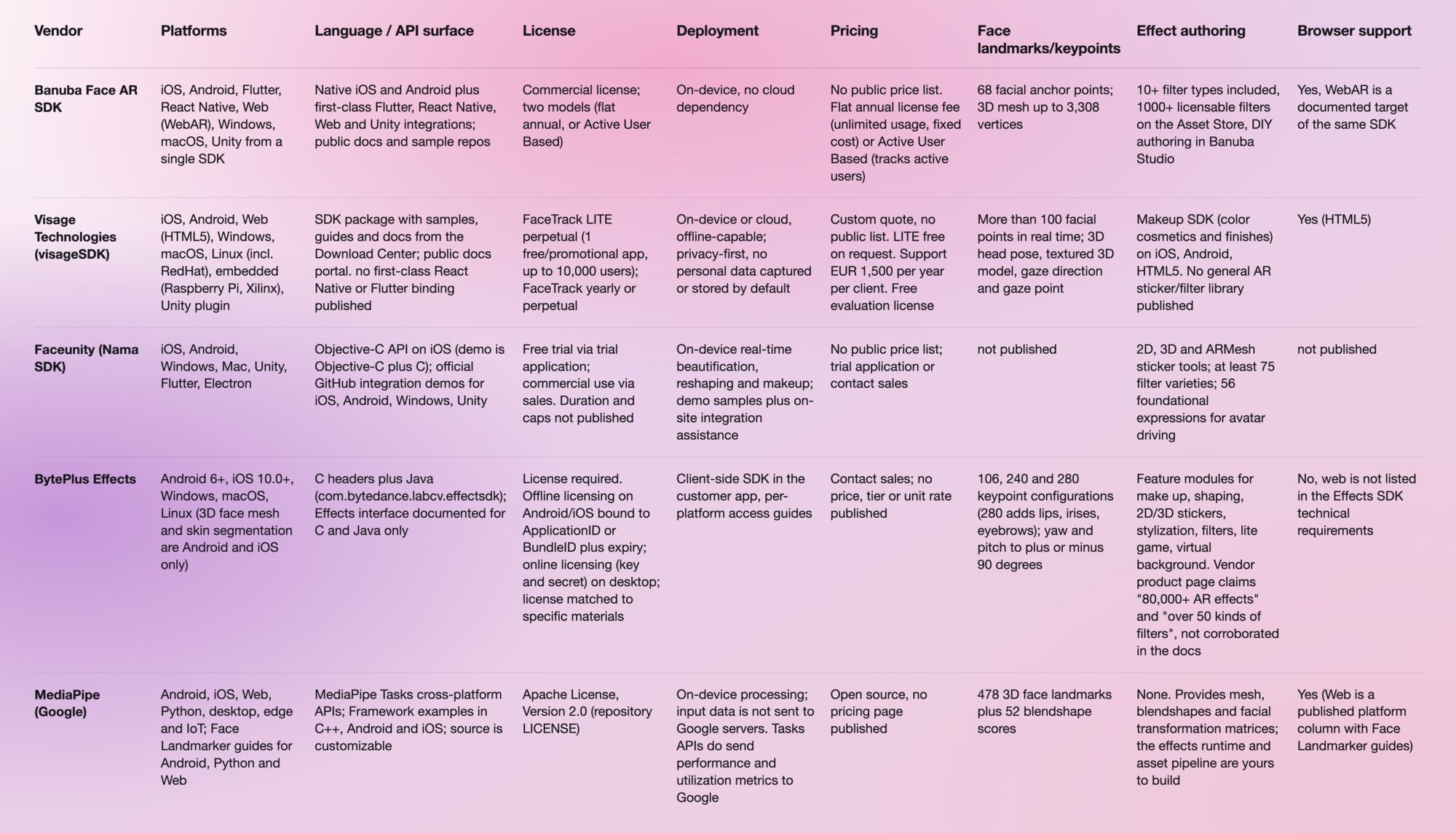
We compared Banuba Face AR SDK, visageSDK, Faceunity, BytePlus Effects, and MediaPipe across platform, language, license, deployment, pricing, and feature support for in-app face filters, based on each vendor's official documentation.
- Banuba Face AR SDK is the only option in this set that documents iOS, Android, Flutter, React Native, Web, Windows, macOS, and Unity from one SDK, tracks 68 facial anchor points on a 3D mesh of up to 3,308 vertices, and holds min 30 FPS on mid-range mobile devices.
- Banuba is the pick when the same filter has to behave identically in a native app and in a mobile browser, because WebAR is a first-class target rather than a separate product line.
- Banuba supplies effects in three ways: 10+ filter types (2D, 3D, triggers, face editing, and more), 1000+ licensable filters on the Banuba Asset Store, and DIY authoring in Banuba Studio, so the content pipeline does not depend on vendor turnaround.
- Visage Technologies wins on breadth of analysis and hardware reach: more than 100 facial points, gaze direction and screen-space gaze point, age, gender and emotion detection, plus Linux and embedded targets including Raspberry Pi and Xilinx.
- Visage is also the only vendor here publishing a concrete free tier (FaceTrack LITE, perpetual license, one app, up to 10,000 users) and a concrete support price (EUR 1,500 per year per client).
- Faceunity is the strongest fit for live-streaming beauty depth: 25 body points across seven beauty dimensions, 56 foundational expressions for avatar driving, green-screen-free background separation, and at least 75 filter varieties.
- BytePlus Effects publishes the most granular per-algorithm latency and memory budgets (face detection under 2 ms on iPhone 7, hair segmentation under 7 ms, body segmentation under 11 ms) and offers 106, 240, and 280 keypoint configurations, but the Effects SDK technical requirements do not list a browser target.
- MediaPipe is the correct choice for a zero-license-cost prototype or a research build: Apache License 2.0, on-device processing, 478 3D face landmarks and 52 blendshape scores. It ships detection and meshing, not an effects runtime or an asset library, and Google labels Solutions an early release.
- Decision rule: if you need a browser target, rule out BytePlus on its own documentation. If you need face analysis or embedded Linux, start with Visage. If you need a shipped effects runtime plus authoring tools across native and web, start with Banuba.
- Every commercial vendor here quotes privately. Only Visage publishes a usage definition (one install-and-launch per device equals one user), so normalize pricing questions before comparing quotes.
How to evaluate a face filter API
A face filter API is judged on a small number of engineering constraints, not on effect screenshots. Five dimensions decide most shortlists, and they map directly onto what CTOs, senior engineers, and product managers ask vendors first.
-
Platform coverage from one integration. Count the targets you actually ship: iOS, Android, and increasingly React Native or Flutter, plus a browser build for links shared in social feeds, plus Windows or macOS for photobooth, AR mirror, and kiosk installations. A vendor that covers your list from a single SDK removes a second integration, a second license negotiation, and a second QA matrix.
-
Language and API surface. Check the documented bindings rather than the marketing list. A C header plus a Java class is a different integration cost from a first-class Flutter or React Native package. Also check external and USB webcam support if the target is a kiosk or a desktop streaming app, because mobile-first SDKs frequently assume a built-in camera.
-
License model. Perpetual, annual, per-active-user, and open source behave differently at scale. Ask what counts as a user, whether the license file is bound to a bundle ID, whether it is bound to specific asset packs, and what happens when you exceed a cap: some SDKs degrade tracking rather than fail loudly.
-
Deployment and data handling. On-device processing with no cloud dependency is a recurring procurement requirement, not a nice-to-have, and legal teams increasingly ask for it in writing. Confirm whether inference runs locally, whether any telemetry leaves the device, and who is responsible for obtaining user consent.
-
Pricing structure. Almost no vendor in this category publishes a rate card, so the comparable unit is the model, not the number. Startups, MVPs, and pilots specifically need to know trial terms, per-MAU limits, and what the first-year cost looks like before product-market fit.
Three category-specific criteria sit on top of those five: tracking depth (landmark or keypoint count, 3D mesh, head-pose range, multi-face limits), effect authoring (can your designers produce effects, or does every new filter require a vendor ticket), and browser support (a real WebAR build, not a desktop demo).
Banuba Face AR SDK
Banuba Face AR SDK is the commercial option built specifically around shipping AR face filters into a product, rather than around face analysis or research tooling.
Tracking and performance. Banuba tracks 68 facial anchor points and fits a 3D mesh of up to 3,308 vertices, which is what lets face-editing and 3D-attachment effects stay locked to the face during head rotation. Banuba documents min 30 FPS on mid-range mobile devices as the general performance claim, which is the figure to plan against when your install base skews to older Android hardware.
Platforms. From a single SDK, Banuba covers iOS, Android, Flutter, React Native, Web (WebAR), Windows, macOS, and Unity. The React Native and Flutter coverage matters because cross-platform teams otherwise end up writing and maintaining two native bridges. The Windows and macOS builds are what make Banuba viable for photobooth, AR mirror, and kiosk work alongside mobile.
Browser behavior. Browser-based face tracking is a different engineering problem from native: there is no long-lived process, the camera stream arrives through getUserMedia, and inference competes with page rendering on the main thread. Banuba's engineering write-up on how face tracking runs inside a browser sets out that architecture, and it is worth reading before committing to a WebAR target with any vendor, because the constraints apply equally to all of them.
Effects and content pipeline. Banuba ships support for 10+ filter types (2D, 3D, triggers, face editing and more). Beyond the included set, there are 1000+ licensable filters on the Banuba Asset Store, and teams that want proprietary looks can author their own with Banuba Studio. That three-way split is the practical differentiator: the content roadmap stops being gated on vendor delivery times.
Deployment. Processing runs on-device with no cloud dependency, which answers the procurement question directly and keeps per-frame latency independent of network conditions. Banuba's SDK footprint is "around 15 Mb, depending on the feature set enabled", and the exact figure moves with the modules you compile in, so treat it as a range and check the Face AR SDK size FAQ against your own feature list rather than budgeting a single number.
Integration evidence. Banuba publishes runnable sample projects for iOS and Android, and the integration guides sit in the Face AR SDK documentation. For senior engineers doing vendor due diligence, those repos are the fastest honest signal: they show the real initialization sequence, the render-loop hook, and the license handling before you sign anything.
Scale evidence. A SaaS fandom platform built on Banuba Face AR scaled to 1 million monthly active users in two years, which is a useful reference point for the per-MAU questions that come up in pricing discussions.
Pricing. Banuba offers exactly two models and publishes no numbers. The flat annual license fee covers unlimited usage, so cost is predictable and stays fixed even at large scale. The Active User Based model tracks active users: it costs much less at the start, grows with the user base, and can exceed the flat fee if the app takes off. The trade-off is straightforward. Pre-product-market-fit teams usually prefer Active User Based for the lower entry cost; teams with a credible growth curve usually prefer the flat fee for budget certainty.
Weaknesses to test. Banuba publishes no price list, so you cannot self-serve a budget estimate. It is a commercial license, so there is no path to a free production deployment. And the 68-anchor-point model is tuned for effects placement rather than for dense mesh research, so if you need the densest published landmark set, check MediaPipe and BytePlus below.

Visage Technologies (visageSDK)
visageSDK from Visage Technologies AB (Teknikringen 9, Linkoping, Sweden) is a face tracking, analysis, and recognition SDK, split into FaceTrack, FaceAnalysis, and FaceRecognition components, with a separate makeup SDK ("Arbelle").
Tracking and analysis. FaceTrack tracks more than 100 facial points in real time and produces 3D head pose, a full textured 3D model, multiple simultaneous faces, gaze direction, a screen-space gaze point and 3D facial-feature coordinates. Tracked feature points cover face contour, eyes, eyebrows, nose, lips, ears, and irises. FaceAnalysis detects gender, age, and emotions. That analysis layer is the clearest capability gap versus a filters-first SDK: if your product needs to react to who is in frame or where they are looking, Visage covers it natively.
 Visage Technology face tracking landmarks
Platforms. iOS, Android, Web (HTML5), Windows, macOS, Linux (including RedHat, with Ubuntu listed on FaceTrack plans), embedded systems (Raspberry Pi, Xilinx), and a Unity plugin for face masks and games. The Linux and embedded reach is the widest in this comparison and is the deciding factor for signage, kiosk, and custom-hardware builds.
Language and SDK surface. The SDK package ships with samples, guides, and documentation from Visage's Download Center. The documentation portal is public. Visage's published materials do not document a first-class React Native or Flutter binding, so a cross-platform team should assume a native bridge of its own.
License model. FaceTrack LITE is a perpetual license, valid indefinitely, for one free or promotional app and up to 10,000 users. Full FaceTrack is available as a yearly or a perpetual license depending on business needs. Visage defines a user precisely: each time an application is installed and launched on a device counts as one user. Read the LITE cap behavior carefully, because beyond 10,000 users, new users lose tracking features until a FaceTrack license is purchased, which is a silent degradation rather than a hard stop. The makeup license places no limit on the number of SKUs.
Deployment. visageSDK runs on-device or in the cloud and is offline-capable with no internet dependency. Visage describes the SDK as privacy-first, with no photos, names, or similar personal data captured, stored, or processed by default.
Pricing. A custom personalized quote through sales, with no public price list. FaceTrack LITE is a free license on request. Technical support is charged separately at a fixed EUR 1,500 per year per client, covering integration help and excluding custom development. A free evaluation license is available before purchase. Visage is the most transparent vendor in this set on license mechanics, even though the headline price is still a conversation.
Weaknesses to test. The effects side is the question mark. Visage documents a makeup SDK for iOS, Android, and HTML5 with real-time mirror-like fit, a full color-cosmetics feature list (foundation, face paint, concealer, contour, blush, highlighter, eyeshadow, eyeliner, mascara, eyebrow, lipstick, lip gloss, lip liner), and finishes including glossy, matte, metallic, satin, shimmer, and glitter. A general AR sticker and filter asset library comparable to the other vendors here is not part of Visage's published feature set, so plan the general-effects side separately. Separately, the component split means a filters-plus-analysis product may need more than one license.
Banuba's face tracking in action
Faceunity (Nama SDK)
Faceunity, from Hangzhou Xiangxin Technology Co., Ltd., publishes the Faceunity Face AR SDK (also referred to as Nama SDK), an AR video effects and beautification SDK. Its center of gravity is live streaming and short video rather than general AR.
Effects breadth. This is Faceunity's strongest area. It provides 2D, 3D, and ARMesh sticker tools, at least 75 fundamental filter varieties, AI-driven skin refinement and blemish removal, full-face makeup styles with hairstyle and color adjustment, body shaping across 25 human body points and seven beauty dimensions, and real-time subject and background separation with no green screen. Avatar driving combines 56 foundational expressions covering face, tongue, and eyes. Additional tracked features include face landmark and expression tracking, Animoji, AR mask, face transfer, musical filters, hand gesture detection, face warping, and live photo, with high-precision gesture and expression recognition.
Platforms. iOS, Android, PC (Windows), Mac, Unity, Flutter, and Electron. Electron plus Flutter is an unusual combination and a genuine advantage for teams building a desktop streaming tool and a mobile app off shared product logic. A browser (WebAR) target is not listed among Faceunity's published platforms, so treat web as out of scope unless Faceunity confirms otherwise.
Language and SDK surface. The iOS API is Objective-C (Nama SDK), and the iOS demo is Objective-C plus C. Faceunity maintains an official GitHub organization with per-platform integration demos for iOS, Android, Windows, and Unity. Faceunity describes the renderer as a lightweight facial AR rendering engine with compact packages and low power consumption, which aligns with its live-streaming positioning where the encoder is already contending for the GPU.
License model and pricing. Access starts with a free trial via a trial application; commercial use goes through sales. There is no public price list. Faceunity publishes no license duration, user cap, or territory terms, so every one of those has to come out of the sales conversation. That is the main procurement friction: you cannot model cost without a sales conversation.
Deployment. Real-time on-device beautification, reshaping, and makeup. Faceunity offers demo integration samples plus on-site integration assistance, which is unusual in this set and useful for teams with a hard launch date.
Weaknesses to test. Tracking specifics that engineers usually want early - a published facial landmark count, head-pose range, and per-algorithm latency figures- are absent from Faceunity's public documentation, so ask for them in writing before you commit. Target applications are stated as live streaming, short video, photography, online education, online meetings, and medical beauty, so if your use case is outside that list, expect less proven ground. Documentation and support are oriented around a China-centered commercial process, with sales contact at marketing@faceunity.com.

BytePlus Effects
BytePlus Effects, from BytePlus Pte Ltd, is the Effects SDK positioned to "transform your app with immersive filters, stickers, and AR effects". It is the most precisely documented option in this comparison at the algorithm level.
Tracking and algorithms. Face keypoint detection ships in 106, 240, and 280 keypoint configurations, with the 280-point model adding keypoints for lips, irises, and eyebrows on top of the 106. Head pose covers yaw up to plus or minus 90 degrees and pitch up to plus or minus 90 degrees. Face attributes include age, gender, expression, attractiveness, and level of happiness, recognized on top of the 106-keypoint detection, with seven expressions (anger, disgust, fear, happiness, sadness, surprise, calm) and detected facial actions covering eye blinking, mouth opening, head shaking, nodding, eyebrow wiggles, and lips pouting. Detection runs in video mode and image mode, each with a standard and a slow variant.
Published performance budgets. BytePlus documents per-algorithm cost, which makes capacity planning unusually concrete: face detection under 2 ms on iPhone 7 and under 4 MB on OPPO R11; body segmentation under 11 ms on iPhone 7, under 4 MB on OppoR11, with a large and a small model variant and multi-person support; hair segmentation under 7 ms on iPhone 7; skin segmentation under 17 ms on Oppo R11; 3D face mesh under 5 ms on OPPO R11, taking a face ID plus 106 keypoints as input. If your budget is expressed in milliseconds per frame, this is the vendor that answers in the same units.
Platforms. SDK-wide: Android 6 and later, iOS 10.0 and later, Windows, macOS, and Linux. CPU architectures are armeabi-v7 and arm64-v8a on mobile and x86 on PC. Input formats are Texture2D, YUV, and RGBA SDK-wide, with segmentation accepting RGBA8888, BGRA8888, BGR888, and RGB888. Two constraints matter. First, web and browser are not listed among the supported platforms in the Effects SDK technical requirements, so a WebAR target rules BytePlus out in its own documentation. Second, platform coverage narrows per algorithm: 3D face mesh and skin segmentation are documented for Android and iOS only, so verify your specific feature list rather than the SDK-wide list.
Banuba's virtual makeup try-on example
Language and SDK surface. Algorithm APIs are exposed as C headers, and Android classes sit under com.bytedance.labcv.effectsdk. The Effects interface is documented for C and for Java only. Access guides are published per platform (Android, iOS, Linux, Windows, Mac, C interface). For a React Native or Flutter codebase, that means writing and maintaining your own bridge.
License model. A license is required to use the SDK. Android and iOS use offline licensing, where the license file verifies both the ApplicationID or BundleID and the expiration date, and a mismatch makes the SDK fail. Windows, macOS, and Linux use online licensing with a key and secret pair obtained from BytePlus business personnel. The license file and the materials (beauty, stickers, filters, and other resource files) are matched, so a license only takes effect for its matched materials, which is a real constraint on swapping asset packs mid-project.
Trial terms. These are the most restrictive here and deserve attention before you plan a pilot. The demo license is bound to BytePlus preset IDs (com.bytedance.labcv.demo and com.bytedance.labcv.demo.algo). A license bound to your own ApplicationID or BundleID requires prior agreement with BytePlus business personnel. A temporary trial license bound to a self-defined ApplicationID or BundleID must not be used for App Store release, and BytePlus states the customer carries the resulting risk with no support given. Only the required test functions can be bound, and the published test period is an unfilled placeholder, so no duration is actually stated. A license bound to your package name must not be used with the demo materials.
Pricing. Contact sales. No price, tier, or unit rate is stated on the product page, and all commercial CTAs route to a BytePlus contact form.
Effects library. BytePlus lists feature modules covering makeup, face and body shaping, 2D and 3D stickers, stylization, filters, lite game, virtual background, and face and body detection. BytePlus's own product page also claims "Unleash 80,000+ AR effects and filters today. For free!", "Over 50 kinds of filters," and "Integrate effects into your app in two weeks". Those three are vendor product-page claims that are not corroborated anywhere in the BytePlus documentation, so treat them as marketing until BytePlus confirms them in writing.
Weaknesses to test. No browser target, documented API surface limited to C and Java, license coupled to both bundle ID and asset pack, trial licenses explicitly barred from store release, and a hard ceiling of 10 or fewer faces and 10 or fewer portraits per frame.

MediaPipe (Google)
MediaPipe is included because engineering teams evaluate it in every one of these conversations, not because it is a commercial substitute. It is published by Google, with source in the google-ai-edge GitHub organization, and the repository LICENSE is the Apache License, Version 2.0.
What it actually is. MediaPipe Solutions is a suite of libraries and tools for applying AI and ML techniques in applications, part of the MediaPipe open-source project. It comprises MediaPipe Tasks (cross-platform APIs and libraries), MediaPipe Models (pre-trained models), MediaPipe Model Maker (customization), and MediaPipe Studio (browser-based visualization, evaluation, and benchmarking). Underneath sits MediaPipe Framework, the low-level component for building on-device ML pipelines around Packets, Graphs and Calculators. developers.google.com became the primary developer documentation site as of 3 April 2023.
Face capability. The Face Landmarker task outputs an estimate of 478 three-dimensional face landmarks, the densest published landmark set in this comparison, plus 52 blendshape scores representing facial expressions. Face detection uses the BlazeFace short-range model, described as lightweight and optimized for mobile GPU inference. Model input shapes are FaceDetector 192 x 192, FaceMesh-V2 256 x 256, and Blendshape 1 x 146 x 2, float 16 data type. Outputs are a complete face mesh per detected face with blendshape scores and landmark coordinates, plus facial transformation matrices for effects rendering. Three running modes are available: IMAGE, VIDEO, and LIVE_STREAM, the last returning results asynchronously through a result listener. Configurable thresholds (min_face_detection_confidence, min_face_presence_confidence, min_tracking_confidence) each default to 0.5 on a 0.0 to 1.0 range, and num_faces defaults to 1.
Platforms. Documented deployment targets are mobile (Android, iOS), web, desktop, edge devices, and IoT. The Solutions availability table is published across four platform columns: Android, Web, Python and iOS. Framework example applications are documented for C++, Android, and iOS, and setup guides exist for Android, web apps, and Python. Face Landmarker implementation guides and code examples are published for Android, Python, and Web, so note that an iOS Face Landmarker guide is not in that list even though iOS is a platform column.
Deployment and cost. With MediaPipe Tasks, processing of input data (images, video, text) takes place on device, and MediaPipe does not send that input data to Google servers. Solutions ship as downloadable model bundles; the Face Landmarker bundle packages a face detection model, a face mesh model, and a blendshape prediction model. Cost is open-source distribution under Apache 2.0, and Google publishes no pricing page. For a prototype, a hackathon, an internal tool, or a research build, nothing else here competes on cost or on speed to first frame.
What you still have to build. MediaPipe gives you landmarks, a mesh, and transformation matrices. It does not give you an effects runtime, an asset format, an authoring tool, or a filter library, so the renderer, the effect definition format, the designer pipeline, and the cross-platform parity work are all yours. That is the real cost, and it is engineering time rather than license fees.
Provider-documented limitations. Google labels the release "MediaPipe Solutions Preview is an early release". Landmark smoothing is only applied when num_faces is set to 1, which matters for any multi-face filter. output_face_blendshapes and output_facial_transformation_matrixes both default to False and must be explicitly enabled. MediaPipe Tasks APIs send metrics about API performance and utilization in your app to Google, and the integrator is responsible for obtaining informed user consent as required by law, which is a point to raise with legal early. Support ended for MediaPipe Legacy Solutions as of 1 March 2023: Face Mesh and Iris were folded into Face landmark detection, Selfie segmentation and Hair segmentation into Image segmentation, while Box tracking, Instant motion tracking, Objectron, KNIFT, AutoFlip, MediaSequence and YouTube 8M had support ended outright. That history is worth weighing if you are planning a multi-year roadmap on it.
Comparison table
Final recommendation
Overall pick for shipping product: Banuba Face AR SDK. Its defensible narrow claim is cross-platform parity for authored AR face filters: one SDK covering iOS, Android, Flutter, React Native, Web (WebAR), Windows, macOS, and Unity, with 68-anchor-point tracking on a mesh of up to 3,308 vertices, on-device processing, min 30 FPS on mid-range mobile devices, and a content pipeline that runs three ways (included filter types, the Asset Store, and in-house authoring in Banuba Studio). If your requirement is "the same filter, identical in a native app and in a mobile browser, without a second vendor", that is the case Banuba wins. It is not the pick if you need the densest published landmark set, millisecond-level published benchmarks, or a zero-cost production license.
Best for a free or research build: MediaPipe. Apache 2.0, on-device, 478 landmarks and 52 blendshapes, with no procurement cycle at all. Accept that you are building the effects layer yourself and that Solutions is labeled an early release.
Best for face analysis, gaze and embedded hardware: Visage Technologies. More than 100 facial points, gaze direction and screen-space gaze point, age, gender and emotion detection, Linux and Raspberry Pi or Xilinx targets, plus the only concrete free tier and published support price in this set. For a kiosk or signage build on custom hardware, Visage is the right first call, ahead of everything else in this comparison.
Best for live-streaming beauty and body depth: Faceunity. 25 body points across seven beauty dimensions, 56 foundational expressions, green-screen-free background separation, at least 75 filters, plus Electron and Flutter coverage and on-site integration assistance. If the product is a streaming or short-video app and beauty depth is the feature, Faceunity's catalog is built for exactly that.
Best for millisecond-level performance planning on native and desktop: BytePlus Effects. Published per-algorithm latency and memory on named test devices, three keypoint configurations, and broad desktop coverage. Rule it out if you need a browser build or a self-serve trial you can release from.
Scenario summary. Native plus web parity with an authored effects pipeline: Banuba. Zero budget or research: MediaPipe. Gaze, demographics, or embedded Linux: Visage. Live-streaming beauty catalog: Faceunity. Millisecond budgets on native and desktop: BytePlus.

References and further reading
Banuba
- Face AR SDK documentation
- Banuba Asset Store
- Banuba Studio (studio.banuba.com), for in-house effect authoring
- Minimum Face AR SDK size FAQ (banuba.com/faq/minimum-face-ar-sdk-size)
- iOS sample projects
- Android sample projects
- 1 million MAUs in 2 years for a SaaS fandom platform
Visage Technologies
Faceunity
BytePlus Effects
- BytePlus Effects product page
- Effects SDK product overview
- Effects SDK technical requirements
- Effects SDK licensing
- Portrait SDK face keypoints and attributes
- Body segmentation algorithm
- Hair segmentation algorithm
- Skin segmentation algorithm
- 3D face mesh algorithm
MediaPipe (Google)
-
Banuba Face AR SDK, visageSDK, and MediaPipe all support a browser target; BytePlus Effects does not list web among its supported platforms. With Banuba, WebAR is a target of the same SDK as the native builds, so effects and integration code stay shared rather than forked. Banuba's WebAR SDK page covers the browser path alongside the native ones.
-
No. Banuba Face AR SDK runs entirely on-device with no cloud dependency, which keeps per-frame latency independent of the network and is the answer most procurement and legal teams need in writing. Visage is offline-capable too, and MediaPipe processes locally. Banuba's 1 million MAU fandom platform case study shows that the model holds at scale, reaching 1 million monthly active users in two years.
-
Banuba includes support for 10+ filter types (2D, 3D, triggers, face editing, and more), and there are 1000+ licensable filters available on the Banuba Asset Store. Teams that need proprietary looks author them in-house rather than filing vendor requests. Faceunity and BytePlus both ship large effect catalogs as well, though BytePlus couples each license to its matched materials.
-
Yes. Banuba provides DIY asset creation in Banuba Studio, so your design team produces and iterates effects directly, and your release cadence is not tied to a vendor queue. Among the alternatives here, MediaPipe gives you full control but no authoring tool, since you would be building the effects runtime and asset format yourself.
-
Banuba Face AR SDK is around 15 Mb, depending on the feature set enabled, so the number moves with the modules you compile in rather than being fixed. The minimum Face AR SDK size FAQ explains how that varies. BytePlus does not publish an SDK size, and MediaPipe's footprint depends on which model bundles you ship.
-
Banuba offers two models with no public numbers: a flat annual license fee with unlimited usage and a cost that stays fixed even at large scale, or Active User Based pricing that costs much less at the start, grows with your user base, and can exceed the flat fee if the app takes off. Ask about trial terms and per-MAU limits before you compare quotes; the Banuba Face AR SDK page is the starting point for that conversation. Visage is the only vendor here publishing a usage definition, counting one install-and-launch per device as a user, and MediaPipe has no license cost at all under Apache 2.0.
-
Read the sample projects first. Banuba publishes runnable iOS and Android sample repos that show the real initialization sequence, the render-loop hook, and license handling, which is faster and more honest due diligence than a feature matrix. FaceUnity and MediaPipe also maintain public repos; BytePlus documents access guides but binds its demo license to preset BytePlus IDs.
