

[navigation]
TL;DR
- We compared Banuba Face AR SDK and DeepAR SDK across Platform, Language, License, Deployment, Pricing, and feature support for React Native face AR apps, based on Banuba product documentation and DeepAR's own published documentation and pricing pages.
- Banuba publishes an official React Native plugin (@banuba/react-native) for iOS and Android, maintained in-house alongside the SDK itself.
- Banuba's React Native API is deliberately narrow: it covers loading and interacting with effects (including Makeup), opening and closing the camera, screenshots and video recording, and Agora video calls. Anything beyond that requires a native integration, and Banuba's documentation says so plainly.
- DeepAR's official SDK feature matrix lists iOS, macOS, Android, and Web. React Native support is not documented by DeepAR, so any React Native path there is a community or self-built wrapper.
- Banuba's Flutter plugin is also developed and supported in-house by Banuba, which matters if your roadmap includes a second cross-platform runtime.
- One Banuba SDK covers iOS, Android, Flutter, and React Native, plus Web, Windows, macOS, and Unity, so a single license and one engine serve the whole surface.
- Pricing models diverge sharply: Banuba charges per platform per month independent of monthly active users, while DeepAR charges by MAU, from free at 10 MAU to $1,000/month at 100,000 MAU and custom pricing above that.
- DeepAR is free for testing and development with a watermark, which makes it cheap to prototype with before any commercial decision.
- Banuba quotes integration in as little as 8 minutes and publishes agent skills for AI coding assistants; DeepAR's documented tooling centers on DeepAR Studio, which is free to use.
Evaluation criteria
Six criteria separate these SDKs for a React Native build. Each one is scored only against what the two vendors document.
React Native integration path. Is there a vendor-published package, and who fixes it when a platform update breaks it?
Platform reach. Which platforms does one license cover, and what happens when the product expands to desktop, web, or Unity?
Language and API surface. What can be reached from JavaScript, and where does the native layer become unavoidable?
Licensing and pricing model. How does the bill behave as the user base grows?
Feature depth. Segmentation, beauty, background handling, and effect library size.
Support and release cadence. Response guarantees and how often the SDK ships.
Banuba Face AR SDK
Banuba's Face AR SDK is a commercial, on-device AR engine for face tracking, beauty effects, 3D masks, backgrounds, and interactive triggers. Teams researching augmented reality react native options usually arrive at the same first question, so it is worth answering directly: the React Native plugin is Banuba's own, published to npm as @banuba/react-native and available for iOS and Android.
The React Native API, and its limits
Banuba's documentation is explicit about what the React Native module does and does not do. Through it, an app can load and interact with any effect, including the Makeup effect, open and close the camera, capture screenshots and record video, and run video calls powered by Agora. The documentation then adds a sentence most vendors leave out: if that is not enough, you should go with native integration.
That is a real constraint, and it should shape the decision. A React Native app that needs effects, a camera surface, capture, and AR in video calls is well served. A React Native app that needs fine-grained runtime control over the tracking pipeline will end up writing a native module regardless of vendor. Banuba's React Native API is described in the plugin's own NativeBanubaSdkManager.ts, and the React Native integration sample is a working starting point rather than a snippet. For video calling specifically, Banuba maintains a separate React Native and Agora sample, forked from Agora's own React Native module.
Integration follows the pattern React Native developers expect: yarn add @banuba/react-native, add Banuba's Maven repository on Android or the podspecs repo on iOS, add the effects folder, then initialize the SDK with a client token.

Platform reach from one SDK
Banuba's Face AR SDK supports HTML5, iOS, Android, Windows, macOS, Unity, Flutter, and React Native, running on iOS 13+ and Android 8.0+ devices. One SDK covering iOS, Android, Flutter, and React Native is the practical benefit: a team that ships React Native today and adds a Flutter surface, a web widget, or a Unity build later does not change vendors or re-license.
The Flutter plugin is developed and supported in-house by Banuba, which is the same argument as the React Native one and is not something every competitor offers. When a platform API change breaks a cross-platform wrapper, an in-house plugin is fixed by the team that owns the engine, not by a volunteer maintainer on an unrelated release schedule.
Tracking and feature depth
The engine tracks 68 facial landmarks and reconstructs a face mesh of up to 3,308 vertices, holding tracking at head angles from -90° to +90° and with up to 70% of the face occluded. Segmentation is granular: hair, skin, eyes, eyebrows, lips, and hands are separate targets, each with its own model. That granularity is what makes convincing makeup and skincare try-on possible, since blending a lip color requires isolating lips rather than blurring a region.
Beauty covers 28 face morphing options with texture-preserving skin smoothing, acne removal, and eye bag removal. Backgrounds accept static images, video, GIFs, and 360-degree environments. The asset library runs to 1,000+ AR effects, with GLTF import for custom models.
Banuba's face tracking in action
Getting started and cost
Banuba quotes integration in as little as 8 minutes, and publishes agent skills and LLM-ready documentation for AI-assisted coding workflows, which shortens the same first-hour work further. SDK size is around 15 Mb depending on the feature set enabled, per Banuba's Face AR SDK size FAQ.
Pricing is per platform per month and independent of monthly active user count. Payment runs yearly (discounted), half-yearly, or quarterly; monthly billing is not offered. Licensing is domain-based for Web and application-based for apps, with the latter negotiable. Support is SLA-backed with responses usually inside several working hours, a dedicated account manager is included, and the SDK ships monthly. A 14-day free trial is available.
Best fit: React Native and Flutter teams shipping production face AR, apps needing makeup or skincare try-on that depends on face-part segmentation, products whose user base is expected to grow past the point where MAU pricing hurts, and teams that need a support SLA.
Skip if: you need footwear try-on, or you want a zero-cost path for an experiment that will never go commercial.

DeepAR SDK
DeepAR SDK, from I Love Ice Cream Ltd., is an end-to-end framework for AR apps across mobile, web, and desktop. Its face tracking, background replacement, and effects are documented in a public feature matrix, and DeepAR Studio gives designers a visual editor for building effects without code.
React Native: not in the documented matrix
DeepAR's official SDK feature matrix lists iOS, macOS, Android, and Web. React Native, Flutter, and Unity support is not listed there, and any community or third-party wrapper is not provider-confirmed. Basically, teams would have to rely on community-built, open-source repositories.
For a React Native team, the practical reading is that the bridge is yours to build and yours to maintain across every React Native and platform SDK upgrade. That is not disqualifying, since plenty of teams write native modules deliberately. It is a cost that belongs in the estimate.
Platform and features
Standard face tracking, multiple face tracking, background replacement, and background blur are available on iOS, macOS, Android, and Web. Physics, particles, scripting, render textures, video recording, sound playback, emotion triggers, eye position, and time-dependent shaders are available across the same four platforms.
The documented gaps matter for specific products. Hair segmentation is iOS only, and individual face-part segmentation is not offered, which constrains makeup and skincare use cases. Emotion detection and video textures are not available on Web. Body tracking is in closed beta. Virtual try-on tracking for glasses, footwear, and watches or jewelry sits in ShopAR, a separate platform rather than the base SDK, and virtual makeup runs through the DeepAR Beauty API, currently in beta and watermarked with a three-minute auto-shutdown during testing. Beauty covers 11 face morphing options, skin beautification blurs texture rather than preserving it, and the effect library is roughly 150 filters. GLTF is not supported.
Desktop coverage is macOS only, Unity is not supported, and background separation quality is documented internally as leaving unseparated regions, with long hair and hands often clipped.
Banuba's Face AR SDK for virtual try-on example
Deployment, cost, and support
DeepAR is an SDK integrated into mobile, web, and desktop applications, with documented integrations for Amazon Interactive Video Service, Agora, and Vonage, and integration guides for Amazon IVS and Azure Communication Services. Licensing is application-based on a yearly term, with monthly billing also available.
Pricing is MAU-based: free up to 10 MAU, $25/month or $250/year up to 1,000 MAU, $100/month or $1,000/year up to 5,000 MAU, $500/month or $5,000/year up to 30,000 MAU, $1,000/month or $10,000/year up to 100,000 MAU, and contact sales above that. Testing and development are free with a watermark. DeepAR Studio is free, and effects made in it carry no additional charge. Support is not SLA-backed; response delays of days have been reported, there is no dedicated account manager, and the SDK ships quarterly.
Best fit: native iOS, macOS, Android, or Web AR builds; prototypes and short campaigns where the free tier and Studio carry the work; teams whose designers need a visual effect editor; footwear try-on via ShopAR.
Skip if: React Native is your primary runtime and you do not want to own a native bridge; you need face-part segmentation for makeup or skincare; you need Unity or Windows; you need an SLA.
Banuba Face AR SDK vs DeepAR SDK
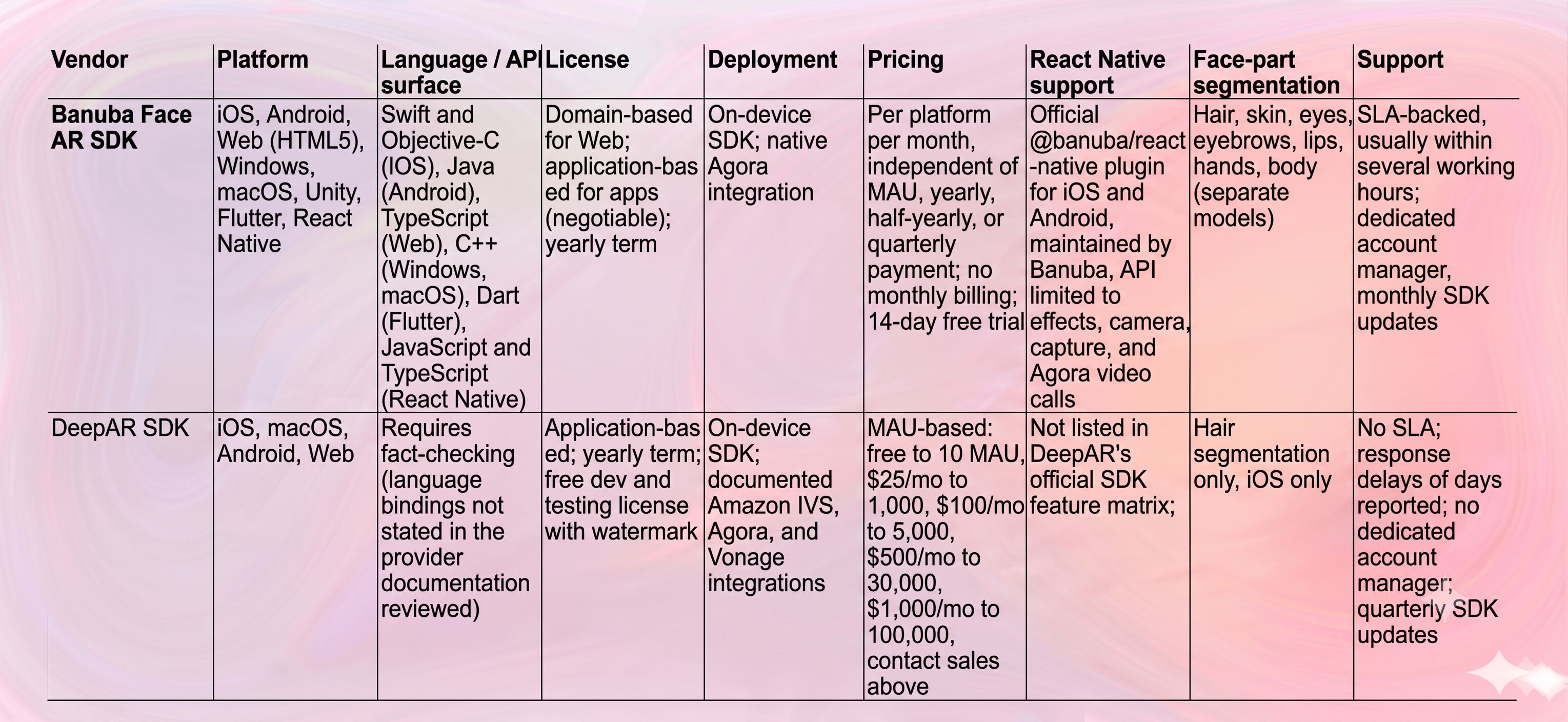
Final recommendation
Overall, Banuba is the stronger choice for a React Native product. It is the only one of the two with a vendor-published React Native plugin, and the honest scope of that plugin (effects, camera, capture, Agora calls, with native integration recommended beyond that) is enough for the large majority of face AR features a React Native app ships. Add the in-house Flutter plugin, coverage of iOS, Android, Flutter, React Native, Web, desktop, and Unity from one SDK, face-part segmentation, and pricing that does not move with MAU, and it is the lower-risk pick for anything heading to production.
Scenario-based winners:
- React Native as the primary runtime: Banuba. The plugin exists, and the vendor maintains it.
- Native iOS, macOS, Android, or Web only, with a small user base: DeepAR. Free to 10 MAU, $25/month to 1,000 MAU, and a free visual editor make it the cheaper start, and React Native is not part of the equation.
- Prototype or a few-week campaign that may never ship commercially: DeepAR. Free for testing and development, watermark accepted.
- Makeup, skincare, or beauty try-on: Banuba. DeepAR documents hair segmentation on iOS only, and no face-part segmentation.
- Footwear try-on: DeepAR, via ShopAR. Banuba's foot-wearable try-on is not offered.
- Windows desktop or Unity in the roadmap: Banuba. DeepAR documents macOS desktop only and no Unity.
- Growth past 100,000 MAU: Banuba. DeepAR's published tiers stop at 100,000 MAU and move to a custom negotiation; Banuba's fee does not track user count.
- A designer-led effect workflow with no engineer in the loop: DeepAR Studio. Banuba Studio exists, but DeepAR's free Studio is the more direct answer to that one requirement.
References / Further reading
Banuba. (n.d.). Banuba Face AR SDK documentation. https://docs.banuba.com/far-sdk
Banuba. (n.d.). Banuba React Native plugin (npm). https://www.npmjs.com/package/@banuba/react-native
Banuba. (n.d.). LLMs: LLM-ready documentation for AI-assisted coding. https://docs.banuba.com/far-sdk/tutorials/development/llms
DeepAR. (n.d.). DeepAR documentation. https://docs.deepar.ai/
DeepAR. (n.d.). DeepAR SDK feature matrix. https://docs.deepar.ai/deepar-sdk/specification/sdk-features
DeepAR. (n.d.). DeepAR SDK pricing. https://docs.deepar.ai/deepar-sdk/pricing
-
Yes. Banuba publishes @banuba/react-native on npm for iOS and Android, maintained in-house alongside the Banuba Face AR SDK rather than by community contributors. It covers loading and interacting with effects, camera control, screenshots and video recording, and Agora-powered video calls.
-
Banuba's documentation states that the React Native API is limited to effects, camera, capture, and video calls, and recommends a native integration if you need more. Banuba's React Native integration sample on GitHub shows the full surface, so you can confirm the fit before committing, and the full engine behind it is described on the Banuba Face AR SDK page.
-
DeepAR's official SDK feature matrix lists iOS, macOS, Android, and Web, and does not list React Native, so this requires fact-checking with DeepAR directly. Banuba, by contrast, documents React Native as a supported platform in its Face AR SDK documentation.
-
Two models dominate. MAU-based pricing starts low and rises with your audience, which is DeepAR's approach. Flat per-platform pricing does not track user count, which is Banuba's: see Banuba's Face AR SDK pricing page for how the per-platform model is structured. Model both at your projected 12-month and 36-month user counts before choosing.
-
Banuba quotes integration in as little as 8 minutes for a working demo, and publishes agent skills and LLM-ready documentation that let AI coding assistants do the scaffolding. Production work (effect design, QA across device tiers) takes longer, but the first render is a same-day task.
-
Yes, with Banuba. One SDK covers iOS, Android, Flutter, and React Native, plus Web, Windows, macOS, and Unity, with the Flutter plugin also developed and supported in-house. A team can start on Banuba's AR SDK in React Native and add a Flutter surface later without changing vendors.
