

In 2026, picking an Android face detection API is a gamble. You’re usually forced to choose between a "free" library that struggles with basic lighting or a cloud-heavy monster that shreds your GDPR compliance. Most developers start with the easy route, only to find their app lagging on everything but the newest Pixel.
The reality? Your users don't all carry $1,000 flagships. They have mid-range phones, they wear masks, and they stand in shaky subway light. If your SDK can't track multiple faces on-device without draining the battery, you've already lost them.
We’re cutting through the noise to compare Banuba, Google ML Kit, Amazon Rekognition, and 3DiVi. We skip beautiful promises and focus on which tool actually handles the majority of Android devices in the wild.
[navigation]
TL;DR
- This comparison is tailored for senior engineers and technical product leads looking for a production-ready Android face detection API and SDKs for security, conferencing, social, or retail applications.
- We analyze the trade-offs between Banuba, Google ML Kit, Amazon Rekognition, and 3DiVi, focusing on how they survive real-world fragmentation, low-light environments, and strict data privacy laws.
- When Banuba is the best choice: Ideal for teams that need 60 FPS real-time performance on mid-range devices, "passive" liveness to reduce user churn, and a privacy-first, on-device architecture that sidesteps the legal hurdles of cloud processing.
- While competitors often focus on 2D landmark counts or cloud-scale matching, Banuba’s patented Face Kernel™ directly infers a 3D mesh, providing unmatched stability and jitter-free tracking even when the face is 70% covered.
Parameters We Analyzed
Shiny feature aside, we dug into the trade-offs that actually break a release cycle. Here is the criteria we used to separate the enterprise-grade tools from the weekend projects:
Performance & Latency
Speed is everything on Android. We examined how these engines actually "see": whether they crunch numbers on the device or wait for a cloud response, and whether they can maintain a high frame rate without overheating the phone.
Feature Set
Beyond a simple bounding box, we checked for the "smart" stuff. This includes emotion tracking and liveness detection to stop spoofing, which are now non-negotiable for security and UX.
Integration Complexity
We measured the path from a fresh project to a stable native Android implementation. If the SDK is a nightmare to hook into your existing codebase, the "savings" on the license won't matter.
Developer Experience & Support
Documentation is often a ghost town when you need it most. We evaluated who provides actual human support and who just leaves you to rot in a community forum.
Privacy
We looked at whether the SDK processes everything locally (on-device) or ships sensitive facial data to the cloud, which determines how much paperwork you'll face for GDPR or CCPA compliance.
Pricing & Licensing
We analyzed the models on the market to see which offer predictable costs and which hide massive bills in "pay-per-request" fine print.
Top 4 Face Detection SDKs for Android: Compared
To make the actual breakdown useful, we’ve pitted Banuba, Google ML Kit, Amazon Rekognition, and 3DiVi against each other in a real-world stress test.
Read on to see which of these tools actually survives the chaos of mid-range hardware and which ones are just "lab-perfect" specimens that fail when a user steps into bad lighting.
Banuba’s Face Detection API & SDK
Banuba’s Face Detection API doesn't just "find" a face; it understands it in 3D. While most tools struggle with the jump from a flat image to a volumetric model, Banuba’s core technology is built for high-performance interaction. It is essentially a pro-grade computer vision lab condensed into a 15MB package.
Technical Deep-Dive: The Face Kernel™
- The secret sauce is their patented Face Kernel™. Traditional SDKs follow a two-step process: they detect 2D landmarks (eyes, nose, mouth) and then run heavy nonlinear equations to "guess" the 3D head pose. Banuba skips the 2D step entirely. It infers a 3D mesh directly from the camera feed.
- 37-Parameter Morphing: Instead of tracking 400+ static points (which hogs CPU), the engine tracks 68 most important ones and 37 facial "morphs" (face positions). This is why it stays stable even if 70% of the face is covered by a hand or a mask.
- Passive Liveness: Their anti-spoofing doesn't make users perform "gorilla dances" (blinking or nodding). It uses deep learning to detect micro-movements, pulse-related changes in skin tone, and 3D light reflections on the eyes to distinguish a human from a high-resolution screen or a mask.
- On-Device & GDPR-ready: Everything happens in the device's system. No biometric data ever touches a server, making it a "drop-in" solution for apps with strict privacy requirements.
- Deeper Analytics (Emotions, Gender, Age): Banuba’s SDK offers a comprehensive 3D face analysis module. It goes beyond simple detection to recognize six basic emotions (anger, disgust, fear, happiness, sadness, and surprise) in real-time. Additionally, the SDK provides automated estimation of age and gender, alongside skin and hair color detection, making it a robust engine for personalized marketing and user profiling.
Key Strengths
- Unmatched Latency: Solid 60 FPS on mid-range Androids. It is optimized specifically for the fragmentation of the Android ecosystem, covering roughly 80% of active devices.
- Extreme Robustness: It maintains a lock on faces even in low-light conditions or from up to 7 meters away. It’s also famous for handling 70% occlusion. It won't lose the user just because they’re wearing a mask, glasses, or a hat.
- Part of a Massive Ecosystem: When you integrate the detection API, you’re plugging into a broader ecosystem within Banuba’s Face AR SDK. This includes 1,000+ ready-made filters and specialized modules for virtual makeup, eyewear, headwear, and jewelry try-on.
- Anti-Jitter Stability: If you’ve ever seen an AR mask "shivering" on a face, that’s jitter. Banuba’s math eliminates this, providing a pinned-to-the-skin look that rivals high-end desktop software.
- Beyond Detection: It handles gender, age, and even "tiredness" detection, making it useful for both retail analytics and driver monitoring.
Ideal Use Cases
- E-commerce & Virtual Try-On: Used by brands like Gucci and Océane to let users try on glasses or makeup. Océane actually saw a 32% add-to-cart rate after integrating Banuba’s Virtual Try-on SDK.
- High-Traffic Social and Entertainment Apps: Ideal for apps that need "Snapchat-style" filters at scale. The fandom platform b.stage scaled to 1 million MAUs using Banuba for its live engagement features.
- Fintech & Security: Using passive liveness for frictionless user onboarding.
- Automotive: Next-gen monitoring of the driver’s state to enhance driving safety.
Banuba prioritizes a "get-to-market" workflow with high-quality Kotlin and Java sample apps on GitHub that are essentially production-ready camera activities. The documentation replaces vague API lists with practical "recipes" for real-world scenarios, while the dedicated Banuba Studio allows designers to handle AR assets without bothering the dev team. For complex issues, you get a direct line to their engineering support instead of waiting for a miracle in a community forum.
Pricing & Licensing
Banuba operates on a commercial subscription model (typically billed annually or quarterly per platform). Unlike "pay-per-request" cloud services that hit you with surprise bills when your app goes viral, Banuba’s flat-fee structure makes costs predictable. You’re paying for a dedicated license that includes tech support and monthly updates for the evolving Android ecosystem. They offer a 14-day free trial for developers to benchmark the performance themselves.
If you are building a basic app with no budget, or you only need to detect faces in static photos where latency doesn't matter, then Banuba isn't the right fit. However, if you need real-time performance on mid-range phones, you care about GDPR/privacy, and you want the option to scale into AR or virtual try-on later, you are in the right place.

Google ML Kit
ML Kit is Google’s attempt to bring their machine learning expertise to every Android developer for free. It’s an on-device SDK that handles basic vision tasks without needing a PhD in data science or a budget. If you need a reliable way to find a face and you don't need fancy AR or biometric security, this is the default starting point.
Performance & Features
- The Tech: ML Kit uses a lightweight pipeline that detects faces and provides landmarks (eyes, ears, cheeks, nose, mouth).
- Latency: It’s impressively fast for basic detection, often hitting the 10-15ms range on modern hardware.
- Contour Mode: It can track 133 points for detailed face contours. However, turning this on limits the SDK to detecting only the single most prominent face, which kills its utility for group shots or busy environments.
- Capabilities: It handles classification (smiling/eyes open) and tracking IDs (keeping track of which face is which in a video). It does not offer liveness detection, 3D mesh reconstruction, or facial recognition (identifying a specific person).
Key Strengths
- Cost: It is completely free. There are no tiers, no usage limits, and no credit cards required.
- Zero Latency Cloud-Free: Like Banuba, it runs entirely on-device, which is great for privacy and offline use.
- Google Ecosystem: If you’re already using CameraX or Jetpack, the integration is seamless. The documentation is top-tier, and the community support on StackOverflow is massive.
Limitations
- Bare-Bones Tooling: It finds the face, but it doesn't help you do anything with it. You have to write all the OpenGL or Canvas code yourself if you want to overlay anything on that face.
- No Liveness: It can’t distinguish between a real person and a photo. If you’re building a banking app, ML Kit isn't enough on its own.
- Stability Issues: Compared to Banuba, the tracking is "jittery." The bounding boxes and landmarks tend to bounce around, which makes it poor for high-end AR.
Ideal Use Cases
- Basic Utility: Auto-cropping profile pictures or triggering a shutter when someone smiles.
- Simple Apps: MVPs where the budget is $0, and the requirements are minimal.
Pricing & Licensing
It uses a free-to-use license under Google’s terms of service. Since it’s part of Google Play Services, it doesn't even add much to your APK size.
It’s a go-to choice if you are a solo dev or an early-stage startup that needs basic face detection with zero overhead and no licensing fees.
But if you have ambitions for a professional virtual try-on, require biometric security (liveness), or need stable, jitter-free tracking for AR, it’s not the best option, as it provides the bare minimum.
Amazon Rekognition
Amazon Rekognition is a different beast entirely. While other tools focus on the device's chip, Rekognition leans on the near-infinite scale of AWS. It’s built for depth: detecting celebrities, moderating content, and searching through millions of faces in seconds. However, that power comes with a physical reality: you need an internet connection.
Performance & Features
- The Tech: This is primarily a cloud-based API. You send an image or video stream to AWS, and their servers do the heavy lifting.
- Latency: Since it’s not on-device, you’re looking at round-trip network lag. It’s great for analyzing a "selfie" during onboarding, but it’s unusable for real-time AR overlays where every millisecond counts.
- Capabilities: Rekognition scans a wide range of attributes, including 8 types of emotions, age ranges, facial occlusion, and even protective equipment (PPE). It also features a dedicated Face Liveness tool (via AWS Amplify) that uses a video selfie check to verify that users are real.
- Scanning: It provides bounding boxes and landmarks for up to 100 faces in a single image.
Key Strengths
- Massive Search (1:N): This is where it shines. You can create "collections" of millions of faces and search against them to find a match instantly.
- AWS Integration: If your backend is already on AWS, adding Rekognition is a natural move. It plugs directly into S3 buckets and IAM security policies.
Limitations
- Network Dependency: No internet means no detection. This makes it a poor fit for apps used in remote areas or high-speed offline environments.
- Privacy Concerns: You are sending biometric data (images/videos) to a third-party server. While AWS is secure, this adds a layer of GDPR and compliance complexity that on-device solutions avoid.
- Integration Overhead: Setting up AWS IAM roles, S3 buckets, and Cognito identities is significantly more complex than dropping a library into an Android project.
Ideal Use Cases
- Biometric Identity Verification: For apps like Amazon One (palm/face payments) or large-scale travel/hospitality apps that need to verify identity against a secure database.
- Content Moderation: Automatically flagging inappropriate user-uploaded profile pictures at scale.
Pricing & Licensing
Rekognition follows a pay-as-you-go model. You pay per image analyzed (usually around $0.001 for the first million) and a separate fee for liveness checks (roughly $0.015 per check). It also depends on the base of the images you upload. While the entry price is low, viral success can lead to unpredictable monthly bills that scale directly with your user base.
Choose Amazon Rekognition if you need to search a massive face database (1:N) or require the deepest possible metadata (emotions, PPE, celebrities) without taxing the user's hardware.
Skip if you need real-time AR performance, work with sensitive data that shouldn't leave the device, or want to avoid the "AWS tax" and complex backend configurations.
3DiVi
3DiVi is an enterprise-grade solution that leans heavily into security and identification. While many SDKs are built for creative filters, 3DiVi is designed for high-stakes scenarios where precision is non-negotiable. Its algorithms consistently rank high in NIST (National Institute of Standards and Technology) testing, making it a favorite for biometric authentication.
Performance & Features
- The Tech: It offers a massive 468 facial landmarks, putting it on par with MediaPipe for detail, but with a sharper focus on recognition accuracy.
- Latency: On Android, detection takes around 30–50ms. It supports GPU acceleration (via TensorRT or OpenVINO) to achieve real-time performance, though it requires more hardware than lightweight alternatives.
- Capabilities: It covers the full spectrum: 1:1 verification, 1:N identification, and deep attribute estimation (age, gender, and 7 basic emotions).
- Deepfake Protection: A standout feature is the Deepfake Estimator, which detects AI-generated spoofing.
Key Strengths
- NIST-Proven Accuracy: It’s one of the few mobile-friendly SDKs with a top-tier rating for recognition accuracy (99.7%+), making it highly reliable for matching faces.
- Flexible Liveness: Offers both active (blink/nod) and passive liveness detection.
- On-Device Efficiency: Like Banuba, it works entirely offline, ensuring no biometric data leaves the device and keeping the app GDPR-compliant.
Limitations
- Complexity: The "Processing Block" architecture is powerful but has a steep learning curve. It’s not a "plug-and-play" tool for beginners.
- Hardware Demands: While it works on Android, its most advanced modules (like high-precision recognition) require decent mobile CPUs/GPUs to avoid lag.
- Support Access: Detailed documentation is available, but the best support is often reserved for higher-tier enterprise clients.
Ideal Use Cases
- Security & Access Control: Used for time-and-attendance management or secure building access.
- KYC & Onboarding: Perfect for banking or crypto apps that need to verify a user’s ID against a live face with high confidence.
Pricing & Licensing
3DiVi uses a customized enterprise model. They offer a 14-day trial, but long-term licensing is usually negotiated based on the number of users or devices.
Who should choose it? Teams building a high-security app (Fintech, GovTech) where the priority is identifying a specific person and stopping deepfakes. Simultaneously, it’s not the best choice for lightweight tools or for tight deadlines when you don't have time to learn a complex API structure.
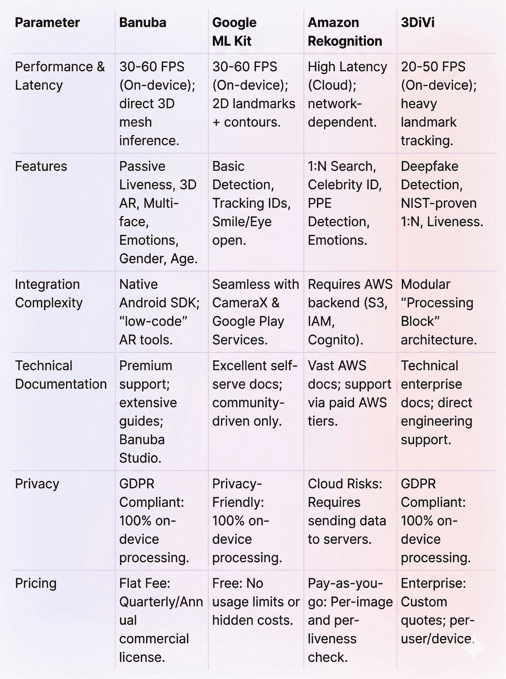
Android Face Detection SDKs Comparison Table
Summary
Choosing an Android face detection API boils down to your product’s ceiling. If you’re a solo developer on a zero-dollar budget, Google ML Kit is the perfect, friction-free starter for basic detection. For enterprise-scale search and celebrity ID, Amazon Rekognition’s cloud power is unmatched, while 3DiVi remains the niche choice for high-stakes biometric security and deepfake protection. However, Banuba is the clear winner for professional teams: its 3D on-device engine delivers 60 FPS performance and total GDPR compliance even on mid-range hardware, making it the only choice where real-time UX and data privacy are the top priorities.


-
The official technical documentation for Banuba Face AR SDK is available online and includes requirements, setup instructions, and configuration details:
- Banuba Face AR SDK iOS documentation
- Banuba Face AR SDK Android documentation
- Banuba Face AR SDK Flutter documentation
- Banuba Face AR SDK React Native documentation
- Banuba Face AR SDK Web documentation
- Banuba Face AR SDK Unity documentation
- Banuba Face AR SDK Desktop documentation
This Banuba Face AR SDK documentation should be your primary reference during integration.
-
You can access official integration code samples for the Banuba Face AR SDK on GitHub. Banuba provides platform-specific examples to help you integrate faster:
- Banuba Face AR SDK iOS integration code sample
- Banuba Face AR SDK Android integration code sample
- Banuba Face AR SDK Flutter integration code sample
- Banuba Face AR SDK React Native integration code sample
- Banuba Face AR SDK Desktop integration code sample
- Banuba Face AR SDK Web integration code sample
- Banuba Face AR SDK Unity integration code sample
These Banuba Face AR SDK repositories include setup instructions and minimal working examples for quick deployment.
-
Yes. The Banuba Face AR SDK includes an LLM-friendly documentation file designed for AI-assisted development and internal knowledge systems:
This structured Banuba Face AR SDK text file can be used with AI tools to streamline onboarding and developer workflows.
-
The Banuba Face AR SDK provides official cross-platform plugins to simplify integration into hybrid applications:
These Banuba Face AR SDK plugins are maintained by Banuba and support faster implementation for cross-platform apps.
-
Prioritize the balance between accuracy and on-device latency, especially for real-time applications where 60 FPS is the gold standard. Technical teams should evaluate the SDK’s robustness against "real-world" variables like low lighting, 3D head angles, and facial obstructions (masks or glasses). Finally, ensure the solution meets your specific compliance needs. On-device processing is generally preferred for GDPR/CCPA as it keeps biometric data off third-party servers.
-
Licensing typically falls into three categories: free/open-source (like ML Kit), pay-as-you-go cloud models (charging per API call or image analyzed), and commercial flat-fee subscriptions. Enterprise-grade SDKs often use annual or monthly licenses per platform, which provide more predictable costs for high-traffic apps compared to usage-based models that can scale unpredictably.
-
For apps requiring high-performance AR or real-time UX, an on-device SDK like Banuba is best because it scales without increasing cloud latency or costs as your user base grows.