

Look at your phone. Chances are, face detection unlocks it, powers your video call background blur, helps you try on glasses in an e-commerce app, and monitors whether you're drowsy while driving. This technology moved fast.
The global facial recognition market sits at roughly $9.3 billion in 2025 and is projected to reach $36.75 billion by 2035, growing at around 15% annually. That growth shows up in real product decisions every day: retailers adding face-based customer insights, banks shipping biometric authentication, car makers embedding driver monitoring, and social apps treating AR filters as a baseline feature.
Security and surveillance currently account for nearly half of all facial recognition spending, but payments are the fastest-growing segment, projected to grow at a 17.8% CAGR as card networks and merchants build consent-based checkout experiences.
Three things converged to make this happen.
- ML models got accurate enough to work reliably across diverse faces and lighting conditions.
- Mobile hardware has become powerful enough to run inference on-device without a cloud round-trip.
- APIs emerged that let developers skip building the pipeline entirely.
Apps like Snapchat, TikTok, and YouCam built early competitive advantages on face detection. Samsung and Gucci use it in production today. Face detection is no longer a differentiator; it's an expectation. The question for most teams isn't whether to add it, but how fast they can ship it.
This article is for engineers and technical founders evaluating exactly that decision. We'll cover what face detection actually requires under the hood, why most teams shouldn't build it themselves, and how a face detection API like Banuba's changes the time and risk calculation.
Face detection is the process of locating and analyzing human faces in images, video streams, or live camera feeds. Building it from scratch means training ML models on millions of images, building inference pipelines, optimizing for device performance, and maintaining all of it over time. A face detection API gives you that capability without building the underlying infrastructure yourself. You connect to prebuilt detection, tracking, and recognition modules, and add them to your app in days rather than months.
TL;DR
- Face detection powers authentication, AR filters, virtual try-on, driver monitoring, and more across nearly every major industry
- Building it from scratch requires ML expertise, massive datasets, GPU infrastructure, and ongoing model maintenance
- The core technical stack (detection models, tracking pipelines, segmentation, rendering) takes 6 to 12 months to build at a high standard
- A face detection API replaces that stack with prebuilt modules that you connect to your existing app
- Banuba's Face API covers detection, tracking, recognition, segmentation, and analysis on iOS, Android, Web, Windows, macOS, Flutter, React Native, and Unity
Why Face Detection Works So Well in Apps
Face detection succeeds in products because it connects directly to how users actually behave. It removes friction, enables personalization, and makes interactions feel immediate. The numbers back this up across every major use case.
Real-time preview drives engagement
Users see changes on their face the moment they happen. No upload, no wait, no disconnect between action and result. That immediacy is what makes AR filters, virtual try-on, and live authentication feel natural. And users respond to it at scale. AR filters and lenses are used by over 500 million users daily on platforms like Instagram and Snapchat, with Snapchat alone reporting over 6 billion AR lens plays per day. Users spend an average of 75 seconds interacting with AR experiences, compared to just 2 to 3 seconds for a traditional banner ad. That's not a marginal difference. It's a different category of attention.
Zero-input interaction cuts drop-off
The camera does the work. Users don't select a region, crop an image, or upload a file. Face detection removes the step entirely. That matters because friction kills conversions. Apps that simplify the login process see 25% higher user retention compared to those with cumbersome procedures. For authentication specifically, devices using Face ID or fingerprint recognition show a reduction in abandoned logins of up to 40%.
Personalization drives purchase decisions
Every face is different. Detection enables experiences that adapt to the individual: makeup that matches your skin tone, glasses that fit your face shape, a filter that tracks your expressions. That matters commercially. Virtual fit modules lower product return rates by about 17% and lift purchase probability by 27%. Boca Rosa Beauty sold $900,000 worth of makeup in just four hours using Banuba-powered try-on technology. For fashion e-commerce, where online shoppers are 10 to 20 times less likely to buy compared to in-store customers, face-powered try-on experiences directly close that gap.
Biometric authentication raises user preference
Passwords are friction users have learned to tolerate, not enjoy. 86% of respondents say they prefer biometrics like facial recognition over standard passwords for identity verification and payments. Over 131 million Americans use facial recognition every day to access their apps, accounts, or devices. For app developers, this preference translates directly into retention.Users are more likely to return when authentication feels seamless, whether access is handled through biometrics, a password manager, or both. Businesses adopting passwordless authentication see up to a 90% reduction in credential-related support tickets.
Shareable outputs extend reach organically
AR effects, try-on screenshots, and filtered video keep users coming back and bring new ones in. AR experiences generate a 300% increase in social sharing rates, and brand recall is 70% higher after AR interactions compared to passive ad exposure. That’s the product design doing distribution work.
The apps that do this well, Snapchat, TikTok, YouCam Makeup, and Zoom with background blur, treat face detection as a core experience layer, not a bolted-on feature. That design philosophy is what separates products users love from products they tolerate.

Core Features Required to Build Face Detection
Before choosing your build path, map out what your product actually requires and what facial detection features will help it become competitive. Here's how to think about the capability tiers:
Basic detection and tracking
- Multi-face detection in a single frame
- Real-time bounding box localization
- Face tracking across video frames (not just static images)
- Handling varying lighting, angles, and partial occlusion
Analysis and intelligence
- Facial landmark detection (eyes, nose, mouth, jaw)
- Emotion and expression recognition
- Age and gender estimation
- Attention and gaze tracking
- Liveness detection (for authentication use cases)
Recognition and identity
- Face encoding and embedding generation
- One-to-one verification (is this the same person?)
- One-to-many identification (who is this person in the database?)
- Anti-spoofing capabilities
Segmentation and region isolation
- Full face segmentation (separate face from background)
- Feature-level segmentation (eyes, lips, skin separately)
- Hair and body segmentation for AR applications
Platform performance
- 30+ FPS on mid-range mobile hardware
- Support for both still images and live video
- Cross-platform consistency across iOS, Android, and Web
Integration surface
- SDK or API bindings for your target platforms
- Documentation and sample code
- Support for your cross-platform framework (Flutter, React Native, Unity)
The Decision Matrix
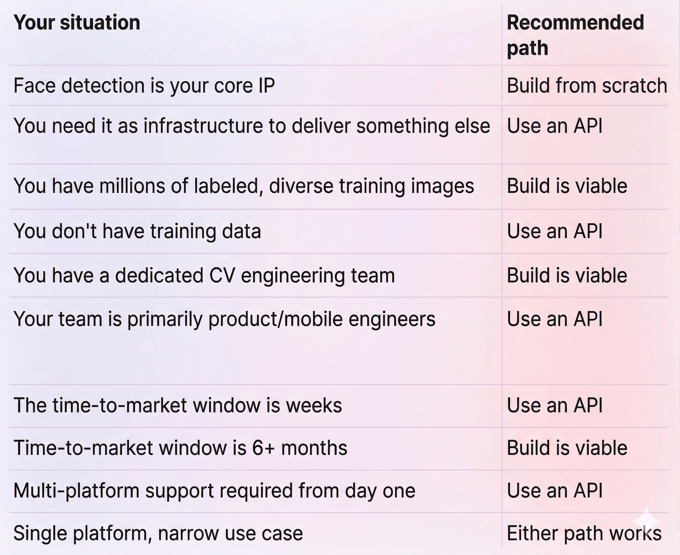
Building Paths: from Scratch vs. Face Detection API
Let’s review two ultimate paths and compare their pros and cons.
Building from Scratch
Let's be direct about what this path requires. It demands real investment. You're not just calling a model. You're building and maintaining a production inference pipeline.
What the tech stack looks like:
- Core ML / Vision (iOS), TensorFlow Lite or ONNX Runtime (Android/cross-platform)
- Detection models: MTCNN, RetinaFace, or BlazeFace
- Recognition models: FaceNet, ArcFace, or VGG-Face
- OpenCV or equivalent for image preprocessing
- GPU-accelerated training infrastructure
- A backend database layer for recognition at scale
Development phases:
- Research and model selection - 4 to 8 weeks
- Data collection and labeling - 6 to 12 weeks, ongoing
- Model training and validation - 4 to 8 weeks
- On-device optimization (quantization, pruning, hardware acceleration) - 4 to 6 weeks
- Platform integration and testing - 4 to 8 weeks
- Ongoing maintenance, retraining, edge case handling - indefinite
Risks:
- Building a custom system from scratch requires a training dataset of millions of labeled images, which are expensive to assemble and maintain.
- Training neural networks from scratch requires large amounts of data and significant computing resources.
- Model drift over time means retraining cycles, not a one-time effort.
- On-device performance optimization is a specialist skill separate from model development.
Pros:
- Full control over model architecture and training data
- No vendor dependency
- Theoretically unlimited customization
Cons:
- 6 to 12+ months to production
- Requires an ML team with computer vision expertise
- High ongoing maintenance burden
- Slow time-to-market kills competitive advantage
- High investment
Using a Face Detection API (Recommended Path)
An API changes the equation completely. Instead of building the detection pipeline, you connect to an existing one. The underlying models, the on-device inference layer, the tracking algorithms: all prebuilt and maintained by someone else. You connect to it, configure what you need, and ship.
Think of it like a payment gateway for face intelligence. You don't build your own card processing infrastructure. You connect to one that's already production-tested at scale. Face detection APIs work the same way.
Who benefits most:
- Mobile teams without in-house ML expertise
- Startups needing to ship fast without a six-person data science team
- Product teams adding face features to an existing app
- Enterprise teams where reliability and support matter as much as functionality
Pros:
- Days to weeks to a working integration
- No ML expertise or training data required
- On-device performance handled by the SDK
- Multi-platform support from a single integration
- Maintained and updated by the provider
Cons:
- Less control over the underlying model
- Licensing cost (but almost always less than the engineering cost of building)
- Customization bounded by API capabilities
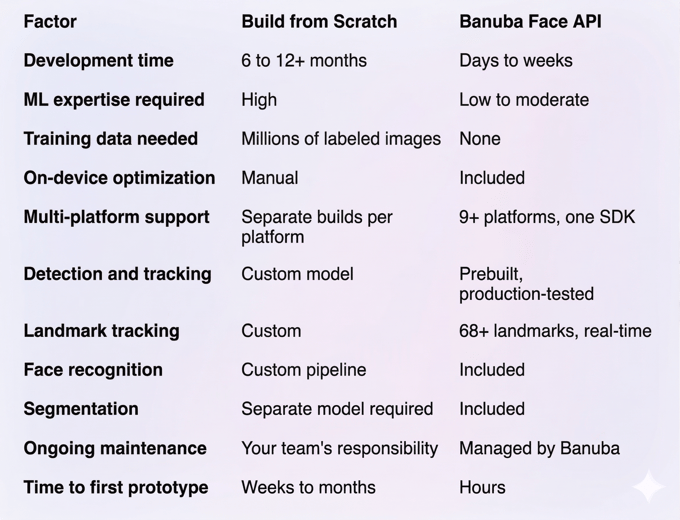
Build vs. API: Comparison Table
Integrating Face Detection with Banuba's Face API
About Banuba's Face API
Banuba's Face API is part of the Face AR SDK, a computer vision platform built over 9+ years and trusted by brands including Samsung and Gucci. It's not a generic cloud API. It runs on-device, which matters for anything requiring real-time performance and a security-first approach.
What it replaces:
- Custom detection model development
- Landmark tracking pipeline
- On-device inference optimization
- Recognition database infrastructure
- Separate segmentation models
- Cross-platform porting work
What it covers:
- Multi-face detection and real-time tracking
- 68+ facial landmark detection
- Face recognition and biometric matching
- Full and feature-level segmentation (eyes, lips, skin)
- Emotion, gaze, and attention analysis
- Liveness detection and anti-spoofing
- Heart rate estimation and tiredness monitoring
- Optional: hand tracking, body segmentation
Platforms supported: iOS 13+, Android 8.0+ (OpenGL ES 3.0+), Web (Chrome, Firefox, Safari via WebGL 2.0), Windows 8.1+, macOS 10.13+, Ubuntu 18.04+, Flutter, React Native, Unity
Integration Overview
We will explore Banuba’s Face Detection API integration path as an example. The integration flow is intentional and simple:
- Request a free trial token at banuba.com/face-api
- Receive setup instructions by email
- Add the SDK to your project using your platform's package manager
- Initialize the SDK with your token
- Pass camera frames or image data to the API and receive structured face data in return
Platform delivery:
- iOS: CocoaPods or Swift Package Manager
- Android: Maven/Gradle
- Web: npm package
- Flutter / React Native: Official cross-platform bindings
- Unity: Unity package
No custom model training. No dataset work. No GPU infrastructure. Full implementation guides and sample codes are provided.
Conclusion
Building face detection from scratch is a legitimate path for teams with ML expertise, the budget, and the runway to do it properly. For most product teams, it's an expensive way to solve a problem that's already solved.
A face detection API removes the hard parts: the model training, the data collection, the on-device optimization, and the maintenance cycle. Banuba's Face API brings 9+ years of production computer vision to your integration, running on-device across every major platform. You ship the feature in weeks, not quarters.
If face detection is on your roadmap, request a free trial token and test the integration before committing to any build path. The 14-day trial is the fastest way to know what you're working with.
-
No. Banuba's Face API is designed for standard mobile and web engineers. You don't need ML expertise or computer vision experience. The SDK handles the inference layer. You need platform development experience for your target environment (iOS, Android, Web, etc.), but nothing beyond that. Documentation, sample code, and community support are all available.
-
Banuba’s Face API supports iOS 13+, Android 8.0+, Web (Chrome, Firefox, Safari on mobile and desktop), Windows 8.1+, macOS 10.13+, and Ubuntu 18.04+. Flutter, React Native, and Unity are also supported. One SDK integration covers most or all of your target platforms without separate native implementations per platform.
-
A basic integration with real-time face detection and tracking typically takes a few days. More complex use cases (recognition pipelines, segmentation for AR effects, multi-feature analysis) take one to two weeks for most teams. That's against 6 to 12 months for a comparable system built from scratch.
