

Adding video editing to a Flutter app becomes complex quickly. Native rendering, export performance, and UI consistency quickly become problems once you move past basic trimming. What works in a demo often struggles in real apps.
That’s why most teams turn to SDKs instead of building editors from scratch. The harder question is which SDKs are compatible with Flutter and are worth the integration effort.
To answer that, we compared three of the most widely used video editor SDKs for Flutter:
- Banuba Video Editor SDK
- IMG.LY Video Editor SDK
- Meishe SDK
The comparison focuses on real Flutter use cases, covering editing features, performance, integration complexity, customization, and production readiness.
[navigation]
TL;DR:
- This guide is designed for Flutter developers and product teams evaluating production-ready video editor SDKs for social, e-commerce, and UGC apps.
- We conducted a deep dive into Banuba Video Editor SDK, IMG.LY, and Meishe, testing them across performance, integration effort, and 2026-standard feature sets.
- Banuba is the best choice for apps that require a fast time-to-market, premium AI-driven automation (like auto-captions and background removal), and the highest performance in the category.
- While IMG.LY focuses on creative templates and Meishe on professional multi-track editing, Banuba stands out for its low-latency Flutter performance and the ability to reduce development timelines by up to 50%.
- IMG.LY and Meishe are viable alternatives for more specific needs, such as template-based design tools or professional-grade broadcasting workflows, but come with a heavier integration lift and slower export behaviors.
How We Evaluated:
To remain objective, we adhered to the same parameters when analyzing all video editor SDKs for Flutter.
Editing Feature Set
We examined what users can realistically create with each SDK. That means the basics like trimming, transitions, text, & audio, but also whether the editor supports richer workflows through effects, automation, or advanced capabilities like AR and AI. The goal was to understand creative range, not just feature count.
Performance and Rendering
Video editing is unforgiving with respect to performance, so we paid close attention to preview responsiveness, processing stability, and export behavior. Longer videos and stacked effects tend to expose weaknesses quickly, especially in Flutter-based apps.
Integration and Dev Support
We also considered what it takes to get from integration to production. Setup effort, API ergonomics, documentation, and example projects all influence how fast teams can move and how painful maintenance becomes later.
UI Customization
How much control teams retain over the editing experience. Some SDKs dictate UI and flow, others allow deeper customization. We evaluated how easily each editor can be shaped to fit an app’s design and interaction model.
Pricing and Licensing
Pricing models, transparency, and scaling behavior all play a role once an app grows beyond early adoption. Here, the focus was on long-term suitability rather than entry-level pricing.
Best Flutter Video Editor SDKs Overview
Below is a side-by-side look at how Banuba, IMG.LY, and Meishe perform against these criteria in real Flutter apps.
Banuba Video Editor SDK
Banuba Video Editor SDK provides a ready-made video-editing layer for Flutter apps that require more than basic trimming. It fits use cases like social video and UGC, where users expect real-time effects, TikTok-like filters, quick exports, and a smooth editing flow inside the app.
Editing Features and Effects
Banuba covers all standard video editing needs out of the box, without forcing teams to assemble basic functionality themselves. This includes:
- trimming and combining multiple clips
- transitions and filters
- text, stickers, and overlays
- audio tracks and sound effects
- support for both recorded and imported video
Where Banuba goes further is automation and effects. Instead of relying only on manual editing, it offers a broad set of AI-assisted and real-time features, including:
- AI clipping
- AI-generated captions
- photo-to-video creation
- lip-sync workflows
- real-time beautification and Face AR
- LUTs, time effects, and animated templates
The effects library includes 1000+ assets, and music is part of the same workflow thanks to a built-in royalty-free audio catalog. This setup is especially suited to camera-first and short-form creation.
Performance and Rendering
Banuba prioritizes responsiveness during editing, even when effects are applied live. This helps maintain a consistent experience inside Flutter apps, where dropped frames or delayed feedback are immediately noticeable.
Export speed follows the same approach. In benchmark testing, with an 8-second near-4K video and a single effect, export time averaged around 3 seconds.
Integration and Developer Experience
Before committing, developers can evaluate the SDK through a 14-day trial and explore sample projects available on GitHub. Banuba is actively maintained, with monthly SDK updates and an active dev community. Teams also have access to 24/7 technical support.
The integration itself is documented step by step. Detailed guides, video editing API references, and example implementations help teams move from setup to a working editor without relying on low-level components. In practice, this approach has allowed teams to shorten implementation timelines significantly; in some cases, reducing development time by up to 50% compared to building a custom video editor.
Customization and UI Flexibility
Banuba doesn’t treat the editor as a fixed UI component. Instead, teams can shape the layout, choose which tools are exposed, and adjust the editing flow to fit the structure of their app. This makes it easier to embed the editor into lightweight mobile interfaces and social-style experiences without it feeling bolted on or visually out of place.
Pricing and Licensing
Banuba follows a usage-based licensing model aimed at production-ready products. Instead of a flat fee, pricing adjusts based on platform coverage, feature configuration, and active user volume, which helps teams align costs with real adoption over time.

IMG.LY SDK
IMG.LY approaches video editing as part of a larger creative ecosystem. Its Video Editor SDK is typically used in apps where video lives next to other creation tools such as images, graphics, or templates rather than acting as a standalone editor.
Editing Features and Effects
The SDK includes the core tools needed to assemble videos, such as:
- trimming and arranging clips
- transitions and basic visual filters
- text overlays and stickers
- audio tracks and sound elements
Instead of emphasizing automation, IMG.LY puts more weight on extensibility and control. Teams can integrate their own assets, including:
- custom fonts
- branded stickers
- proprietary media libraries
More recently, IMG.LY has expanded its feature set with native AI capabilities. These additions support tasks like video generation, caption creation, and thumbnail generation, extending the editor beyond purely manual editing.
Performance and Rendering Behavior
Under the same benchmark conditions, export time was roughly 17 seconds, noticeably slower than real-time-oriented editors.
Integration and Developer Experience
IMG.LY provides excellent documentation and modular GitHub samples, allowing developers to launch a professional-grade editor in just a few hours. Its native C++ engine ensures elite, frame-accurate performance, though the bridge-based architecture can make deep UI customization and platform-specific build configurations feel rigid.
Customization and UI Flexibility
IMG.LY offers a white-label experience with a headless engine that enables developers to build a custom interface from scratch or theme the prebuilt UI to match the brand's aesthetics. However, because the editor runs as a native bridge, deeper structural UI changes often require writing Swift or Kotlin code rather than using standard Flutter widgets.
Pricing and Licensing
IMG.LY operates on a commercial subscription model with custom enterprise pricing tailored to your specific platforms and feature requirements. It is best suited for large enterprises and well-funded startups that prioritize a polished, "TikTok-style" user experience and rapid time-to-market.
Meishe SDK
Meishe (Meicam) is a professional-grade SDK built on a high-performance engine designed for complex, multi-track editing and broadcast-level workflows. While it provides a robust Flutter plugin, the integration is technically "heavy" and requires significant engineering effort compared to lighter alternatives. It is best suited for enterprise apps needing elite 4K/HDR capabilities rather than a simple, plug-and-play UI layer.
Editing Features and Effects
The SDK provides a comprehensive suite for professional-level assembly, including:
- Multi-track non-linear timeline editing
- Frame-accurate trimming and speed ramping
- Advanced color grading (LUTs) and HDR support
- Keyframe animations and complex transitions
- Professional audio mixing and equalization
Meishe emphasizes deep technical control, allowing developers to extend the editor with sophisticated assets, such as:
- Custom 3D stickers and AR filters
- Animated localized subtitles and font libraries
- Dynamic particle effects and shaders
Performance and Rendering Behavior
Meishe utilizes a self-developed media engine that leverages hardware acceleration to deliver stable 30+ FPS previews even during complex 4K or HDR multi-track editing. While its rendering is exceptionally reliable for effect-heavy projects, the architecture prioritizes technical precision over raw speed, resulting in consistent but deliberate export times of approximately 5 seconds for standard clips.
Integration and Developer Experience
Meishe (Meicam) offers a technically dense integration experience designed for high-end engineering teams rather than those seeking a quick "plug-and-play" solution. While it provides dedicated Flutter plugins and functional demo projects, developers often face a steep learning curve due to complex, broadcast-centric documentation and a "heavy" bridge-based architecture that requires significant platform-specific configuration.
Customization and UI Flexibility
Meishe provides an extensively white-labelable framework that allows for complete UI modularity through its granular API wrapper. While it supports building entirely bespoke interfaces, the integration is technically "heavy," often requiring manual native-side logic to achieve deep customization.
Pricing and licensing
Meishe follows a quote-based enterprise model with an annual subscription that typically requires direct contact with their business team to determine final costs. While they offer a free trial period that allows developers to test all features with a watermark, commercial licensing is primarily targeted at larger organizations that can justify the investment for broadcast-grade tools.
Best Video Editor SDKs: Flutter at Glance
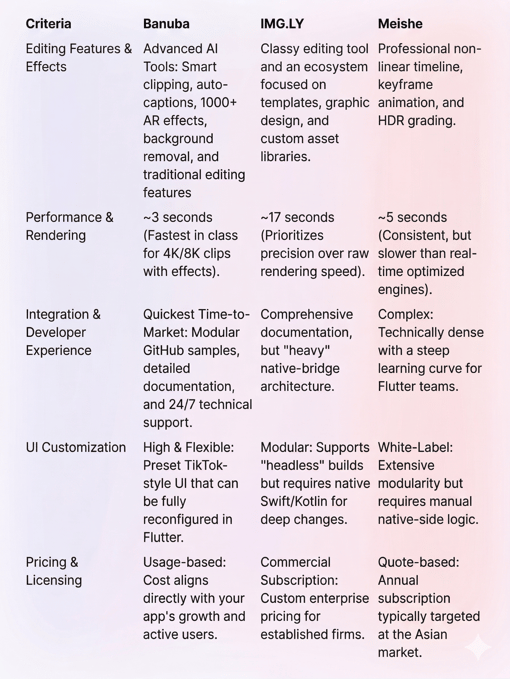
Summary
For teams prioritizing speed and performance, Banuba is the premier choice, offering a "TikTok-in-a-box" experience with the fastest export times (~3s) and most accessible AI/AR features, making it ideal for startups and social platforms needing a rapid, high-impact launch. While IMG.LY serves as a robust alternative for enterprise design suites requiring template-based creative automation, and Meishe remains the specialized pick for broadcast-grade 8K workflows, Banuba’s seamless Flutter integration and 24/7 support provide the best ROI for 90% of modern mobile video editor use cases where user engagement and lean development are the primary drivers.
-
The complete technical documentation for the Banuba Video Editor SDK is available online and includes requirements, setup instructions, and configuration details:
- Banuba Video Editor SDK iOS documentation
- Banuba Video Editor SDK Android documentation
- Banuba Video Editor SDK Flutter documentation
- Banuba Video Editor SDK React Native documentation
This Banuba Video Editor SDK documentation is regularly updated and should be your primary reference during integration.
-
You can access official integration code samples for the Banuba Video Editor SDK on GitHub. Banuba provides platform-specific examples to help you integrate faster:
- Banuba Video Editor SDK iOS integration code sample
- Banuba Video Editor SDK Android integration code sample
- Banuba Video Editor SDK Flutter integration code sample
- Banuba Video Editor SDK React Native integration code sample
These Banuba Video Editor SDK repositories include setup instructions and minimal working examples for quick deployment.
-
Yes. The Banuba Video Editor SDK includes an LLM-friendly documentation file designed for AI-assisted development and internal knowledge systems:
This structured Banuba Video Editor SDK text file can be used with AI tools to streamline onboarding and developer workflows.
-
The Banuba Video Editor SDK provides official cross-platform plugins to simplify integration into hybrid applications:
These Banuba Video Editor SDK plugins are maintained by Banuba and support faster implementation for cross-platform apps.
-
When evaluating a video editor SDK, developers should prioritize rendering performance and export speed to ensure the app remains responsive on mid-range devices. Key technical factors include the availability of comprehensive Flutter documentation, the modularity of the UI for branding purposes, and the presence of native hardware acceleration. Banuba excels here by offering a highly optimized engine that reduces implementation time by up to 50% compared to custom builds.
-
Most professional SDKs operate on a commercial subscription or usage-based model, where costs scale with platform coverage and active user volume. Licensing typically includes a trial period followed by an annual fee that covers technical support and regular updates for new iOS and Android versions. Banuba’s usage-based model is particularly advantageous for scaling apps, as it aligns your investment directly with your user growth and real-world adoption.
-
For scaling production apps, an SDK must offer stable performance across diverse hardware tiers and consistent cross-platform support. Banuba Video Editor SDK is the best fit for scaling because it maintains high-frame-rate previews and rapid export speeds (~3s) while intelligently adjusting effect complexity for lower-end devices to prevent crashes or overheating. Its robust Flutter plugin and 24/7 technical support ensure that, as your user base grows, the editing experience remains stable.