

- Banuba Face AR SDK: official first-party Flutter plugin, best overall choice
- FaceUnity: Flutter listed as supported, strong effect catalog, no public pricing
- DeepAR: transparent MAU pricing, but its official feature matrix covers iOS, macOS, Android, and Web only
- Visage Technologies (visageSDK): strong tracking and analysis with embedded and Linux support, no documented Flutter wrapper
[navigation]
TL;DR:
- We compared Banuba, FaceUnity, DeepAR, and Visage Technologies across Platform, Language, License, Deployment, Pricing, and Flutter plugin availability for building AR face effects in Flutter apps, based on each vendor's official documentation and pricing pages.
- Banuba Face AR SDK is the only SDK in this set with a Flutter plugin developed and supported in-house. It ships as banuba_sdk on pub.dev, runs on iOS 13+ and Android 8.0+, and covers 97% of iOS and 80% of Android devices.
- One Banuba Face AR engine serves iOS, Android, Flutter, React Native, Web, Windows, and macOS, so a Flutter team gets the same effects and the same tracker on every platform from a single SDK.
- Banuba's face tracker follows 68 facial anchor points and reconstructs a 3D face mesh with up to 3,308 vertices, keeps working with up to 70% of the face occluded, and detects faces up to 7 meters from the camera.
- A recorded integration of Banuba's Flutter plugin takes under 8 minutes from adding the dependency to running effects (video proof available).
- FaceUnity supports Flutter and offers a wide effect catalog (75+ filters, body shaping, virtual backgrounds), but publishes no price list: access goes through a trial application and sales contact.
- DeepAR prices transparently by monthly active users, from free (up to 10 MAU, watermarked) to $1,000/month (up to 100,000 MAU), but Flutter is absent from its official SDK feature matrix.
- Visage Technologies tracks more than 100 facial points and runs on embedded systems (Raspberry Pi, Xilinx), but documents no Flutter wrapper and quotes pricing individually, with technical support billed separately at €1,500 per year.
How Did We Evaluate These Flutter AR SDKs?
Every vendor was scored on the same five constraint dimensions: Platform coverage, Language and API surface, License model, Deployment model, and Pricing. On top of those, we added two criteria that matter specifically for Flutter work: whether an official Flutter plugin exists (and who maintains it), and the depth of face tracking the engine delivers once it is running inside a Flutter app. All competitor data comes from each vendor's own documentation and pricing pages, current as of mid-2026.
Banuba's AR filters example
What Makes Banuba Face AR SDK the Best Flutter AR Option?
Banuba develops and supports its Flutter plugin in-house, which is the single biggest differentiator in this list. Most AR vendors treat Flutter as a community afterthought; with a first-party Flutter AR plugin, the same company that builds the face tracker also ships and versions the Dart API. The plugin is published as banuba_sdk on pub.dev and lets a Flutter app load and interact with any effect (including the Makeup effect), process still images, control the camera (open, close, take photos, flashlight, facing), record the screen, and run video calls through Banuba's Agora integration.
The engine underneath is the same one Banuba ships natively. It tracks 68 facial anchor points, reconstructs a 3D face mesh with up to 3,308 vertices, holds tracking across the full -90° to +90° head-angle range, tolerates up to 70% facial occlusion, and detects faces up to 7 meters from the camera. The Flutter plugin runs on iOS 13+ and Android 8.0+, which covers 97% of iOS and 80% of Android devices in the field.
Integration is deliberately short. Add the banuba_sdk dependency, initialize BanubaSdkManager with a client token, and attach the effects folder: the steps are documented in the Flutter integration guide and demonstrated in the quickstart-flutter-plugin repository. A recorded run of this integration takes under 8 minutes. For a full walkthrough of the build process, see Banuba's guide on how to build Flutter AR features with an SDK.
Cross-platform reach is the other advantage: one SDK covers iOS, Android, Flutter, React Native, Web, Windows, and macOS. A team that starts in Flutter and later adds a native or React Native surface keeps the same effects and the same tracker; the approach mirrors the one described in this walkthrough of integrating AR features into React Native apps. If the built-in plugin capabilities are not enough for an edge case, Banuba's docs point teams to native integration as the escape hatch, so there is no hard ceiling.
Best for: Flutter-first teams that want a vendor-maintained plugin, deep face tracking, and room to expand to other platforms without switching SDKs.

Is FaceUnity a Good Flutter AR SDK?
FaceUnity (Hangzhou Xiangxin Technology) lists Flutter among the supported platforms of its Face AR SDK, alongside iOS, Android, Windows, Mac, Unity, and Electron. The effect catalog is broad: 2D, 3D, and ARMesh stickers, at least 75 filter varieties, AI-driven skin refinement, full-face makeup styles with hairstyle and color adjustment, real-time background separation without a green screen, and avatar driving based on 56 foundational expressions. Body shaping covers 25 body points. Real-time beautification, reshaping, and makeup all run on-device.
The trade-offs sit on the commercial side. There is no public price list; evaluation goes through a trial application, and commercial use is negotiated with sales. Web browser support is not listed among its platforms, so a team that wants mobile plus web from one vendor will not find that combination documented here. Official integration demo repositories cover iOS, Android, Windows, and Unity.
Best for: teams that also target Unity or Electron, need a large ready-made effect library, and are comfortable negotiating pricing through sales.

Does DeepAR Support Flutter?
Not officially. DeepAR's own SDK feature matrix lists iOS, macOS, Android, and Web; Flutter does not appear in it, and any community wrappers are not provider-confirmed. A Flutter team choosing DeepAR should budget for building and maintaining its own platform channels around the native SDKs.
Within its documented platforms, DeepAR offers standard and multiple face tracking, background replacement and blur, emotion detection (not on Web), and hair segmentation (iOS only). Body tracking is in closed beta, and virtual makeup lives in a separate Beauty API that is itself in beta, free for testing with a watermarked preview that shuts down after 3 minutes. Documented video integrations include Amazon IVS, Agora, and Vonage.
Pricing is DeepAR's strongest point: it is fully public and MAU-based. The SDK is free for development and testing (with a watermark), free in production up to 10 MAU, then $25/month up to 1,000 MAU, $100/month up to 5,000 MAU, $500/month up to 30,000 MAU, and $1,000/month up to 100,000 MAU, with annual discounts and contact-sales above that.
Best for: web-first or native iOS/Android projects with predictable user counts that value transparent pricing over Flutter support.

Is Visage SDK an Option for Flutter Apps?
Visage Technologies' visageSDK is a face tracking, analysis, and recognition SDK rather than an effects engine, and it documents no Flutter or React Native wrapper (Unity is its only named engine integration). Its strengths are elsewhere: it tracks more than 100 facial points in real time, provides 3D head pose, gaze direction, and a full textured 3D face model, and its FaceAnalysis component estimates gender, age, and emotions. Platform coverage is wide on the native side: iOS, Android, HTML5, Windows, macOS, Linux, and embedded systems such as Raspberry Pi and Xilinx. It runs on-device or in the cloud and is privacy-first by default, capturing no personal data.
Licensing is quote-based with no public price list; a free FaceTrack LITE tier covers one app up to 10,000 users, and technical support is billed separately at €1,500 per year. A virtual makeup module (its makeup SDK, integrated with FaceTrack) is available on iOS, Android, and HTML5.
Best for: computer-vision-heavy products (analytics, automotive, embedded devices) where face tracking data matters more than consumer-facing AR effects, and Flutter is not a requirement.
How Do the Best Flutter AR SDKs Compare?
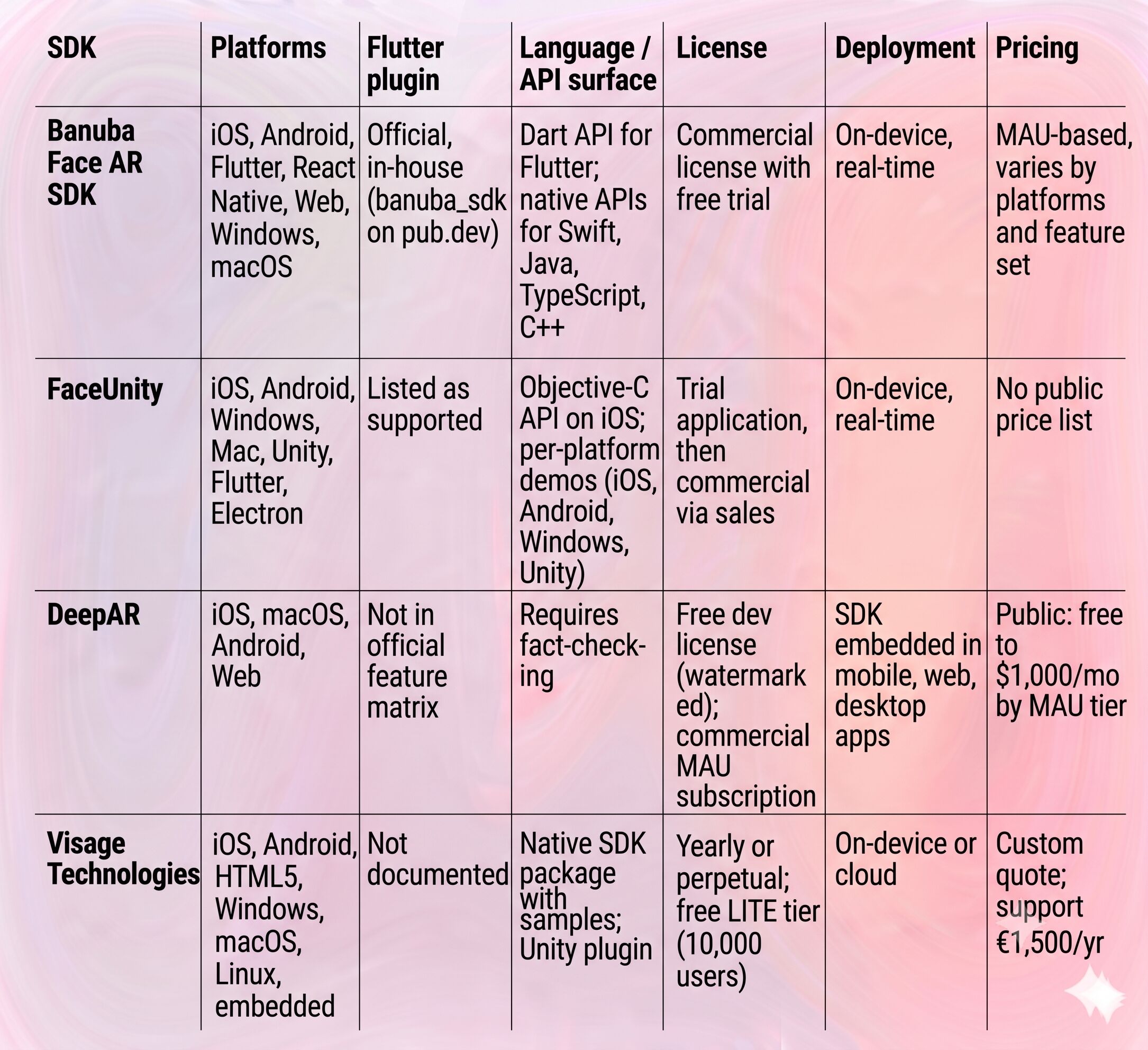
Which Flutter AR SDK Should You Choose?
For a Flutter app, the overall recommendation is Banuba Face AR SDK: it is the only option here where the Flutter plugin is a first-party product with vendor support, documented integration, and the full tracking stack (68 anchor points, 3,308-vertex mesh, 70% occlusion tolerance) exposed to Dart. The under-8-minute recorded integration and the 97% iOS / 80% Android device coverage remove most of the schedule and compatibility risk that AR projects usually carry.
Scenario-based picks differ:
- Web-only product with a fixed budget: DeepAR. Its public MAU pricing makes costs predictable, and its Web support is first-class in its own matrix.
- Unity or Electron alongside mobile: FaceUnity, which names both platforms and ships official Unity demos.
- Embedded, automotive, or analytics use cases: Visage Technologies, with Linux, Raspberry Pi, and Xilinx support plus 100+ tracked points and face analysis.
- Flutter app that may expand to React Native, web, or desktop: Banuba's AR SDK, since one engine covers all of those surfaces with the same effects.

References / Further Reading
-
Yes. Banuba's banuba_sdk Flutter plugin supports iOS 13+ and Android 8.0+, which together cover 97% of iOS and 80% of Android devices. The plugin wraps the same face tracking engine Banuba ships natively, and its source and example app are available in the banuba-sdk-flutter repository.
-
With Banuba, a recorded integration takes under 8 minutes: add the banuba_sdk dependency, initialize the SDK manager with a client token, and link the effects folder. The face-ar-flutter-sample shows a minimal working setup a team can copy from. Building equivalent functionality from scratch is a multi-month computer vision project.
-
Yes. Banuba's Flutter plugin can load and interact with any effect, including the Makeup effect, so beauty and cosmetics features run inside Flutter without native code. For dedicated e-commerce makeup try-on, Banuba also offers a specialized AR makeup solution with product-accurate rendering.
-
SDK size depends on which features you enable. Banuba's Face AR SDK adds around 15 Mb, depending on the feature set, and the exact composition is documented in Banuba's SDK size FAQ. When comparing vendors, ask for the size of your specific feature combination rather than the headline minimum.
-
Partially. DeepAR is free up to 10 MAU with a watermark, and Visage offers a free FaceTrack LITE tier for one app up to 10,000 users, though neither documents Flutter support. Banuba provides a free trial of its Face AR SDK, so a Flutter team can validate the plugin and effects on real devices before licensing.
