

Building an app with augmented reality live streaming in 2026 is a balancing act. It’s not just about the "wow" factor of a filter; it’s about making sure that filter doesn’t crash a mid-range phone or lag so badly that the streamer looks like they’re in a poorly dubbed movie.
Most developers hit the same walls: APIs that are a nightmare to integrate, performance that tanks as soon as the phone heats up, and "success taxes" (MAU-based pricing) that make virality a financial liability.
Today, we are comparing three heavyweight champions of augmented reality live streaming: Banuba Face AR, BytePlus Effects, and DeepAR. We’re looking at what actually matters in production:
- Does it kill the battery or lag the stream?
- Will it work for users on three-year-old Androids?
- Can you predict your bill before the end of the month?
Whether you're building social commerce, virtual events, or a gaming platform, you need a solution that fits your stack and your scale.
[navigation]
TL;DR:
- This analysis is designed for technical leaders, senior engineers, and PMs responsible for integrating augmented reality live streaming into production-ready apps, from social commerce to virtual events.
- We break down the performance, features, integration effort, and pricing models of Banuba Face AR, BytePlus Effects, and DeepAR.
- The core differences lie in mobile optimization, first-party support for Flutter/React Native, and whether the pricing model penalizes your growth with "success taxes" like MAU-based pricing.
- Banuba AR SDK is the best choice if you need a reliable, high-performance engine with transparent pricing, a vast effect base, and stable cross-platform wrappers that cut down on native maintenance over time.
- BytePlus is a strong contender for those requiring a massive TikTok-heritage asset store, while DeepAR fits smaller-scale prototypes where designers need a visual studio for rapid iteration.
Evaluation Criteria
To give you an honest look at how these tools perform in production, we’ve broken the comparison down into six critical pillars. This isn't just about a feature checklist; it's about identifying where your app might break or where your budget might leak.
- Platform Support: We examined how each SDK supports iOS, Android, and Web, with a specific focus on React Native and Flutter wrappers. If the wrapper is buggy, your "cross-platform" dream becomes a native maintenance nightmare.
- Performance & Latency: In augmented reality live streaming, the SDK competes with the video encoder for CPU cycles. We analyzed processing times and frame rates to see which engine stays cool under pressure.
- Feature Set: We evaluated the depth of AR capabilities, from standard face masks to advanced body segmentation, virtual try-on (VTO), and AI-driven "beauty" effects that streamers demand.
- Integration Complexity: A comparison of "time-to-hello-world." We measured the amount of boilerplate code required and the ease with which the SDK integrates with common streaming protocols such as RTCP and WebRTC.
- Developer Experience & Support: Great tech is useless if the documentation is out of date. we checked the quality of guides, the responsiveness of tech support, and the activity of developer communities.
- Pricing & Licensing Model: We compared the long-term financial impact of MAU-based tiers (the "success tax") versus flat-fee models to see which one offers the most ROI as you scale.
Augmented Reality in Live Streaming: Top 3 AR SDK
We’ve put Banuba, BytePlus, and DeepAR under the microscope to see which one holds up when the stream goes live. Read on to find out which SDK offers the best mix of "ready-to-use" features and production-grade stability for your specific tech stack.
Banuba Face AR SDK
Banuba’s Face AR SDK isn't just a collection of filters; it's a high-performance computer vision engine built specifically for the messy reality of consumer hardware. While other SDKs look great on a brand-new iPhone, Banuba is optimized to keep a live stream running at 60 FPS on a three-year-old Android without melting the battery.
Virtual background in Banuba Face AR SDK
A massive win for dev teams is the native Agora integration. You can attach virtual backgrounds, beauty filters, and AR masks to the world’s leading streaming SDK without fighting with custom glue code or complex synchronization.
On the developer side, Banuba is built for speed and long-term maintenance. Their documentation is highly technical yet accessible, featuring sample code on GitHub and first-class, in-house wrappers for React Native and Flutter, a rarity in a field that often relies on buggy community plugins.
You aren't left in a vacuum once you integrate, either; the SDK receives monthly updates to stay ahead of OS shifts, and their tech support is staffed by engineers who actually understand live streaming pipelines. Between a dedicated support portal and a growing developer community, you’re getting a partner that prioritizes uptime and ease of implementation over just "cool" stickers.
Key Strengths
- Predictable Cost: They use a flat-fee, per-platform pricing model. Unlike competitors who charge per user (MAU), your bill won't explode if your app goes viral.
- Market Reach: It’s optimized for 97% of Apple devices and 80% of the Android market, including mid-range phones that usually struggle with AR.
- Developer-First Workflow: Includes first-class wrappers for React Native and Flutter, an Offline Mode, and an AR Cloud to keep your initial app download size tiny.
- Customization: Access to Banuba Studio for creating unique effects and an Asset Store with 1,000+ ready-made filters.
- Multi-Face Tracking: The plugin can track up to 6 faces on desktop and around 4 faces on Unity, Android, and iOS. While it can technically track more, sticking to 4 ensures the high performance required for augmented reality live streaming.
Technical Deep-Dive: Why it’s faster
Banuba’s Augmented Reality for Live Streaming performance comes from their patented 3D Face Kernel™. Most SDKs find 2D points on a face and then run complex math to "guess" the 3D position. Banuba skips this. It establishes a 3D head model directly, which saves massive amounts of CPU and GPU power.
- Landmarking: It tracks 68 facial points with sub-pixel accuracy.
- Stability: Their 3D mesh with 37 morphs ensures that filters stay glued to the face even if the user turns their head 90 degrees or if 70% of their face is covered (e.g., by a hand or a mask).
- Segmentation: They’ve perfected jitter-free background removal and "hair segmentation." In a live stream, this means the edges of the streamer stay crisp and don't "flicker" against a virtual background.
Ideal Use Cases
- Social Media Broadcasts: Enhancing creator streams with high-end effects for their subscribers or small-scale shows for friends. For apps like Vroom, AR became a retention engine. By integrating Banuba, they saw a 30% increase in MAU and a 54% jump in new users. High-quality filters lowered the "barrier to entry" for users to turn on their cameras, directly driving platform growth.
- Public relations: Allowing musicians, actors, or influencers to excite fans with live AR-powered shows accessible to global audiences. For example, b.stage, a SaaS fandom platform, scaled to 1 million MAUs in just two years after integrating Banuba’s AR SDK. Because you can't have a filter glitch during a paid 1-on-1 with a movie star.
- Interactive Webinars: Making distance education engaging with 3D learning aids and AR face effects.
- AR Conferencing: Improving professional broadcasts and casual streams with "Beauty API" touch-ups or virtual background changers. When Bermuda integrated Banuba’s Face AR SDK into their live-chat, they hit over 15 million AR interactions per month. The filters increased session lengths because the tracking remained stable even on the low-end Androids common in their global markets.
Banuba’s AR SDK is a perfect choice if you are building a production-ready app for a global audience, need to control your long-term costs, and care about "glass-to-glass" latency in augmented reality live streaming.
Don't choose Banuba if you are a solo hobbyist working on a zero-budget project and only need basic 2D stickers with no concern for performance on older devices.
BytePlus Effects SDK
BytePlus is the enterprise arm of ByteDance, offering the same engine that powers TikTok and Douyin. It is designed for large-scale platforms that want to replicate a social-first aesthetic with a heavy emphasis on engagement-driven AR.
Key Strengths & Features
- The Content Library: Access to 80,000+ ready-to-use stickers and assets. If a trend starts on TikTok, the asset is usually available here instantly.
- Engagement-First: Includes "Lite Games" and interactive AR features specifically tuned to increase viewer dwell time and interaction.
Technical Analysis: Performance & Support
- Platform Support: Solid coverage for iOS, Android, Web, and Unity. While they offer React Native and Flutter support, the integration is often more manual and less "wrapped" than Banuba’s.
- Performance: Inherits TikTok’s high-efficiency code. Background removal typically runs in <50ms per frame, but performance can vary aggressively based on device tier: high-end phones get the "TikTok polish," while older hardware may see quality auto-scaling.
- Developer Experience: While documentation is vast, it can feel fragmented. Support is professional but follows a rigid enterprise hierarchy, making it harder for small teams to get quick technical answers.
Limitations
- Integration Friction: Developer feedback frequently mentions a "maze-like" documentation structure. Initial setup typically takes 1-2 weeks, significantly longer than "plug-and-play" competitors.
- Opaque Pricing: There is no self-service checkout. It’s a "Contact Sales" enterprise model that often requires significant annual commitments.
Ideal Use Cases
- E-Commerce Live Streaming: Using advanced virtual try-on and gesture-triggered product highlights to drive sales.
- Mass-Market Social Apps: Platforms requiring a massive, rotating library of trendy assets.
- Gamified Streams: Interactive broadcasts where viewers or streamers trigger effects through physical movements or gestures.
The lack of transparent pricing and the high technical barrier to entry make it difficult for resource-constrained teams or startups looking for a fast "Time-to-Market". Without a significant budget or enterprise-level support needs, the overhead of the "Contact Sales" process is often prohibitive.
DeepAR SDK
DeepAR is a cross-platform engine frequently chosen for rapid prototyping and projects where visual variety is prioritized over deep backend customization. It is a common entry point for teams moving from basic face-tracking to a more comprehensive AR suite.
Key Strengths & Features
- Creative Workflow: The DeepAR Studio allows designers to create, test, and export effects in a visual environment, decoupling the creative process from the engineering timeline.
- Multi-Face & Emotion Tracking: Supports tracking up to four faces simultaneously and includes built-in AI for Emotion Detection (e.g., happiness, sadness, anger), which can trigger real-time stream events or overlays.
Technical Analysis: Performance & Support
- Platform Support: Strong native coverage for iOS, Android, Web (WASM/WebGL), macOS, and Unity. However, its React Native and Flutter support often relies on community-maintained or "forked" plugins, which can introduce maintenance risks for cross-platform production apps.
- Performance: Optimized for real-time interaction, achieving 30-60 FPS depending on the device.
- Developer Experience: The documentation is visual and well-organized for native platforms. While there is an active developer forum and YouTube tutorials, direct technical support responsiveness varies based on the user's subscription tier.
Limitations
- The "Success Tax": DeepAR uses a Monthly Active User (MAU) pricing model. While this lowers the barrier for entry, costs scale linearly with your user base, which can create significant budgeting hurdles if a live stream goes viral. It offers a free, watermarked version for testing and development, with paid tiers starting around $25/month.
- Cross-Platform Maintenance: Because the Flutter and React Native wrappers are not always updated in lockstep with the native SDKs, teams using these frameworks may face delays in accessing the latest features.
Ideal Use Cases
- Social Gaming & Interactive Challenges: Apps that utilize multi-face tracking and emotion-based triggers for "vs" challenges or group streams.
- Education & Virtual Meetups: Using background blur, beauty filters, and 3D learning aids to enhance professional or academic video broadcasts.
DeepAR is a poor fit for high-traffic viral platforms where an MAU-based bill could quickly exceed server costs. Additionally, teams building exclusively in Flutter or React Native may find the reliance on community-maintained plugins too unstable for a core production feature compared to a first-party supported solution.
Comparison Summary Table
To sum up our evaluation, here is a side-by-side comparison of how these three SDKs perform across the six critical pillars of production-grade augmented reality live streaming.
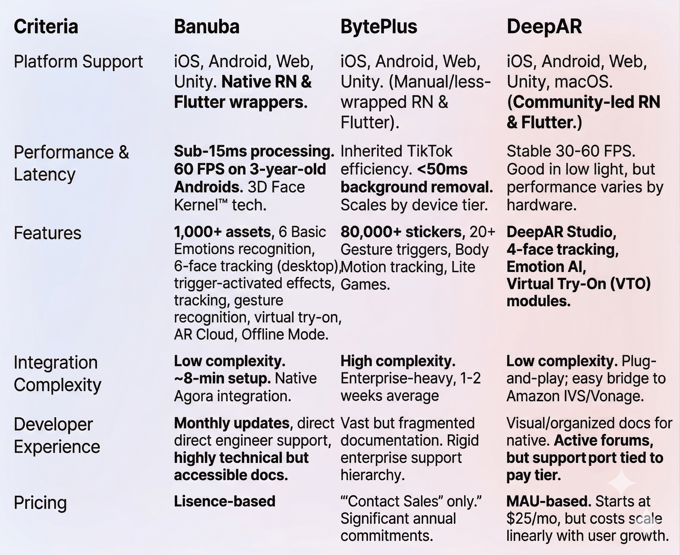
Conclusion
While DeepAR offers a similar low-barrier entry and BytePlus provides a massive TikTok-style asset library for enterprises, Banuba remains the definitive choice for long-term scalability. It is the best fit when your technical stack involves cross-platform frameworks like Flutter or React Native, where first-party support is critical, and when your audience includes users on mid-range devices who cannot afford the performance lag of heavier engines.
Ultimately, if you need predictable pricing that protects your margins as you grow, and a professional-grade engine that handles everything from TikTok-style editing to real-time emotion tracking, Banuba provides the most stable foundation for a production-ready app.

-
The official technical documentation for Banuba Face AR SDK is available online and includes requirements, setup instructions, and configuration details:
- Banuba Face AR SDK iOS documentation
- Banuba Face AR SDK Android documentation
- Banuba Face AR SDK Flutter documentation
- Banuba Face AR SDK React Native documentation
- Banuba Face AR SDK Web documentation
- Banuba Face AR SDK Unity documentation
- Banuba Face AR SDK Desktop documentation
This Banuba Face AR SDK documentation should be your primary reference during integration.
-
You can access official integration code samples for the Banuba Face AR SDK on GitHub. Banuba provides platform-specific examples to help you integrate faster:
- Banuba Face AR SDK iOS integration code sample
- Banuba Face AR SDK Android integration code sample
- Banuba Face AR SDK Flutter integration code sample
- Banuba Face AR SDK React Native integration code sample
- Banuba Face AR SDK Desktop integration code sample
- Banuba Face AR SDK Web integration code sample
- Banuba Face AR SDK Unity integration code sample
These Banuba Face AR SDK repositories include setup instructions and minimal working examples for quick deployment.
-
Yes. The Banuba Face AR SDK includes an LLM-friendly documentation file designed for AI-assisted development and internal knowledge systems:
This structured Banuba Face AR SDK text file can be used with AI tools to streamline onboarding and developer workflows.
-
The Banuba Face AR SDK provides official cross-platform plugins to simplify integration into hybrid applications:
These Banuba Face AR SDK plugins are maintained by Banuba and support faster implementation for cross-platform apps.
-
When evaluating SDKs for live environments, the most critical factor is processing latency (the time it takes to render a frame), as any delay over 15-20ms can cause desync between the video and audio. Developers should also prioritize platform reach, ensuring the engine runs at a stable 60 FPS on mid-range Android devices, not just flagship iPhones, and that first-party wrappers are available for cross-platform frameworks like Flutter or React Native to minimize integration debt.
-
Pricing generally falls into two categories: MAU-based (Monthly Active Users) and license-based (per platform). MAU models, like DeepAR’s, offer low entry costs but can become expensive as your app scales, effectively acting as a "success tax." License-based models, like Banuba’s, provide a predictable annual or monthly cost regardless of how many millions of users you reach, making it easier for businesses to project long-term ROI.
-
Banuba is widely considered the best choice for scaling because its pricing model remains fixed even as user counts explode. Technically, its 3D Face Kernel™ is designed for high-concurrency environments and maintains performance on older hardware where other engines might throttle. Furthermore, its AR Cloud and Offline Mode ensure that scaling doesn't bloat the app’s initial download size or crash the experience in low-bandwidth regions.