

Photo booths stopped being a coin-operated curtain years ago. The photobooth software and apps segment is on track at a 22.3% CAGR, and the wider photo booth market sat at $818 million in 2024 with steady high-single-digit growth ahead. The reason is simple. Guests share what they make on the spot, and operators want activations that produce social-ready content, not just a paper strip.
That shift puts AR at the center. Face filters, beauty touch-ups, and swapped backgrounds are now the draw at weddings, trade shows, and retail pop-ups. AR is also no longer niche on the consumer side: Snap alone reports more than 250 million people using AR every day. Booth makers feel the pressure to match that polish.
The hard part is the room. A booth is unattended, sits in unpredictable lighting, often loses internet, and has to handle a group of friends crowding the lens. The two SDKs here take opposite routes to that problem, and the gap shows up fast once you deploy. This piece sets out how they differ on tracking, deployment, branding, content, and cost, with the booth itself as the test bench.
[navigation]
AR photo booth software lets you add face filters, beautification, virtual backgrounds, and group effects to a booth or kiosk without building a computer vision pipeline yourself. Banuba ships an on-device SDK that runs offline, tracks several faces at once, and gives you full control over branding and effects. SnapAR's Camera Kit brings Snapchat's Lens engine to your app, but ties content creation to Lens Studio and runs through Snap's cloud and review process. For a fixed installation that has to work in any venue, Banuba is the safer fit.
TL;DR
- This guide is for engineers and product owners building photo booths, event kiosks, or brand activations that need real-time AR.
- It compares two options: the Banuba AR Photo Booth SDK and Snap's Camera Kit (SnapAR).
- Banuba runs fully on-device, so the booth keeps working when the venue Wi-Fi drops.
- Camera Kit gives you Snapchat-grade Lenses, but lenses must be authored in Lens Studio and pass Snap's app review.
- Pick Banuba when you need offline reliability, group shots, white-label branding, and custom effects; pick Camera Kit when you want Snapchat's exact look and a Snap-native pipeline.
How we evaluated
We scored both options against what a real on-site booth demands, not against a generic feature checklist:
- Reach across hardware. iOS, Android, Web, and the desktop or kiosk builds booths actually run on.
- Tracking under stress. Multiple faces, off-angle poses, partial occlusion, and dim light.
- Deployment model. On-device versus cloud, and what happens when connectivity fails.
- Brand and content control. White-labeling, custom effects, and who owns the creative pipeline.
- Licensing and price predictability. How cost behaves as a booth fleet scales.
The Unattended Booth Test
Before we start, here is a quick original lens we use to separate booth-ready AR from phone-app AR. Run any SDK through these five questions:
- Does it still work with the router unplugged? A booth at a venue with flaky Wi-Fi cannot depend on a cloud render.
- Can it handle the whole group? Friends pile in. The tracker needs to find every face, not just the closest one.
- Whose brand is on screen? A paying client wants their logo, not someone else's watermark or look.
- Who can make new effects, and how fast? Seasonal campaigns need new content without a vendor bottleneck.
- What does the bill do when there are 10 booths instead of one? Pricing should be predictable as the fleet grows.
Banuba AR Photo Booth SDK
Banuba builds AR photo booth software on its own face tracking stack, the same technology shipped to brands like Gucci and Samsung, and used inside apps with tens of millions of installs. The pitch for booths is direct: real-time effects that react to touch and expression, on every major platform, with all processing happening on the device.
How the tracking actually works
This is where the Banuba section earns its depth. The tracker does not lean on a flat list of landmark dots. It runs a 3D mathematical face model that represents the face as a set of roughly 3 dozen morphs, covering expression, anthropometry, and head position in the frame. From that model, it can build a face mesh of up to 3,308 vertices.
Working in 3D rather than 2D points buys three things a booth cares about:
- Stability. A patented anti-jitter mechanism runs the algorithms several times per frame to separate the real face signal from camera noise, which keeps effects from twitching on a static booth feed.
- Range and angle. The tracker holds up at distances near 7 meters, across head angles from roughly -90 to +90 degrees, and with up to 70% of the face covered. Useful when a guest leans in, turns sideways, or wears a costume.
- Low-light tolerance. Event lighting is rarely studio-grade. The model is trained on balanced datasets and keeps tracking in dim rooms and across skin tones, ages, and genders.
Because all of this runs locally, there is no per-session network round-trip. The booth keeps producing AR with the venue router unplugged, and no face data leaves the device, which simplifies the GDPR conversation for operators.
Capabilities a booth uses
- Multi-face capture for up to 16 people in one frame, with a shared filter.
- Virtual backgrounds that swap the backdrop for a still image, GIF, or 3D environment, with several people in the shot at once.
- Beautification: skin smoothing, even skin tone, teeth and eye whitening, and subtle face morphing, each with adjustable intensity.
- Triggers and AR games launched by a smile, wink, or other expression, plus single, multi, and touchless interaction modes for the booth screen.
- A 1,000+ effect catalog plus custom effect development, so a client's campaign art ships without you writing shaders from scratch.
Platforms and integration
Coverage runs across iOS 13+, Android 8.0+, Web via WebAssembly, Windows, macOS, and Unity, with maintained Flutter and React Native plugins. Sample projects and quick-start repos are live on Banuba's GitHub, and there are agent skills that let AI do all the work for you. For a kiosk team, the practical win is one tracking engine across the touchscreen app, a web mirror, and any companion mobile build.
Real-world signal
Banuba's booth and camera work is not theoretical. The vendor's case studies include a multi-platform production agency running face filters and green-screen backgrounds inside AR photo booths, and sMedio, whose AR camera app was preinstalled on over 500,000 devices.
 Banuba's photobooth stickers examples
Limitations
- You supply or commission the creative direction; the catalog helps, but a fully bespoke look still takes design effort in Banuba Studio.
Best for
Fixed booths and event kiosks that need offline reliability, group shots, white-label branding, and custom effects under predictable licensing.
Who should skip it
Teams that specifically want the literal Snapchat Lens aesthetic and Snap's distribution, and are fine with routing through Snap's pipeline.

SnapAR (Camera Kit)
Camera Kit is Snap's official SDK for integrating the Snapchat AR engine into third-party iOS, Android, and web apps, without requiring users to install Snapchat. It carries the platform's tracking quality, and it is a strong choice when the goal is that exact look.
Key strengths
- The same face, body, and hand tracking that powers Snapchat at a large scale.
- A single lens can deploy across iOS, Android, and web.
- Access to the Lens Creator community and the Creator Marketplace for ready-made lens packs.
Banuba's AR effects for photobooth in action
Limitations for a booth
- Content is locked to Lens Studio. Per Snap's terms, lenses for Camera Kit must be authored in Lens Studio or other Snap-provided tools, so your effect pipeline depends on Snap's editor and release cadence.
- Branding and a review gate. Integrations include a Snap terms-of-service prompt and Snap branding requirements, and staging builds carry a Camera Kit watermark until Snap reviews and approves the production token.
- Cloud in the loop. Lens delivery and tokens run through Snap's services, which adds a dependency a fully offline booth would rather avoid.
Best for
Social and creator apps, and brand activations that want Snapchat's signature lenses and Snap-native distribution.
Who should skip it
Operators who need guaranteed offline operation, their own branding with no third-party watermark or prompt, and full control over the effect pipeline.

Comparison table
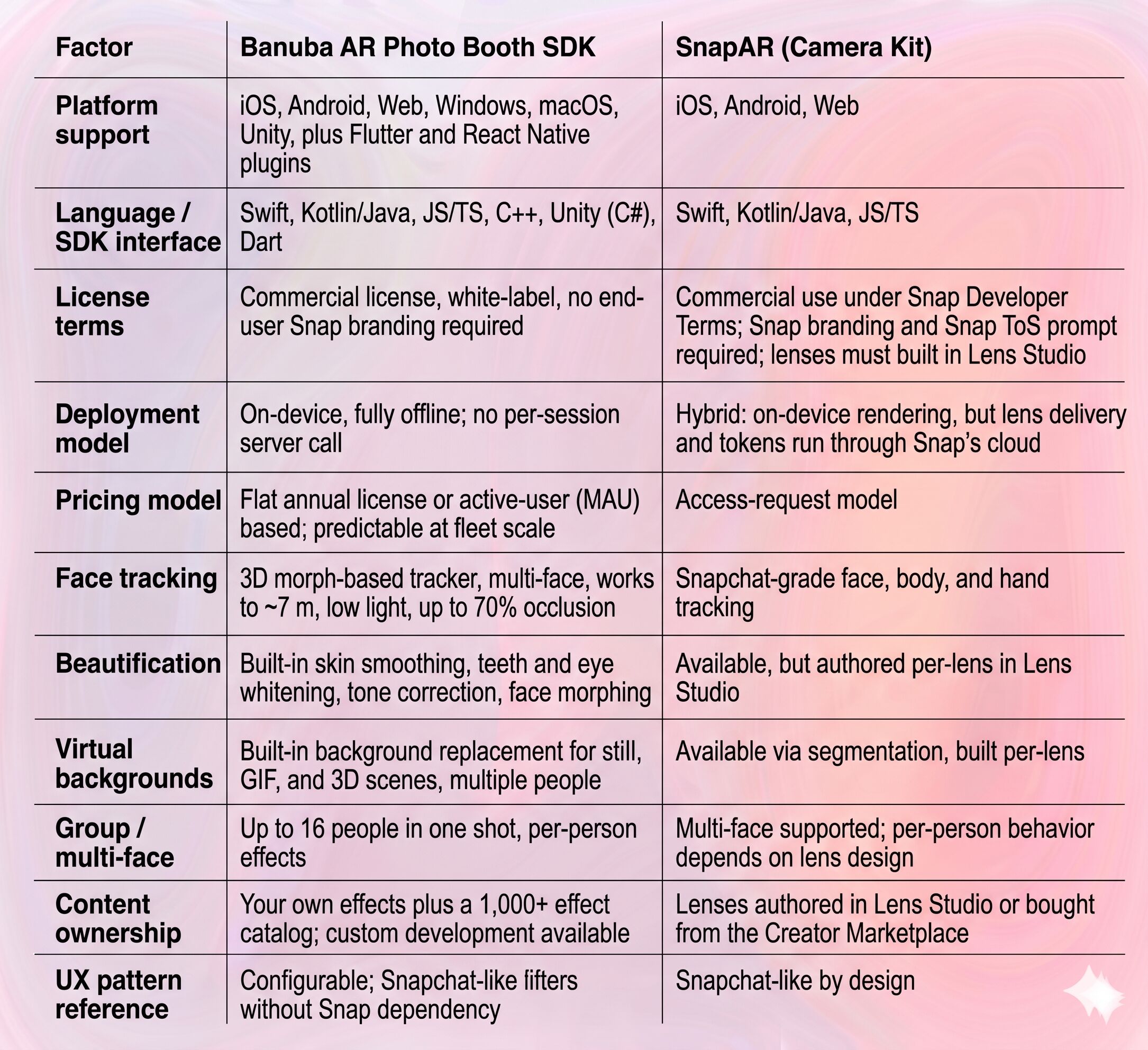
Choosing between them
If you build fixed photo booths or event kiosks: Banuba. Offline operation, multi-face group capture, white-label branding, and predictable licensing line up with how booths are actually deployed.
If you build a social or creator app and want the Snapchat look: Camera Kit. The lens aesthetic and Snap's ecosystem are the point, and a network dependency is acceptable in a phone app.
If brand control is the top constraint: Banuba, since there is no required third-party watermark or terms prompt on screen.
If your team already lives in Lens Studio: Camera Kit shortens the path, because your existing lens skills carry over.
Weigh it against four factors: connectivity at the venue, how many faces a shot must hold, whose brand goes on screen, and how the cost behaves across a fleet rather than a single unit.
Remove the hesitation with Banuba’s free 14-day trial period. Validate your idea with their AR photobooth software without commitment.
References
Banuba. (n.d.-a). AR SDK for photo booth software. Retrieved June 4, 2026, from https://www.banuba.com/solutions/ar-photo-booth
Banuba. (n.d.-b). Face tracking software. Retrieved June 4, 2026, from https://www.banuba.com/technology/face-tracking-software
BusinessWire. (2025, November 5). Snap Inc. announces third quarter 2025 financial results [Press release]. https://www.businesswire.com/news/home/20251105447972/en/Snap-Inc.-Announces-Third-Quarter-2025-Financial-Results
Global Market Insights. (2024). Photo booth market size & share, growth forecasts 2025-2034. Retrieved June 4, 2026, from https://www.gminsights.com/industry-analysis/photo-booth-market
Snap Inc. (n.d.-a). Camera Kit. Retrieved June 4, 2026, from https://ar.snap.com/camera-kit
Snap Inc. (n.d.-b). Releasing your Camera Kit app. Snap for Developers. Retrieved June 4, 2026, from https://developers.snap.com/camera-kit/app-review/release-app
Technavio. (2025). Photobooth software and apps market growth analysis, 2025-2029. Retrieved June 4, 2026, from https://www.technavio.com/report/photobooth-software-and-apps-analysis
-
Start with deployment. A booth needs on-device tracking that survives a dropped connection, reliable multi-face capture for groups, branding you control, and a clear path to make new effects. Then check platform coverage and how licensing scales across multiple units.
-
Two common shapes. A flat annual license gives unlimited use and a fixed, predictable cost, which suits booth fleets. An active-user or MAU model starts cheaper and grows with usage, which suits apps with uncertain scale. Some platforms instead gate production access behind a review and quote commercial terms separately, so confirm the exact figures before you commit.
-
Banuba's on-device model and flat-license option is the best choice. It keeps behavior and cost predictable as you add units, with no per-session cloud dependency.
