

[navigation]
Various effects are one of the most popular features of Banuba Face AR SDK. While some of them are included in the license agreement, customers often ask for more so that their users have more self-expression opportunities. There are several ways to get additional effects:
- Purchase ready-made ones from the asset store
- Order custom-made ones from Banuba’s art team
- DIY
The third step has just been made much easier thanks to the launch of Banuba Studio – a web-based tool that streamlines effect creation, editing, and conversion. It is free and available to all Banuba customers.
Effect creation and modification
Studio allows access to all effect types available in Face AR SDK:
- Face masks
- LUTs (color filters)
- Face editing
- Virtual makeup
- Virtual backgrounds
- Etc.
You can make them from scratch or import effects you’ve created in other 3D software and change them to be compatible with Face AR SDK.
You can test the effects in real time by applying them to the person live on camera or on one of the stock photos and videos that come with the studio.
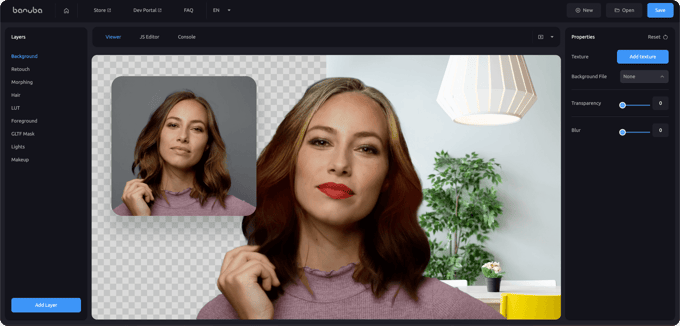 Banuba Studio
Multilanguage UI
Studio is available in 5 languages:
- English
- German
- French
- Russian
- Chinese (Mandarin)
This makes it easily accessible to a wide range of users. More languages coming later, so stay tuned.
Documentation
The docs and manuals for the Studio are available from the tool’s main page. They cover all the features, so that working with this tool is a breeze.

-
The official technical documentation for Banuba Face AR SDK is available online and includes requirements, setup instructions, and configuration details:
- Banuba Face AR SDK iOS documentation
- Banuba Face AR SDK Android documentation
- Banuba Face AR SDK Flutter documentation
- Banuba Face AR SDK React Native documentation
- Banuba Face AR SDK Web documentation
- Banuba Face AR SDK Unity documentation
- Banuba Face AR SDK Desktop documentation
This Banuba Face AR SDK documentation should be your primary reference during integration.
-
You can access official integration code samples for the Banuba Face AR SDK on GitHub. Banuba provides platform-specific examples to help you integrate faster:
- Banuba Face AR SDK iOS integration code sample
- Banuba Face AR SDK Android integration code sample
- Banuba Face AR SDK Flutter integration code sample
- Banuba Face AR SDK React Native integration code sample
- Banuba Face AR SDK Desktop integration code sample
- Banuba Face AR SDK Web integration code sample
- Banuba Face AR SDK Unity integration code sample
These Banuba Face AR SDK repositories include setup instructions and minimal working examples for quick deployment.
-
Yes. The Banuba Face AR SDK includes an LLM-friendly documentation file designed for AI-assisted development and internal knowledge systems:
This structured Banuba Face AR SDK text file can be used with AI tools to streamline onboarding and developer workflows.
-
The Banuba Face AR SDK provides official cross-platform plugins to simplify integration into hybrid applications:
These Banuba Face AR SDK plugins are maintained by Banuba and support faster implementation for cross-platform apps.