
Discover our latest Video Editor SDK releases for iOS and Android. We’ve added a new feature of custom video background remover. Now, users can change backgrounds in the video with an image from the gallery. We’ve also updated the trimmer allowing it to cut the recorded videos. And we’ve designed the Time Warp Scan filter, the one that is going viral on TikTok now.
Video Editor SDK Release versions
- 1.0.15 iOS
- 1.0.15.1 Android
Video Trimmer Updated
Previously the trimmer was available only for the gallery videos, allowing the user to cut the uploaded videos. Now, it works for the camera too. Users can record videos and trim them right away.
Video Editor Demo: Trimmer Updated
Full list of video trimmer specs
- Trim uploaded and recorded videos.
- Cut the beginning and the end of the video.
- Slide lines to set new frames.
Platforms: iOS, Android
Video Editor Background Change
With the new release, we added the Video Background Changer feature. Users can now record videos with custom backgrounds uploaded from the gallery.
The filter requires the Face AR component. The video editor uses a background subtraction (green screen) technology that tags the image into the human or the background. The latter can be removed or changed into an image per user choice.
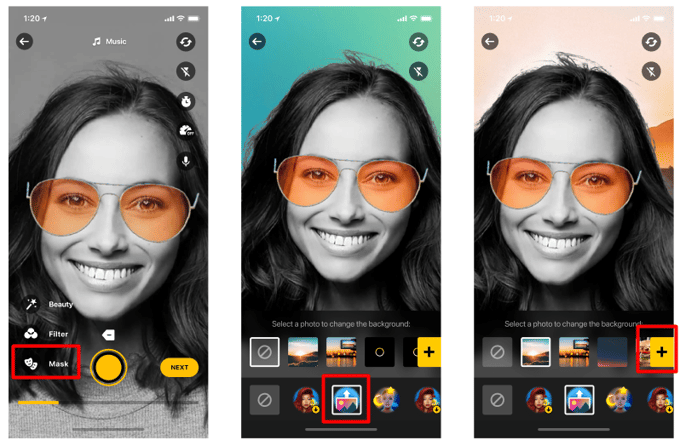 Screen 1: Tap 'Masks' to find Background remover.
Screen 2: Background icon.
Screen 3: Add custom backgrounds from the gallery.
The feature works pretty much as in Tiktok:
- Tap on the icon with background separation.
- The gallery pops up.
- Pick an image or video.
- The background is substituted in the camera in real-time.
- Record video.
Users can apply the background remover in a variety of cases. They can create vlogs, record video lessons with thematic backgrounds, for self-presentational video profiles in dating or HR apps, or just for fun Tiktok-like short videos.
Platforms: iOS, Android
Time Warp Scan Filter Added
You can now integrate the Time Warp Scan effect in your video editor. The effect distorts an image in a sophisticated way. It freezes the image on the screen gradually as a line moves down, or across the screen. The mask is applied for real-time recording, and the line orientation can change by the tap on the screen.
Time Wrap Scan Filter Demo
Platforms: iOS, Android
Dependencies: Face AR, Audio, and AR Cloud become optional
Our iOS and Android video editing SDK includes several modules, which are now optional. The optional modules include:
- Face AR enables face tracking effects, e.g. AR masks, try-ons, backgrounds.
- Audio Browser to add music using the third-party service (we use Mubert).
- AR Cloud lets you store effects on the server instead of code which saves app size.
If your app suggests just the video capture and editing functionality with full-screen video effects, you may go with basic video editor SDK features and not specify these modules. It significantly reduces the binary size of the SDK.
Video Quality Improved
We start using H.265(HEVC) codec for video decoding in our SDK and exported videos. The codec provides better video quality and reduced file size. The intermediate video will encode in H.265 encoder if it is available on the current device. Due to that and bitrate reduction, the export file size was reduced by 1,5-2 times.
Other Improvements and Changes
- When the commercial token expires, exported video quality decrease to 360p. Banuba watermark is added.
- Recording and displayed time accuracy are optimised.
- Bitrate reduced. New numbers.
- Moved from H.264 codec to H.265 (HEVC)
- Audio frequency changed from 44100 to 48000 kHz
Looking to add a Tiktok-like video editor to your app?
Our SDK does the job.

-
The complete technical documentation for the Banuba Video Editor SDK is available online and includes requirements, setup instructions, and configuration details:
- Banuba Video Editor SDK iOS documentation
- Banuba Video Editor SDK Android documentation
- Banuba Video Editor SDK Flutter documentation
- Banuba Video Editor SDK React Native documentation
This Banuba Video Editor SDK documentation is regularly updated and should be your primary reference during integration.
-
You can access official integration code samples for the Banuba Video Editor SDK on GitHub. Banuba provides platform-specific examples to help you integrate faster:
- Banuba Video Editor SDK iOS integration code sample
- Banuba Video Editor SDK Android integration code sample
- Banuba Video Editor SDK Flutter integration code sample
- Banuba Video Editor SDK React Native integration code sample
These Banuba Video Editor SDK repositories include setup instructions and minimal working examples for quick deployment.
-
Yes. The Banuba Video Editor SDK includes an LLM-friendly documentation file designed for AI-assisted development and internal knowledge systems:
This structured Banuba Video Editor SDK text file can be used with AI tools to streamline onboarding and developer workflows.
-
The Banuba Video Editor SDK provides official cross-platform plugins to simplify integration into hybrid applications:
These Banuba Video Editor SDK plugins are maintained by Banuba and support faster implementation for cross-platform apps.
-
Yes, Banuba Video Editor SDK includes agent skills for Claude Code, Codex, and Qwen Code. You can install them with a single command. See the Banuba Agent Skills documentation page.