

An average person spends a whopping 18 hours per week watching audiovisual content online, with most of it being short clips on TikTok, Instagram, and the like. No wonder that short-form video has quietly become a must-have. For social apps and niche platforms alike, Reels-style user-generated content is no longer a “nice extra” but what users expect by default. Whether the product targets travelers, fitness enthusiasts, or creators, the ability to record, edit, and share polished video inside the app now defines the experience.
Behind the scenes, however, building Reels features is far beyond simple. For development teams, the first instinct is often to build everything in-house. That usually means a DIY React Native or native workflow involving video playback research, recording pipelines, editing features, and backend storage. Each component is manageable on its own. However, together, they create a long and costly roadmap.
There is another option: a Video Editor SDK that can handle much of this complexity out of the box. In this article, we’ll compare both approaches (DIY versus SDK) and explain how to integrate Banuba’s Video Editor SDK to deliver Reels-like functionality without reinventing the entire video stack.
[navigation]
TL;DR
- Integrating ready-made Reels-like features is easier, faster, and cheaper than making them from scratch;
- You can use Banuba Video Editor SDK add all the relevant functionality to your app;
- To implement it, send us a message through a contact form, receive the unique token, and follow the instructions below.
What Instagram Reels Features Actually Require
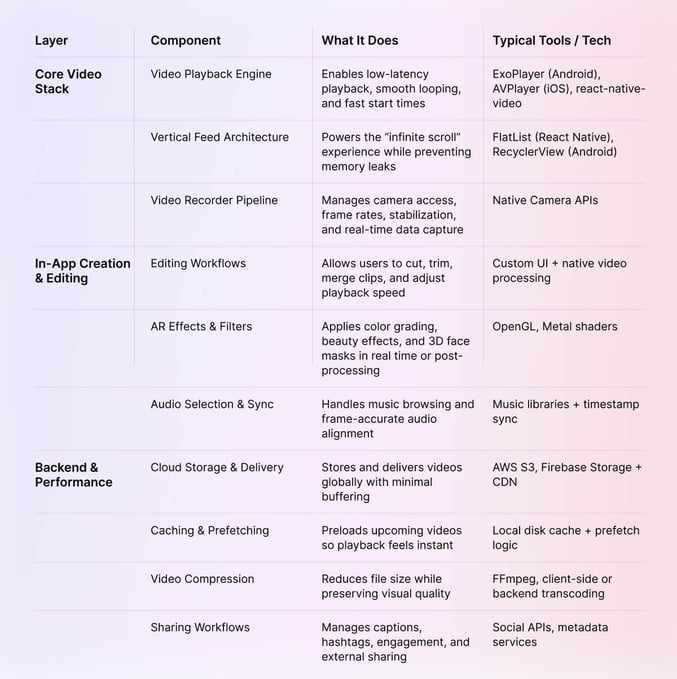
What users see as a single “Create” button is actually the result of many interconnected systems working together. To ship a high-quality Reels experience, developers must solve problems across video, UX, and infrastructure.
1. The Core Video Stack
- Video Playback Engine
Low-latency playback and smooth looping usually rely on ExoPlayer, AVPlayer, or React Native video libraries.
- Vertical Feed Architecture
An optimized feed, for example, built with FlatList in React Native or RecyclerView on Android, is critical to prevent memory leaks while delivering an “infinite” scroll.
- Video Recorder Pipeline
This manages the camera hardware interface, ensuring stable frame rates and handling real-time data from the camera sensor to the local storage.
2. In-App Creation & Editing Tools
- Editing Workflows
Cutting, trimming, merging, and speed controls form the baseline of any usable video editor.
- AR Effects & Filters
Using OpenGL or Metal shaders to apply color LUTs, beauty filters, and 3D face AR masks to the live camera feed or post-processed video.
- Audio Selection & Sync
Music selection and precise audio alignment ensure videos feel intentional, not improvised.
3. Backend & Performance Infrastructure
- Cloud Storage & Delivery
CDNs backed by scalable storage platforms keep load times short, regardless of user location.
- Caching & Prefetching
Preparing the next video before it’s needed is key to that frictionless swipe experience.
- Video Compression
Reducing file size without visual loss is essential for performance and cost control.
- Sharing Workflows
Metadata, interactions, and external sharing complete the loop from creation to distribution.
Reels-style video feature stack

DIY vs. Using Banuba SDK: What’s the Best Way to Add Reels Features?
Adding Reels-style video isn’t just a feature decision but an architectural one. At a high level, teams are choosing between maximum control and maximum efficiency. Both paths work, but they lead to very different development realities.
Path 1. Building Reels In-House (DIY)
The DIY route gives full ownership over the video stack. Every decision, from playback to compression, is the developers' to make. In practice, that freedom comes with a long and complex roadmap:
-
Spinning up a React Native or native project optimized for video-heavy workloads
- Integrating and tuning ExoPlayer or AVPlayer to support auto-play feeds without frame drops
- Writing native camera modules that behave consistently across devices
- Building custom editing logic for trimming, merging, and stitching clips
- Designing a vertical feed that keeps dozens of videos alive without crashing memory
- Creating backend APIs for uploads, storage, and transcoding
- Implementing caching and prefetching to keep swipes instant
Where DIY gets hard:
Device fragmentation, deep AV/ML expertise for effects and audio sync, and the ongoing cost of maintaining a video pipeline across OS updates.
Path 2. Integrating Banuba Video Editor SDK
"Our goal is to redefine how users approach video creation. The Video Editor SDK empowers developers to seize market opportunities through faster releases, giving their users the tools to express themselves and unleash their creativity like never before." — Anton Liskevich, CPO/Co-Founder of Banuba
Banuba replaces that roadmap with a single, modular integration. Instead of assembling the video stack piece by piece, teams plug into a production-ready system designed for short-form video from day one.
Out of the box, Banuba Video Editor SDK provides:
- Production-Grade Pipeline
A battle-tested recording and processing engine that handles device fragmentation for you.
- Advanced Creative Suite
Includes a multi-clip timeline, seamless transitions, and effects.
- Micro-Feature Depth
Features like Picture-in-Picture (Duets), speed controls, reverse playback, and automated captions are already built-in.
- Music & Assets
Native integration for music providers and GIF/sticker overlays.
- Cross-Platform Support
Consistent UI and performance across various platforms (iOS, Android, React Native, Flutter).
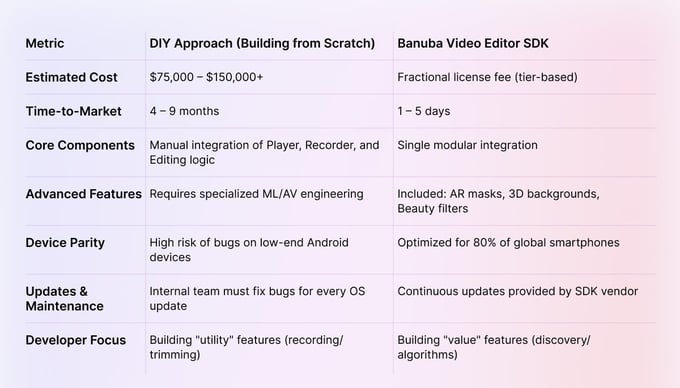
DIY vs. Banuba SDK: At a Glance
Technical Advantages
- Modular Architecture
Unlike DIY builds, developers can toggle functionality via a config file, keeping the SDK light (to a minimum of 14 MB).
- Cross-Platform Developer Support
Banuba provides specialized wrappers for React Native CLI and Flutter, allowing web-oriented teams to implement native-grade video features without writing Objective-C or Java code.
NOTE: For a full integration walkthrough, refer to Banuba’s official Documentation, complete with examples and framework-specific guidance.
Architecture Overview: How Reels Features Are Built With Banuba
Understanding the architecture of a Reels-like feature helps in planning your resource allocation. When using Banuba, the heavy lifting of video processing is offloaded to a specialized native layer, while your app manages the business logic and storage.
The Frontend (Mobile Client)
- Native Execution
Even if you use React Native or Flutter, the Banuba Editor runs natively (using Swift/Kotlin). This ensures that heavy video encoding and AR rendering don't "block" your UI thread, keeping the app responsive.
- Modular Triggering
Your app simply calls the SDK module when a user taps "Create." The SDK takes over the camera, provides the editing interface, and handles the user's creative workflow.
- Export Handles
When editing is complete, the SDK exports a finished video (usually .mp4) to a local folder on the device and provides your app with a file path for uploading.
The Backend (Storage & Delivery)
- Your Own Storage
While Banuba provides a full-featured video editor, hosting and storage are handled by your backend. Services like AWS S3, Firebase, or Google Cloud make storing uploaded files easy.
- Upload-Ready Files
The SDK outputs compressed, web-optimized files. This means you don't necessarily need an expensive server-side transcoding farm (like FFmpeg on the cloud) to make the videos playable for other users.
- Thumbnail Generation
The SDK can automatically pre-generate a "cover image" or thumbnail during the export process, saving your backend from having to extract frames later.
Performance & Privacy
- Blazing-Fast Exports with Hardware Acceleration
By using the device’s GPU and built-in video encoders, Banuba speeds up video exports while keeping battery use low.
- On-Device AR
Banuba keeps AR face tracking and background removal entirely on the device, so no video data is ever sent to servers — a big win for user privacy and regulatory compliance.
How to Add Instagram Reels Features To Your Product
As developing everything from the ground up is too complex, we will focus on integrating a fitting ready-made solution. In this case – Banuba Video Editor SDK. It is an AI-powered module, tailor-made for modern short video formats (TikToks, Reels, Stories, etc.). The SDK offers both basic necessities and advanced augmented reality effects for making shareworthy content. The Video Editor SDK also has an API version that is more flexible but has fewer features out of the box.
Note that having many features doesn't mean this SDK is bloated. You can pick and choose the feature set, and on average, Banuba Video Editor SDK only increases the download size by 30 Mb on average (the core features take just 14 Mb). The Video Editor SDK is also simple to work with, as each feature is designed to be developer-friendly and has thorough documentation.
Now let’s get to the integration.
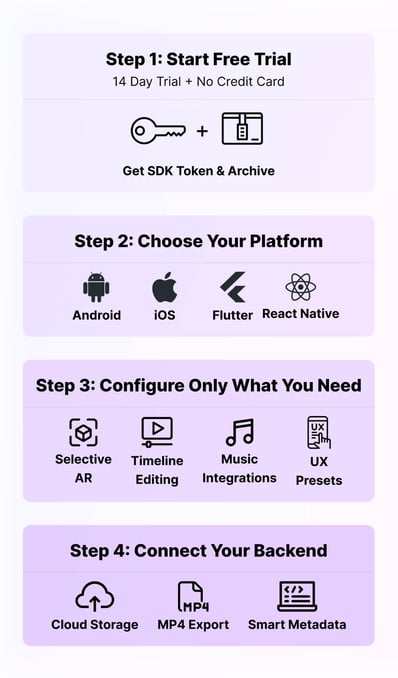
Step 1. Start with a Free Trial
You can test the SDK for free during a 14-day trial period (no credit card required). This allows you to judge whether this product fits your business vision. To start, fill out the form below.
You will receive a unique token and an archive with the SDK.
Step 2. Choose Your Platform
Banuba Video Editor SDK is designed to fit into your existing stack. Instead of manually implementing playback, editing, audio sync, and AR pipelines, Banuba provides these components pre-built and optimized. You can jump-start your project by exploring the following official samples:
Step 3. Configure Only What You Need
Unlike most all-in-one video editors, Banuba is designed to stay lean. Its modular architecture lets teams fine-tune the experience and avoid unnecessary bloat.
- Flexible Timeline Editing
Choose between a simple "one-shot" recorder or a multi-clip timeline.
- Music Freedom
Use the inbuilt royalty-free music library, connect with a 3rd-party provider, or add your own custom tracks.
- UX Presets
Select UI layouts that match either the TikTok or Instagram Reels aesthetic.
Step 4. Connect Your Backend
Banuba powers the creative flow, but ownership of the content stays with you. After a user finishes editing, the SDK delivers a ready-to-use video file.
- Flexible Storage
Choose Firebase, AWS S3, or a private cloud setup.
- Mobile-Optimized Output
The SDK produces compressed MP4 files designed for smooth mobile playback.
- Smart Metadata
Storing duration, resolution, and cover images ensures instant loading in the feed.
DIY + Banuba Hybrid Approach (Best for Startups)
For many fast-growing startups, the reality is more nuanced than a strict “either/or” choice. Instead, the most successful products often adopt a hybrid architecture. This strategy allows you to maintain total control over your unique value proposition (like your discovery algorithm or social graph) while offloading the high-risk technical debt of video processing to a specialized engine.
Ship Your MVP in Days Instead of Months
The hybrid approach begins by using Banuba as the core recording and editing engine. This helps teams avoid the “development valley of death”, which is the 4–6 months typically spent building a stable, cross-platform video recorder from scratch. Instead, you can launch an MVP (Minimum Viable Product) quickly, gather real user feedback, and move forward while competitors are still fixing camera issues.
Focus on Your Core IP
By using an SDK for the "utility" of video editing, the engineering team can focus on what actually makes the app successful:
- Proprietary Feed Algorithms
Spend your time on the "For You" page logic rather than fixing audio-sync bugs.
- Custom Feed UX
While Banuba handles the editing screen, you still build and maintain full ownership of the vertical scroll UI, user profiles, and community features.
- Data & Backend
You retain 100% ownership of your backend infrastructure, user data, and the final video assets.
Scale and Swap Over Time
The modular nature of this setup means you aren't "locked in." You can use the SDK for the heavy lifting of AR effects and hardware-accelerated transcoding, but gradually replace the gallery or sharing UI with your own custom-coded components as your brand evolves. This provides a scalable path from a lean startup to a market leader without ever sacrificing performance.
Conclusion
Building a competitive short-video platform today is a game of speed and execution quality. As we’ve seen, recreating Instagram Reels from scratch is a serious engineering challenge. Going fully DIY sounds flexible on paper, but in practice, it often means longer timelines, bigger budgets, and a strong dependence on niche AV and ML skills.
That’s why the smartest approach in 2026 is hybrid:
- Build what defines you: Keep ownership of your UI, discovery logic, and backend systems.
- Outsource what slows you down: Let Banuba Video Editor SDK power recording, multi-clip editing, AR effects, and hardware-accelerated exports.
By offloading the complex recording, editing, and AR workflows to Banuba, teams immediately access roughly 80% of Reels functionality. This shortens MVP development from months to a single day, eliminating device-specific debugging headaches.
All in all, most users don’t care how it’s built. They care that it’s fast, creative, and smooth. Combining your social layer with Banuba’s proven editing engine is the fastest way to deliver exactly that.
Reference List
Aulas, C., & Harytonau, A. (2025, November 19). 5 Best React Native Video Player Libraries (2025). https://www.banuba.com/blog/best-react-native-video-player-libraries
Banuba. (n.d.-a). GitHub - Banuba/ve-sdk-android-integration-sample: Integrating Banuba Video Editor SDK with an Android app. Code samples, dependencies, customization options, etc. GitHub. https://github.com/Banuba/ve-sdk-android-integration-sample
Banuba. (n.d.-b). GitHub - Banuba/ve-sdk-flutter-integration-sample: How to integrate Banuba Video Editor with a Flutter app - for iOS and Android. GitHub. https://github.com/Banuba/ve-sdk-flutter-integration-sample
Banuba. (n.d.-c). GitHub - Banuba/ve-sdk-ios-integration-sample: Integrating Banuba Video Editor SDK with an iOS app. Code samples, dependencies, customization options, etc. GitHub. https://github.com/Banuba/ve-sdk-ios-integration-sample
Banuba. (n.d.-d). GitHub - Banuba/ve-sdk-react-native-cli-integration-sample. GitHub. https://github.com/Banuba/ve-sdk-react-native-cli-integration-sample
Banuba. (2024, April 1). AI Closed captions | Banuba Video Editor SDK V1.35.0 [Video]. YouTube. https://www.youtube.com/watch?v=7WL8E7RVA70
Banuba Face AR SDK | Banuba SDK V1.17.6. (n.d.). https://docs.banuba.com/far-sdk
Bradley, S. (2025, November 13). How using Instagram’s Edits app could help you get more views on your videos. Business Insider. https://www.businessinsider.com/instagram-wants-creators-using-edits-app-vp-design-brett-westervelt-2025-11
Kamps, H. J. (2023, February 19). Your MVP doesn’t need to be perfect; it needs to be stage appropriate. TechCrunch. https://techcrunch.com/2023/02/19/stage-appropriate-mvps-investors-founders/
Krasko, A. (2025, August 19). Video background subtraction in a nutshell. https://www.banuba.com/blog/background-subtraction-in-a-nutshell
Krasko, A., & Liskevich, A. (2025, December 4). We tried the leading video editors for social media in 2025. https://www.banuba.com/blog/top-social-media-video-editors
Team, B. (n.d.). VE_PIP_5S_360x720. https://www.banuba.com/video-editor-sdk
VE_AI_Clipping_9s_360x720. (n.d.). [Video]. https://www.banuba.com/video-editing-api
-
There are primarily two paths: Custom Development (DIY) and SDK Integration.
- DIY involves building every component from scratch, including the camera interface, editing logic, and video processing pipelines.
- SDK Integration (like Banuba Video Editor SDK) allows you to drop a pre-built, "battle-tested" video module into your existing app. This handles the heavy lifting while you simply connect it to your backend.
-
Using an SDK is the smarter choice when time and budget are limited. Developing a stable video editor from scratch can exceed $100,000 and take 4–9 months, while integrating an SDK can often be completed in under a week at a fraction of the cost, enabling you to launch and start generating ROI almost immediately.
-
Record & edit, as well as wow your users in minutes:
- Record: Multi-clip videos and hands-free timers
- Polish: Merge clips, add music, adjust speed
- Enhance: Background removal, AR masks, automatic captions
-
DIY: Requires a full team of 4–6 engineers with specialized AV expertise.
SDK: Requires only a single developer familiar with your framework, while the SDK takes care of the resource-intensive tasks behind the scenes.
-
Yes! Even though the engine runs under the hood, the UI is flexible:
- Branding: Swap in your icons, fonts, and brand colors.
- Features: Turn editing tools and buttons on or off as needed.
- Workflow: Arrange screens and export options so it blends seamlessly into your app.