

Retailers add AR to an online store in one of three ways: a marketplace plugin, a hosted try-on widget on the product page, or an SDK inside their own app. Banuba TINT is a virtual try-on engine for web and mobile e-commerce covering makeup, hair color, glasses, jewelry, and accessories, with add-to-cart rates above 30% and 600%+ add-to-cart increases in production deployments. Banuba builds one of the products compared on this page, so the selection criteria are stated before the vendor list, and every vendor gets an honest description of what it is best at.
The decision that costs money is not whether to offer AR. It is which of the three routes fits the catalog, because each one implies a different amount of 3D and digitization work, a different integration team, and a different bill. Digitization is where most of that cost sits, and it is the part vendors quote least clearly.
[navigation]
TL;DR:
- Three delivery routes exist: a marketplace plugin (fastest, least control), a hosted web widget (no app install, brand-controlled UI), and a native SDK (most control, most engineering).
- Banuba TINT runs as a web widget that can be live in under two weeks and works in the browser on almost any connected device, which is why it suits retailers who need several product categories behind one try-on button.
- The hidden cost is digitization, not integration. AR try-on plans from several vendors assume AR-ready 3D models already exist, and model creation is billed separately.
- Skin-tone accuracy is the number one complaint buyers report about existing try-on tools, ahead of tracking stability and coverage.
- Eyewear is the category where fit matters most, and it is digitized from photographs of the frame rather than from a CAD pipeline.
- WebAR removes the app install, which is the single largest drop-off point in a shopping funnel, but it inherits the browser's camera limits.
- MediaPipe and ML Kit are free building blocks, not try-on products. They give face landmarks and nothing else: no catalog, no shade rendering, no admin panel.
- Published prices exist in this market. Banuba TINT has three options: Easy Virtual Try-On at $49 to $349 per month, a Shopify extension at $319 to $1,599 per month, and custom enterprise integration priced on try-on sessions per month.
How does AR in eCommerce actually work?
AR overlays digital content on the real world through a device camera, so the shopper sees the product on themselves or in their room instead of on a model. For augmented reality ecommerce, the sequence is always the same four steps, whichever vendor supplies the engine.
- Detection and recognition. When the shopper opens virtual try-on, the camera feed is analyzed for the relevant features, such as the lips for lipstick or the bridge of the nose for eyewear.
- Overlay. A digital representation of the product is drawn onto those features in real time, with the texture behavior the category needs: gloss for lips, volume for lashes, a 3D model for frames.
- Tracking. As the shopper moves, smiles, or turns, the overlay follows. Banuba TINT uses a patented face tracking mesh of 3,308 vertices, which is denser than landmark-only tracking.
- Decision. Seeing the product on their own face or in their own room is what converts. This is the step the whole stack exists to serve.
Nearly 95% of Gen Z shoppers say they want AR in online shopping, and 75% of smartphone users are expected to use AR regularly.

Virtual reality vs augmented reality: what is the difference?
Virtual reality replaces the shopper's surroundings and needs a headset. Augmented reality adds to their surroundings and runs on the phone they already hold. With 4.8 billion smartphone owners worldwide, AR is one of the two that a retailer can deploy to an existing audience today. That is the whole practical difference, and it is why this page covers AR only.
Which types of AR matter for retail?
- Markerless AR uses the environment or the shopper's face, with no code or trigger image. Every face try-on and every furniture placement app works this way.
- Marker-based AR is triggered by an image or QR code, which makes it the right shape for packaging and print campaigns rather than for a product page.
- Location-based AR uses GPS and belongs to store-finder and in-mall experiences.
- Projection-based AR projects onto physical surfaces and is an in-store fixture, not an online-store feature.
For an online store, only the first two are relevant, and only markerless AR sits on a product page.
How should retailers choose between AR vendors?
Run the shortlist through six criteria before looking at any demo. They are ordered by how often they kill a project after signature.
- Who digitizes the catalog, and at whose cost? This is the largest hidden line item. Some AR try-on plans assume AR-ready 3D models already exist and price model creation separately. Banuba TINT generates virtual cosmetics from product parameters in its admin panel, and builds eyewear from three photographs of the frame, front, right, and left, so the work stays in-house.
- How many categories does one contract cover? A beauty retailer that also sells glasses and hair color either buys one engine or three.
- Web, app, or both? A widget on the product page reaches every visitor. An SDK reaches only people who installed the app.
- Where does the camera frame go? On-device processing keeps shopper images off the vendor's servers, which shortens the privacy review.
- What does the storefront integration look like? A native marketplace app is a few clicks. Everything else is an engineering ticket.
- Is the price published? Several vendors in this market quote only on request, which makes budgeting an email thread.
What are the top AR try-on tools for beauty brands?
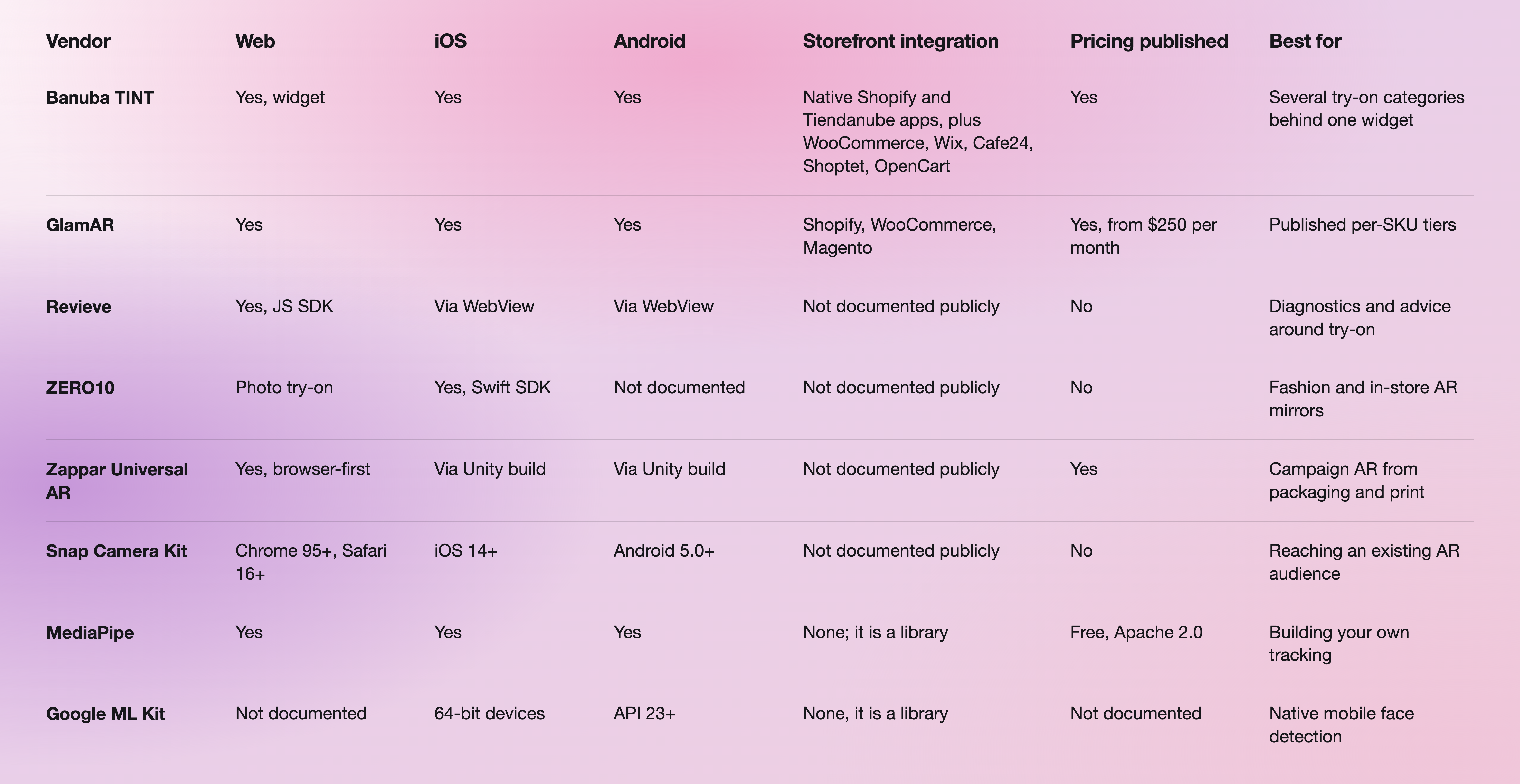
The eight options below cover the realistic shortlist for a retailer, from full try-on platforms to the open-source pieces a team would use to build its own. Each entry states what the vendor is genuinely best at. Facts come from each vendor's own documentation and pricing pages.
- Banuba TINT: best for multi-category try-on behind a single web widget. Web-based, launches in under two weeks, and covers makeup, glasses, contact lenses, jewelry, headwear, scarves, eyelashes, and hair color from one integration. Native apps for Shopify and Tiendanube, plus WooCommerce, Wix, Cafe24, Shoptet, and OpenCart. Self-service digitization, white-label UI, and on-device processing with no shopper images stored. More than 22,000 digitized products ship with it, and new collections can be added in under 48 hours.
- GlamAR: best for teams that want published per-SKU pricing tiers. Plans run from $250 per month for 10,000 monthly views and 50 SKUs on web, to $450 per month for 100,000 views and 500 SKUs across web, app, and in-store, per its AR try-on pricing page. Try-on spans makeup, eyewear, jewelry, watches, accessories, footwear, apparel, and nails on iOS, Android, and web. Note that its AR try-on plans assume AR-ready 3D models already exist and price model creation separately.
- Revieve: best for wrapping diagnostics and advice around try-on. Its modular JavaScript SDK loads from a CDN or npm, with WebView plugin samples for iOS and Android and a React Native example. Pricing is not published.
- ZERO10: best for fashion and in-store AR mirrors. Its AR Mirror is a storefront installation built for continuous operation, and the ZERO10SDK is an iOS framework in Swift distributed through Swift Package Manager. Web try-on is photo-based. Pricing is not published.
- Zappar Universal AR: best for browser-first campaign AR triggered by packaging or print. The Universal AR docs are open without a login, the SDKs run in the mobile and desktop browser, and native iOS and Android reach comes through a Unity build rather than a standalone native SDK. No Flutter or React Native SDK is listed.
- Snap Camera Kit: best for reaching shoppers where an AR audience already exists. Camera Kit ships official SDKs for iOS 14 and later, Android 5.0 and later, and the web on Chrome 95+ and Safari 16+. On Safari, SIMD and Web Worker mode are listed as unsupported. Pricing is not published.
- MediaPipe: best free starting point for a team building its own tracking. Google distributes it under the Apache License 2.0 with no pricing page, and the Face Landmarker bundle packages face detection, face mesh, and blendshape models. It gives you landmarks, not a try-on product.
- Google ML Kit: best platform-native face detection baseline for a mobile app. Face Detection needs Android API level 23 or higher, runs on 64-bit iOS devices, and has no documented web or browser SDK, which rules it out for a product page.
Two names worth knowing even though they are not try-on engines: Zakeke and Threekit sit in the 3D configurator and product-visualization layer rather than the face try-on layer, and Google's AI Overview for this topic names them as the SaaS route retailers take. Banuba and Zakeke already work together on the eCommerce side, which is the usual shape here: configurators and try-on engines complement each other rather than compete.
Which AR product-visualization tools should retailers consider?
For a deeper read on the plugin layer specifically, Banuba keeps a running comparison of virtual try-on plugins for eCommerce and a ranked list of virtual try-on apps for Shopify.
How does AR handle eyewear size and fit recommendations?
Eyewear try-on works from a 3D model of the frame rendered onto the shopper's face, and the accuracy of the fit depends entirely on how that model was produced. With Banuba TINT, a retailer uploads three photographs of the frame, front, right, and left, and the model is generated from them, so an optical store can digitize its own catalog without a 3D studio. Frame position then follows the face mesh rather than a static landmark set, which is what keeps the frames sitting on the bridge of the nose when the shopper turns their head.
Fit is the reason eyewear is usually the first category an optical retailer digitizes, and it is also the category where a wrong result is most obvious to the shopper. Banuba compares the vendors in this specific category in its breakdown of virtual eyewear try-on software.
Web-based AR or app-based AR: which fits when?
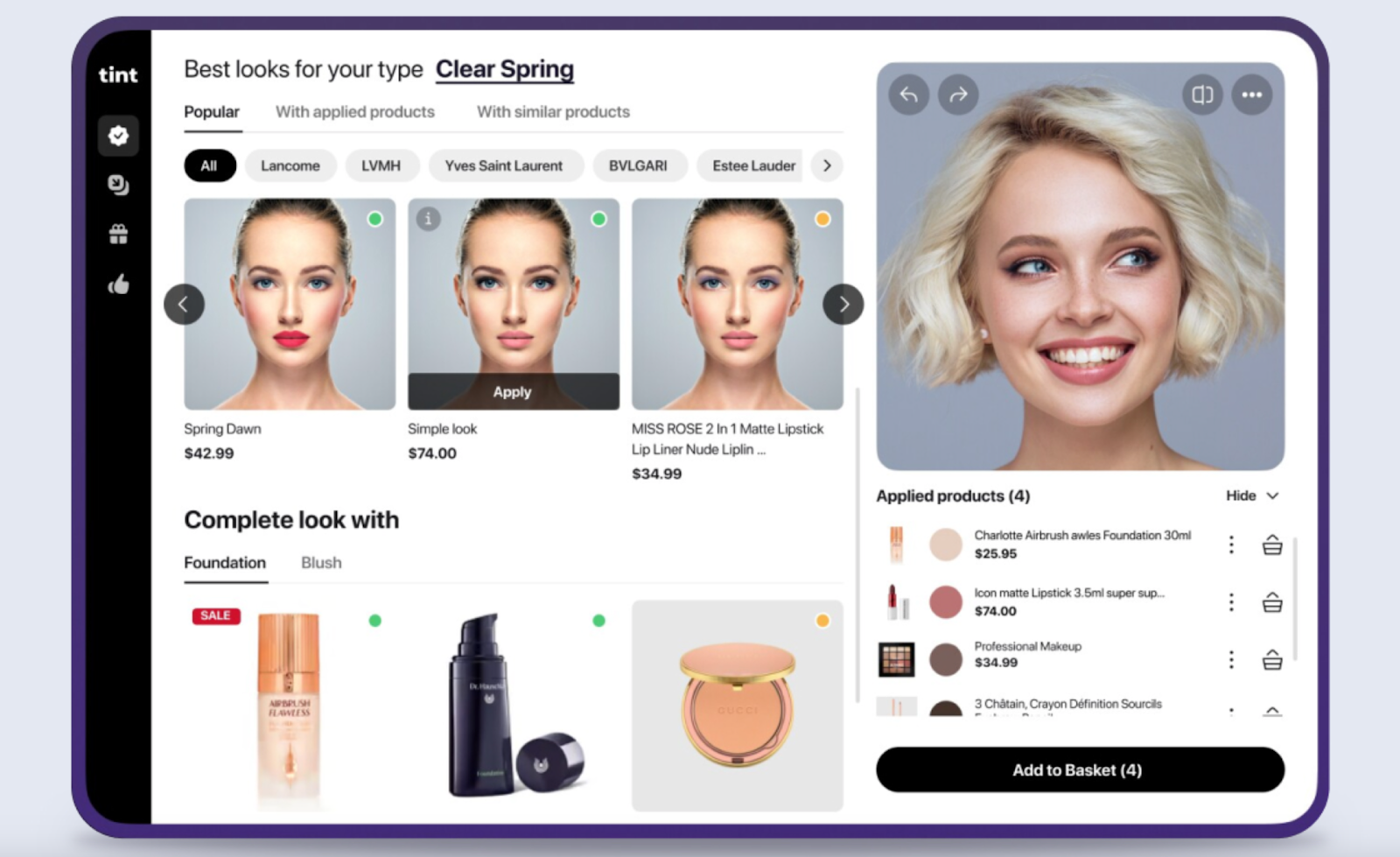
Web AR wins whenever the goal is conversion on the product page, because it removes the app install, which is the largest single drop-off in a shopping funnel. Banuba's TINT widget is web-based and runs in the browser on almost any connected device, so the shopper taps a button and the camera opens. The trade-off is that the browser sets the limits: the widget needs an HTTPS connection for camera access and supports the last two major Safari and iOS versions and the last five versions of Chrome, Opera, Edge, and Samsung Internet.
App AR wins when the try-on is part of a longer session that the retailer already owns, such as a loyalty app with repeat visits, or when the experience needs device capabilities the browser does not expose. That is an SDK project with a mobile team attached. Most retailers reach for browser-based AR try-on first and add the app path later, not the other way around.

How do you keep AR commerce low-latency in emerging markets?
Process on the device, and keep the payload small. Banuba TINT runs try-on on the shopper's own device rather than streaming camera frames to a server, so the experience does not depend on upload bandwidth and no shopper images are collected or stored. That same design choice is what makes the privacy answer short.
Beyond that, three practical levers matter: digitize at the resolution the category needs rather than the maximum available, because eyewear frames and lipstick shades have very different budgets; load the try-on widget on interaction rather than on page load, so the product page is not slowed for visitors who never open it; and test on the mid-range Android hardware your analytics actually show, not on the newest flagship. Helen Fedulova's write-up on the catalog work nobody demos covers the asset side of this in more detail.
Where is augmented reality applied in eCommerce today?
AR tools can raise conversion rates substantially, and Gen Z shoppers are the loudest constituency for them, with 63% saying AR would simplify online shopping. Six applications carry almost all of the value.
Virtual try-on
The highest-impact application. Shoppers preview makeup, eyewear, jewelry, and accessories on themselves before buying, which raises purchase confidence and cuts the returns that come from a mismatch between the photo and the product. Building a bespoke engine per brand is rarely worth it, which is why most retailers license one. Banuba's virtual try-on platform adds AI product recommendations on top, sorting the catalog by what suits the individual shopper.
3D online shopping
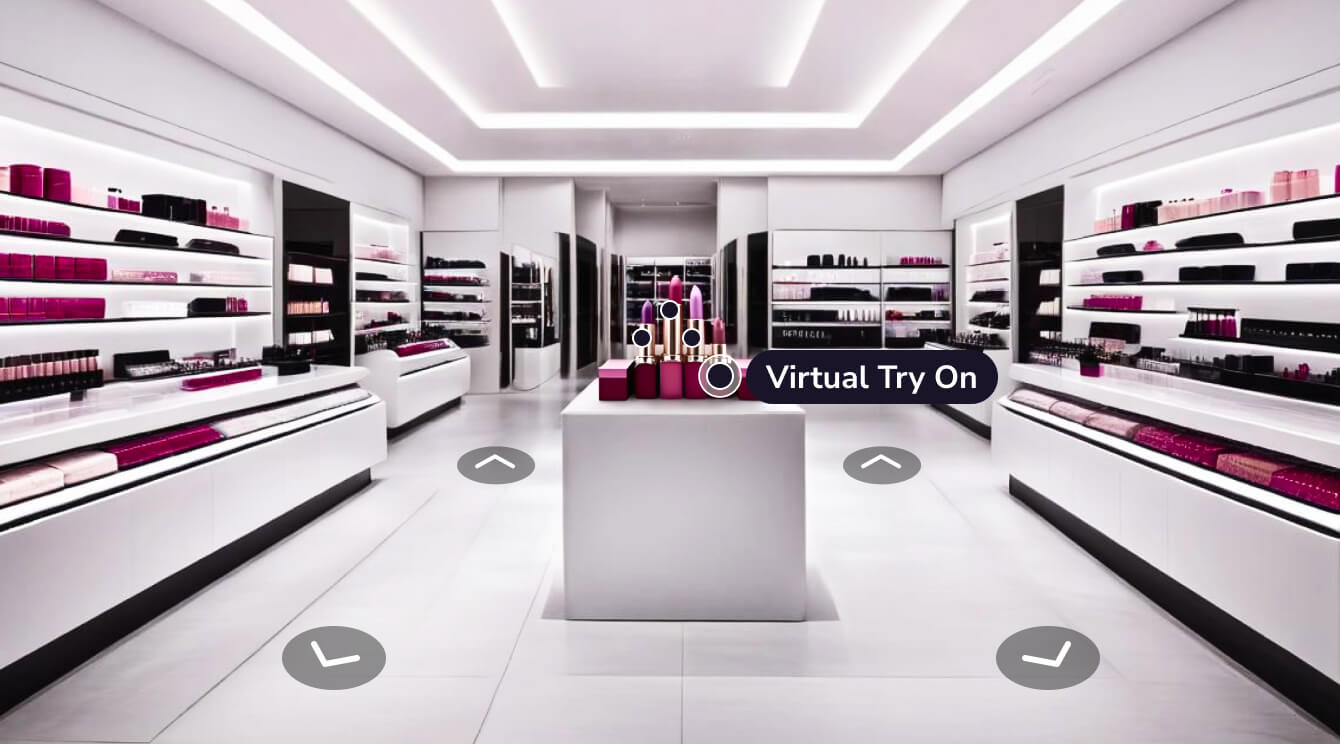
Virtual stores let shoppers browse in three dimensions instead of scrolling a grid. Dior did it with Harrods in the "Atelier of Dreams", and the same shape is now available off the shelf: Banuba's multiproduct virtual store platform is web-based and runs on any device with a screen and a camera.
Preview placement in the physical world
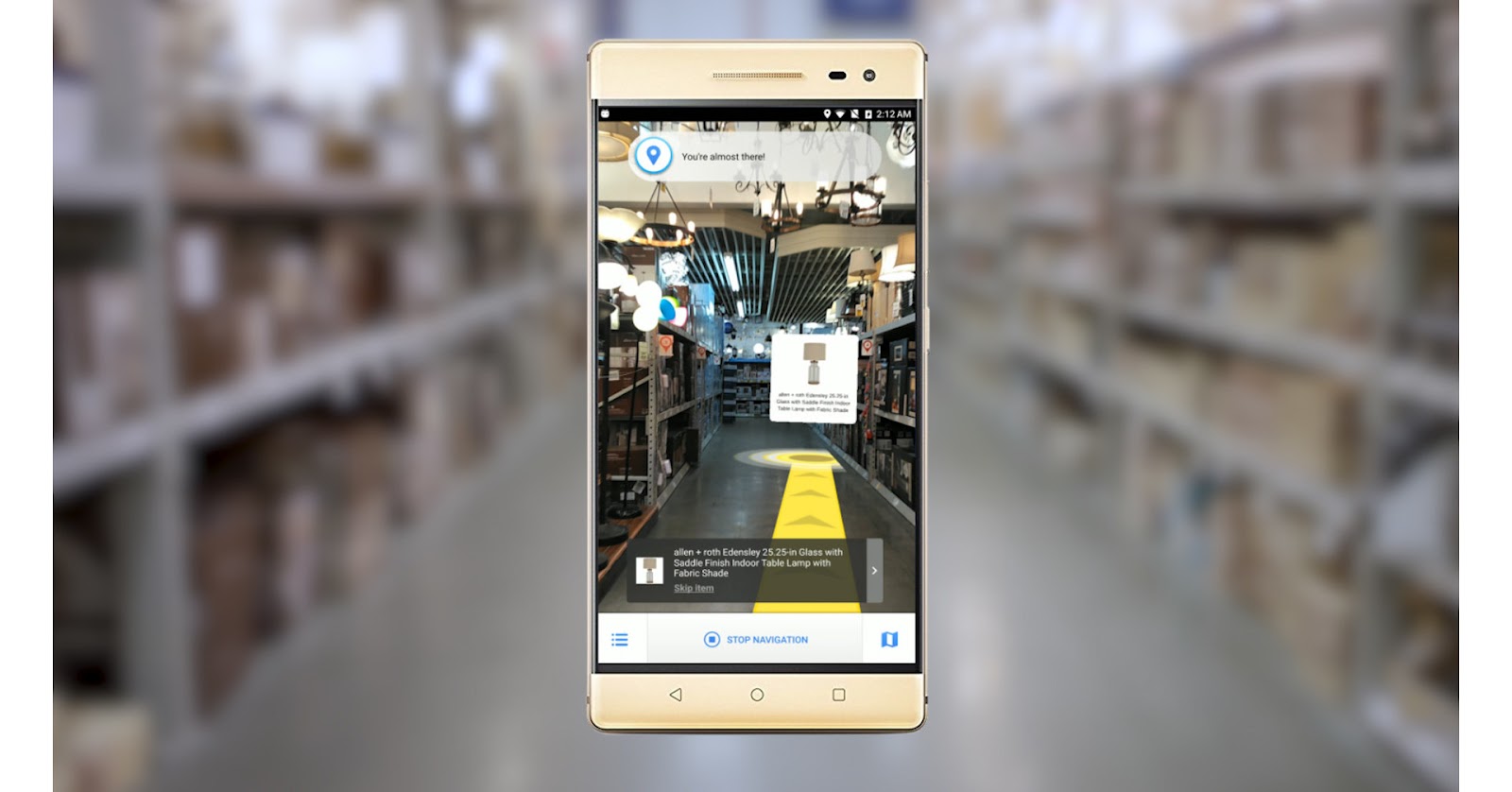
Furniture and decor retailers let shoppers place true-to-scale models in their own rooms before ordering, which is how a shopper checks that a sofa fits the wall it is meant for. This is the category where size and scale drive returns, so the payback is the most direct of any AR application.
Interactive user manuals
AR-enabled instructions overlaid on the physical product replace paper manuals, improving comprehension and cutting support tickets after the sale.
Social media filters
Branded AR effects on Instagram, TikTok, and Snapchat extend try-on to where shoppers already spend attention, driving awareness and user-generated content rather than direct conversion.
3D product construction
Detailed 3D models let shoppers inspect a complex product from every angle and customize it before buying, which is why automotive and configurable goods lean on it hardest.

Why is AR a good match for online shopping?
It raises engagement
AR-powered retailers are reported to be 200% more engaging than rivals without it. Try-on turns a static product page into something the shopper interacts with, and interaction time correlates with basket size.
It lifts conversion
Banuba's virtual try-on plugin is associated with up to 300% higher conversions, because seeing the product on yourself removes the doubt that stops the add-to-cart. Brazilian beauty brand Océane is the clearest example: its add-to-cart rate went from the 3% industry average to 32%, and it sold out a month of stock in a week.
It reduces returns
Returns in online retail are largely an expectation problem. Accurate try-on sets the expectation correctly before the order, and Banuba's plugin is associated with up to 60% lower return rates. Return reduction is usually the line item that funds these projects internally, because it shows up in margin rather than in a marketing budget.
It widens the audience
Try-on appeals to shoppers who want to experiment before committing, and 3D visualization appeals to those who want to inspect before buying. Together they reach segments a photo grid does not.

How do you implement AR in an eCommerce business?
- Name the metric first. Conversion rate, return rate, average order value, or time on the product page. The metric decides the category you digitize first.
- Pick the delivery route. Marketplace plugin for speed, web widget for brand control without an app, SDK for an app-first retailer. Building from scratch is a multi-year project and almost never the right answer.
- Count the digitization work honestly. Ask each vendor who produces the 3D assets, who pays, and how long a new collection takes. With Banuba TINT, cosmetics are generated from product parameters, and eyewear from three frame photographs, and new collections go live in under 48 hours.
- Integrate. On Shopify or Tiendanube, Banuba's virtual try-on plugin installs from the marketplace with no code. On another CMS or a custom storefront, it is an integration ticket, and the WebAR SDK is the route for a fully custom experience.
- Measure and iterate. Track try-on opens, add-to-cart after try-on, and returns by digitized SKU rather than site-wide, so the effect is attributable.
-
There is no single best one, because the answer changes with the category mix. For a retailer that needs makeup, eyewear, jewelry, and hair color behind one try-on button, Banuba TINT is the strongest fit, since all of those categories ship in one web widget that installs on Shopify and Tiendanube without code. For a brand that sells only apparel in physical stores, an in-store AR mirror vendor will fit better. Start from the criteria list above rather than from a vendor ranking, and see Banuba's comparison of virtual try-on plugins.
-
Real-time face tracking plus per-category rendering, running on the shopper's device. Banuba TINT tracks the face with a patented 3,308-vertex mesh, which is denser than landmark-only tracking, and renders each category with the behavior it needs, such as gloss texture for lipstick and volumetric simulation for lashes. Shades are rendered to look correct on all skin colors, which is the most common complaint buyers report about try-on tools they have already tried. Details are on Banuba's makeup virtual try-on page.
-
On Shopify or Tiendanube, install Banuba's virtual try-on plugin from the marketplace, upload your SKUs, choose the AR attributes such as colors and textures, and test during the free trial. On WooCommerce, Wix, Cafe24, Shoptet, OpenCart, or a custom storefront, Banuba's team handles the integration. For a fully custom build, the Banuba WebAR SDK is the alternative route.
-
Banuba's TINT plugin, GlamAR, and the category specialists each have a Shopify presence, and they differ mainly in category breadth and in who produces the 3D assets. Banuba's Shopify app covers makeup, glasses, and hair dye on every plan with unlimited products and a 14-day free trial. Banuba keeps an updated ranking in its guide to virtual try-on apps for Shopify.
-
Published entry prices in this market start in the low hundreds per month, and several vendors quote only on request. Banuba has three options: Easy Virtual Try-On, a no-code platform that connects to any store and has offline options, at $49 to $349 per month; the Shopify extension at $319 to $1,599 per month depending on monthly try-on volume; and custom enterprise integration priced on try-on sessions per month. The Banuba TINT pricing guide explains how the plans are structured.
-
It is a reasonable shortlist entry for makeup specifically, and a strong one when makeup is not the only category. Banuba TINT renders makeup in real time on the live camera rather than as a photo overlay, ships with more than 22,000 digitized products, generates new virtual cosmetics from product parameters in its admin panel, and adds AI recommendations that sort the catalog by what suits the shopper. Where it will not be the best answer is for a brand that needs only in-store mirrors or only apparel. Banuba's side-by-side makeup try-on comparisons set out the trade-offs.
