

A beauty API is a set of ready-made face beautification and makeup try-on modules that a developer calls instead of building a computer vision pipeline. Banuba Face AR SDK is a real-time, on-device face tracking and AR effects SDK that runs at 60 FPS on mid-range mobile hardware with a -90° to +90° head-angle tracking range. That tracking layer is what the beautification and makeup modules sit on top of, which is why the integration work is configuration rather than research. A team that already has a camera screen can have lipstick, foundation, skin smoothing, and teeth whitening rendering on a live face without hiring a computer vision engineer.
[navigation]
TL;DR:
- Banuba's beauty API is not a hosted web service. It ships inside Banuba Face AR SDK and runs entirely on the device, so frames never leave the phone.
- Banuba's tracking engine reconstructs a 3D face mesh with up to 3,308 vertices from 68 facial anchor points, using direct 3D reconstruction rather than converting 2D landmarks into 3D.
- Banuba Face AR SDK holds tracking under up to 70% facial occlusion and across the full -90° to +90° head-angle range, which is what keeps makeup anchored when a user turns away or raises a hand.
- Banuba's current implementation path is prefabs. The older Makeup API and Face Beauty API are marked deprecated in Banuba's documentation, so new integrations should use makeup prefabs instead.
- Banuba documents 20 makeup prefabs, covering foundation, concealer, contour, highlighter, blush, lipstick, lip liner, lip gloss, eyeshadow, eyeliner, eyelashes, eyebrows, and more, each configured through color, finish, and coverage parameters.
- In Banuba Face AR SDK, beautification is a separate module set from makeup: skin smoothing, teeth whitening, face morphing, eye bag removal, eye beautification, hair coloring, LUT filters, and background separation.
- Banuba Face AR SDK covers iOS, Android, Web, Flutter, React Native, Unity and desktop from one integration, so cross-platform teams write the effect configuration once.
- A SaaS fandom platform built its live-streaming beauty layer on Banuba Face AR SDK and passed 1 million monthly active users across 224 countries two years after launch.
What Is a Beauty API and What Does It Actually Do?
A beauty API is a documented set of methods that apply face modification and makeup rendering to a live camera feed, a still image, or a prerecorded video. Instead of writing shaders, segmentation models, and a face tracker, a developer calls a named feature and passes it parameters.
The distinction that matters for planning: this is not a REST endpoint. Banuba's beauty modules ship inside Banuba Face AR SDK and execute on the device. There is no upload step, no round trip, and no per-request latency, which also removes the privacy question that comes up in almost every beauty and try-on review, because camera frames never leave the handset.
AR Beauty and Makeup API overview
Two capability groups sit behind the same face filter. Makeup covers the products a shopper would buy: lipstick, eyeshadow, foundation, blush, brows. Beautification covers how the person wants to look on camera: smoother skin, whiter teeth, softer facial proportions, brighter eyes. Banuba's documentation describes how to combine both in a single effect, which is what most beauty apps end up needing.

Why Would a Developer Integrate a Beauty API Instead of Building It?
Building the same functionality in-house means owning a face tracker, per feature segmentation, a rendering pipeline, and a color model that behaves correctly across skin tones and lighting. It also means maintaining that stack on every OS release.
An SDK-based beauty API changes the shape of the work:
- Effects become configuration files rather than handwritten code, so behavior stays consistent between effects.
- Feature parameters are public and documented, so product teams can adjust a look without a new build of the renderer.
- One integration covers iOS, Android, Web, Flutter, React Native, Unity and desktop.
- Time to market collapses from a research project to an integration task.
For engineering leads evaluating this, the decision usually comes down to two questions: does the tracker hold up in real conditions, and is the documentation good enough that a senior engineer can get a demo running the same week. Banuba publishes platform-specific quickstarts and sample repositories for exactly that reason.
Banuba's beauty makeup effects example
How Does Banuba's Tracking Engine Support Makeup Rendering?
Makeup rendering is only as good as the face model underneath it. Banuba's engine reconstructs the 3D head model directly from the camera feed instead of inferring 2D landmarks and lifting them into 3D. Skipping that intermediate conversion is what keeps the mesh stable when conditions get difficult.
In practice, that produces 68 facial anchor points and a 3D face mesh with up to 3,308 vertices, with tracking that stays locked across the full -90° to +90° head-angle range and tolerates up to 70% facial occlusion, the kind of coverage you get when a hand, a microphone, or a mask crosses the face.
That stability is the difference between lipstick that stays on the lips during a live stream and lipstick that slides off the moment someone turns their head. Color behavior matters just as much as geometry, and there is a good breakdown of why color accuracy decides whether shoppers trust an AR try-on if you are weighing rendering quality against tracking specs.
Which Makeup Features Can You Implement?
Banuba's current implementation path is makeup prefabs. A prefab represents a specific region of the face and is configured through a small set of parameters, typically color, finish, and coverage. The older Virtual Makeup API and Face Beauty API are both marked deprecated in Banuba's documentation, so new work should start from prefabs.
There are 20 documented makeup prefabs. Grouped by area:
Base and skin
Makeup base, eyebags, foundation, concealer, contour, and highlighter. Foundation and concealer take a color plus a finish (for example, natural) and a coverage level, so a brand can map its real shade range onto the try-on.
Lips
Lipstick, lip liner, lip shine, lip gloss, lip chameleon, and lip glitter. The finish parameter is what separates a matte from a shimmer product, and it is set per prefab rather than baked into a texture.
Eyes and brows
Eyeshadow, eyeliner, eyelashes, eyebrows, eyelid gloss, eyelid chameleon, and eyelid glitter. Eyeshadow accepts an array, so layered looks are described in configuration rather than assembled from flattened textures.
Cheeks
Blush, with the same color, finish, and coverage model as the rest of the set.
All of them can be combined in a single effect definition, which is how a "full look" is assembled from individual product SKUs.

Which Beautification Features Come With It?
Beautification is a separate module set from makeup, and most beauty and streaming apps ship both:
- Skin. Softening and evening out skin without flattening its texture.
- Teeth whitening. Intensity is set on a 0 to 1 scale.
- Face morphing. Adjusts facial proportions by moving vertices on the 3D face model.
- Eye bags removal. Targeted retouching under the eyes.
- Eyes beautification. Including iris color changes for contact lens try-on.
- Hair coloring. Virtual hair shade application.
- Photo filters (LUTs). Color grading applied over the whole frame.
- Background separation. Replacing or blurring what is behind the user.
Live-streaming and video-chat products tend to lean on this set more heavily than on makeup, because the goal is camera confidence rather than product discovery. Natural-looking touch-up is also what a SaaS fandom platform that reached 1 million monthly active users in two years cited when it chose Banuba for its live chat and streaming features, alongside face filters and 3D masks.
How Do You Combine Features Into an Effect?
Each feature is a visual modification of the face or one region of it. A set of features grouped together becomes an effect:
- Effect 1 might contain only a lipstick prefab.
- Effect 2 might contain lipstick, eyeshadow, and face morphing.
Custom textures are supplied by placing the corresponding file into the effect's folder. Supported texture formats include .png and .ktx.
For an e-commerce catalog, this maps cleanly: one effect per product, or one effect per curated look, with the parameters driven by the same color data already stored in the product database. For a selfie or streaming app, effects are usually presets a user can toggle.
What Does the Integration Path Look Like?
The realistic sequence for a first working build:
- Pick the platform target. Banuba Face AR SDK supports iOS, Android, Web, Flutter, React Native, Unity, and desktop, so decide whether one integration covers the whole roadmap.
- Run a quickstart. Start from the platform-specific basic integration guides for iOS and Android.
- Clone a beauty sample. Banuba maintains dedicated beauty repositories for Android, iOS, and web.
- Build the effect. Define the prefabs, set color, finish and coverage, and drop in any custom textures.
- Test under stress. Extreme angles, partial occlusion, low light, and older mid-range devices, because that is where 2D-to-3D pipelines usually break first.
There are no code snippets in this guide on purpose. The documentation and the sample repositories are the current source of truth, and they change faster than a blog post does.
From Scratch or SDK: Which Path Fits?
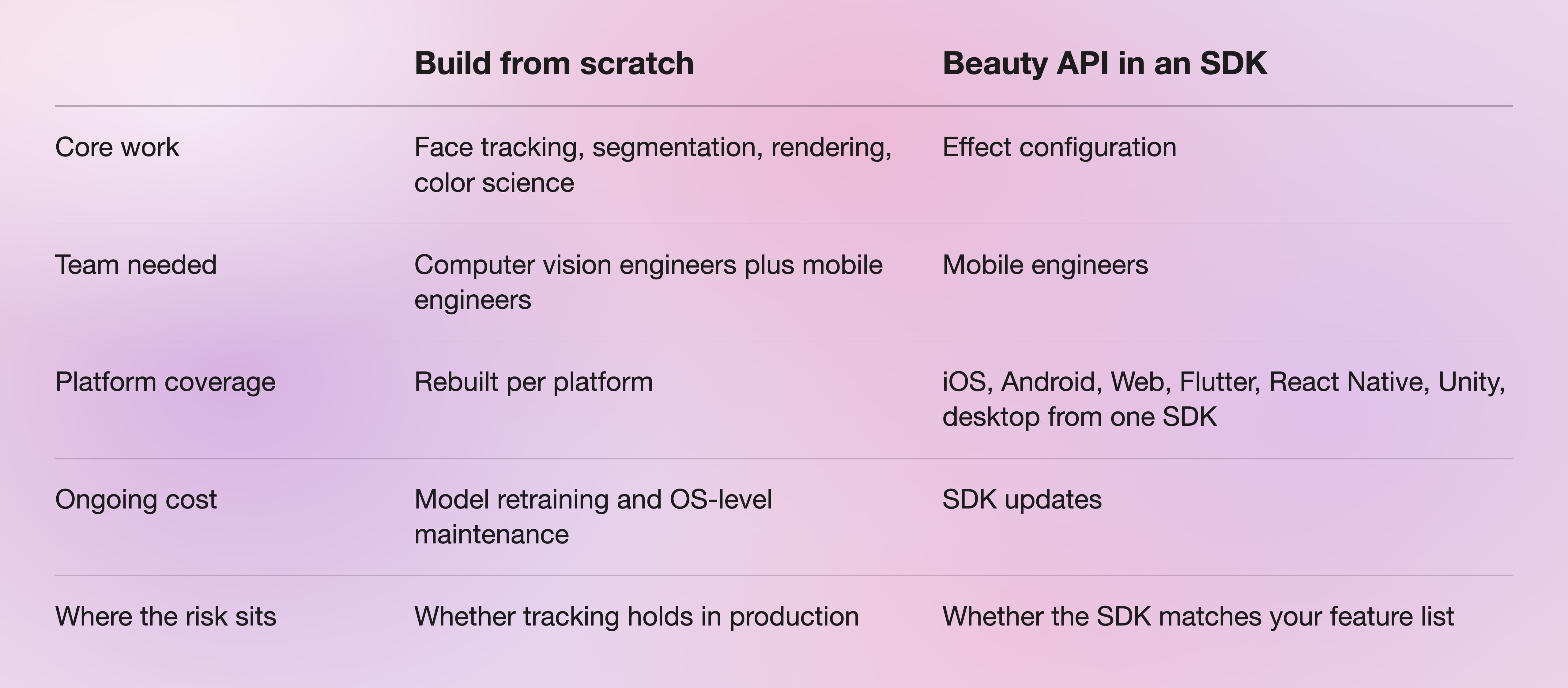
Building from scratch is defensible when face tracking itself is the product. If makeup and beautification are features inside a larger app, the SDK path removes an entire research workstream.
Conclusion
Implementing a beauty API is now an integration decision rather than a computer vision project. The hard parts—a stable 3D face model, per-feature segmentation, and color behavior that survives real lighting—are already solved inside Banuba Face AR SDK. What is left for your team is choosing which of the 20 makeup prefabs and the beautification modules your product actually needs, wiring them to your catalog or your presets, and testing on the devices your users hold.
Start with a quickstart and a beauty sample repository. If the demo runs on a mid-range device the same week, the rest is product work.
-
The official technical documentation for Banuba Face AR SDK is available online and includes requirements, setup instructions, and configuration details:
- Banuba Face AR SDK iOS documentation
- Banuba Face AR SDK Android documentation
- Banuba Face AR SDK Flutter documentation
- Banuba Face AR SDK React Native documentation
- Banuba Face AR SDK Web documentation
- Banuba Face AR SDK Unity documentation
- Banuba Face AR SDK Desktop documentation
This Banuba Face AR SDK documentation should be your primary reference during integration.
-
You can access official integration code samples for the Banuba Face AR SDK on GitHub. Banuba provides platform-specific examples to help you integrate faster:
- Banuba Face AR SDK iOS integration code sample
- Banuba Face AR SDK Android integration code sample
- Banuba Face AR SDK Flutter integration code sample
- Banuba Face AR SDK React Native integration code sample
- Banuba Face AR SDK Desktop integration code sample
- Banuba Face AR SDK Web integration code sample
- Banuba Face AR SDK Unity integration code sample
These Banuba Face AR SDK repositories include setup instructions and minimal working examples for quick deployment.
-
Yes. The Banuba Face AR SDK includes an LLM-friendly documentation file designed for AI-assisted development and internal knowledge systems:
This structured Banuba Face AR SDK text file can be used with AI tools to streamline onboarding and developer workflows.
-
The Banuba Face AR SDK provides official cross-platform plugins to simplify integration into hybrid applications:
These Banuba Face AR SDK plugins are maintained by Banuba and support faster implementation for cross-platform apps.
-
No. Banuba Face AR SDK, including its beauty and makeup modules, runs on the device. Camera frames are processed locally, which is why the same Banuba face detection and tracking engine is used in products with strict privacy requirements. Confirm the specifics for your deployment with Banuba before launch if you need it in writing.
-
Use prefabs. Banuba's documentation marks both the Virtual Makeup API and the Face Beauty API as deprecated and points new integrations to the prefabs system instead. Existing integrations still work, but prefabs are where the current parameter set lives.
-
Yes. Banuba offers a free trial of the Face AR SDK. Licensing then runs on two models: a flat annual license fee, where usage is unlimited, and the cost stays fixed even if the app scales to a very large user base, or Active User-Based licensing, where the cost tracks active users over time, starts significantly lower and grows with the user base, and can exceed the flat fee if the app takes off. The Banuba Face AR SDK pricing guide walks through both, and it is worth raising your expected user volumes early since that is what decides which model fits.
