
[navigation]
Major Features and Improvements
Facial feature editing
The flagship feature of a new release is enhanced facial feature editing (also known as face morphing). It has been present in the previous versions. However, in the 1.7 we added options to easily customize everything:
- Eyebrows (spacing, height, bend)
- Eyes (shape, size, spacing, squint, lower eyelid size & position)
- Nose (width, length, tip size)
- Mouth (size, smile, shape, lip thickness)
- Cheeks (size of the cheeks and cheekbones, dimples/sunken cheeks)
- Chin (length, width, V-shape)
This addition has many potential applications. For example, it can be used to simulate the results of plastic surgery, edit photos, change appearance for video calls and much more. Facial feature editing can also be combined with other similar features, e.g. face touch-up for more impressive effect.
Controlling the new functionality is simple. Check out the instructions here.

Virtual backgrounds
- Much faster background segmentation on Apple devices with Bionic processors (A12+, M1+) due to new neural network architecture with improved utilization of CoreML Neural Engine.
- Reduced person/background contour jittering for background segmentation in camera landscape mode on Windows and web
- Reduced average CPU usage on Windows and web due to algorithm optimization (see table below)
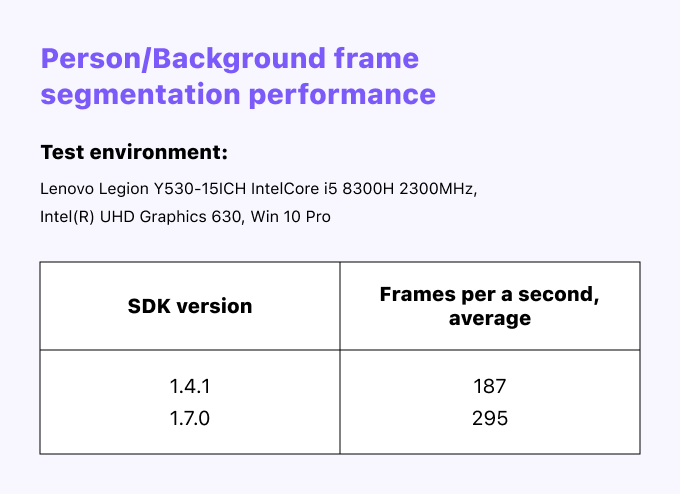 Face AR SDK version comparison
3D Facial Tracking
- Neural networks for face keypoints estimation are updated. Reduced jittering of face mesh.
- Redesigned face detection algorithm. New neural networks take up less disk space, and face detection works faster and better, especially with medical masks and cases with many persons in a frame.
- Facial tracking of multiple faces works in parallel now.
- Added facial tracking mode with reduced CPU load based on reducing computations and face mesh interpolation between some frames without loss of quality except for some extreme hard cases with face occlusions and multiple faces. The new face tracking mode is enabled on the Web by default and disabled by default for other platforms. You can enable it manually if you are interested in reducing CPU load.
Facial features recognition
- More accurate eyebrows keypoints refinement
- Sharper lips contour
- Fixed eyebrow action units
Hand Tracking
- Reduced CPU consumption while no hands are in videostream (reduced CPU usage by hand detector)
- Better virtual-try-on of rings
EffectPlayer
- Reduced CPU and power usage by our rendering engine
- New makeup morphings included
WebAR
- Safari 16.4+ is fully supported now. Starting with version 16.4 SIMD, the math calculations are finally supported in Safari too. We have made the necessary patches, and now Banuba SDK 1.7.0 can use all advantages of WASM SIMD calculations in Safari 16.4+. It’s up to two
times faster. - A memory leak was fixed.
Bug Fixes and Other Changes
Offscreen Effect Player:
- Fixed using video as a virtual background
- Fixed adding of audio for Android
Other:
- Sound in recorded video, Gif playback, Video from gallery rotation on iOS
- Shaders instancing and names for new Makeup API
- Makeup API for Unity
- Resize for Metal
- Hair mask size
- Fixed TFlite initialization
-
The official technical documentation for Banuba Face AR SDK is available online and includes requirements, setup instructions, and configuration details:
- Banuba Face AR SDK iOS documentation
- Banuba Face AR SDK Android documentation
- Banuba Face AR SDK Flutter documentation
- Banuba Face AR SDK React Native documentation
- Banuba Face AR SDK Web documentation
- Banuba Face AR SDK Unity documentation
- Banuba Face AR SDK Desktop documentation
This Banuba Face AR SDK documentation should be your primary reference during integration.
-
You can access official integration code samples for the Banuba Face AR SDK on GitHub. Banuba provides platform-specific examples to help you integrate faster:
- Banuba Face AR SDK iOS integration code sample
- Banuba Face AR SDK Android integration code sample
- Banuba Face AR SDK Flutter integration code sample
- Banuba Face AR SDK React Native integration code sample
- Banuba Face AR SDK Desktop integration code sample
- Banuba Face AR SDK Web integration code sample
- Banuba Face AR SDK Unity integration code sample
These Banuba Face AR SDK repositories include setup instructions and minimal working examples for quick deployment.
-
Yes. The Banuba Face AR SDK includes an LLM-friendly documentation file designed for AI-assisted development and internal knowledge systems:
This structured Banuba Face AR SDK text file can be used with AI tools to streamline onboarding and developer workflows.
-
The Banuba Face AR SDK provides official cross-platform plugins to simplify integration into hybrid applications:
These Banuba Face AR SDK plugins are maintained by Banuba and support faster implementation for cross-platform apps.